Browse help
Before paying a supplier, it is prudent to check that their tax compliance certificate (attestation de régularité fiscale) is valid. Billora keeps the end-of-validity date and warns you before it expires.
1. Enter the expiry date
In the supplier's record (creation or edit), the Attestation de régularité fiscale — échéance (Tax compliance certificate — expiry date) field receives the end-of-validity date shown on the document.
2. The alerts
In the notification centre, you are notified:
- 30 days before the expiry date;
- 7 days before;
- on the day itself.
The same alert is never sent twice. All team members, including the external accountant and viewers, receive it.
3. Spot the suppliers concerned
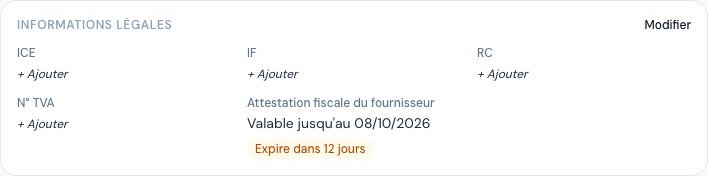 On the supplier's record, the badge flags a certificate that is nearing its expiry date.
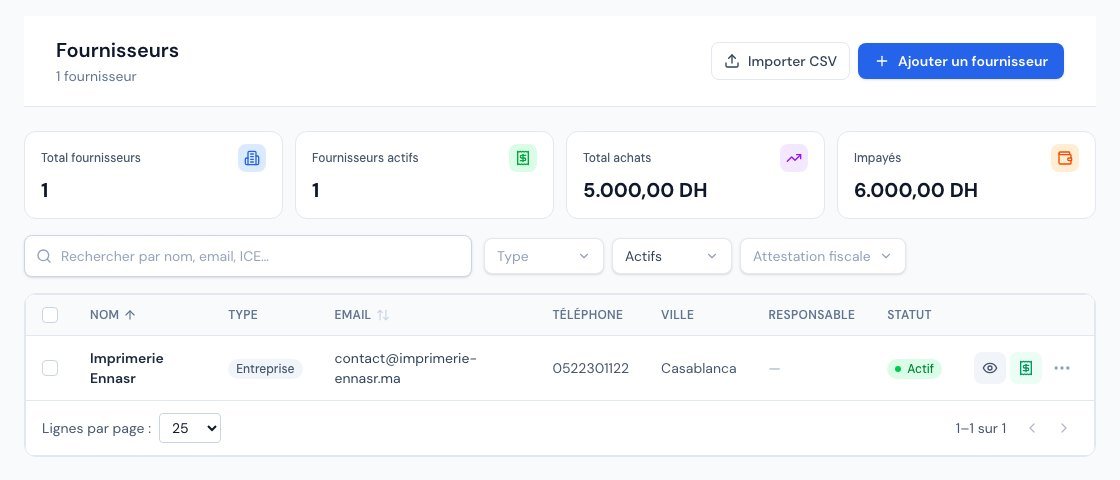 The list of suppliers, with the « Attestation fiscale » (Tax certificate) filter.
- On the supplier's record, an amber badge (« Expire dans X jours » (Expires in X days), from 8 to 30 days) or a red one (0 to 7 days, or « Expire aujourd'hui » (Expires today)) accompanies the date; an expired certificate is flagged as such.
- In the list of suppliers, the Attestation fiscale filter keeps only those whose expiry date has passed or is within 30 days.
Was this article helpful?
Invoice compliantly, effortlessly
DGI-compliant invoices, quotes, credit notes, VAT and supplier tracking in a single tool.
Try it free