Browse help
What is it for?
The aged balance (balance âgée) sorts your outstanding amounts by how late they are relative to the due date: what your clients have not yet paid you (receivables) and what you have not yet paid your suppliers (payables). It answers the question: "Where is my money stuck, and for how long?"
Example. Mounia runs a print shop in Meknès. At the end of the month, she opens the aged balance: 40 000 DH is still owed by her clients, of which 12 000 DH is in the "61-90 jours" (61-90 days) bracket. She knows she must chase these clients first, before these invoices move into "90+ jours".
1. Open the report
- In the menu, open Rapports (Reports), then Balance âgée (Aged balance).
- The report is displayed immediately. It always shows the current state of your balances: there is no period selector.
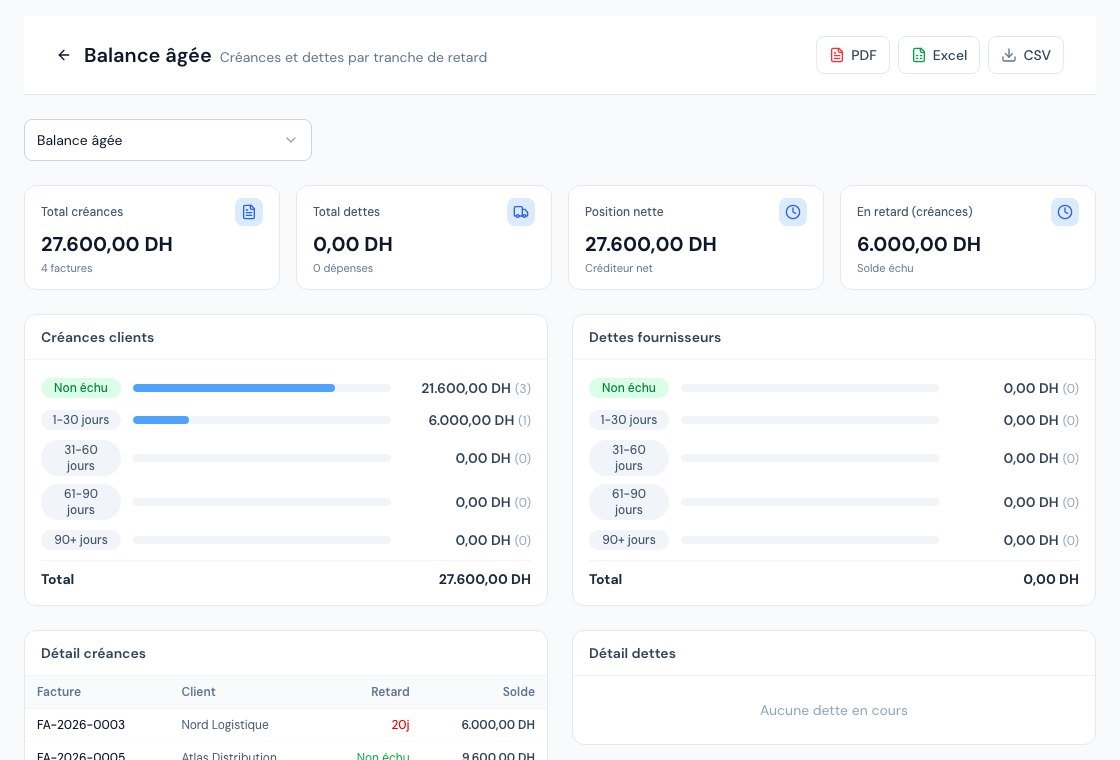 The aged balance report with its overdue brackets.
If the aged balance is not included in your subscription, the page displays "La balance âgée n'est pas incluse dans votre abonnement actuel" (The aged balance is not included in your current subscription) and indicates from which plan it is available.
2. The overdue brackets
Lateness is measured in days between today and the document's due date.
| Bracket | Meaning |
|---|---|
| Non échu (Not yet due) | The due date has not yet passed, or no due date is entered. |
| 1-30 jours (1-30 days) | Overdue by one to thirty days. |
| 31-60 jours (31-60 days) | Overdue by 31 to 60 days. |
| 61-90 jours (61-90 days) | Overdue by 61 to 90 days. |
| 90+ jours (90+ days) | Overdue by more than 90 days: the hardest to recover. |
A document without a due date is placed in "Non échu", even if it is old. For the report to be accurate, always enter a due date on your invoices, or a payment term on your clients and suppliers.
3. Read the report
At the top, four indicators:
- Total créances (Total receivables): everything your clients owe you, with the number of invoices.
- Total dettes (Total payables): everything you owe your suppliers, with the number of expenses.
- Position nette (Net position): receivables minus payables ("Créditeur net" (Net creditor) or "Débiteur net" (Net debtor)).
- En retard (créances) (Overdue (receivables)): the "Solde échu" (Overdue balance), that is, the sum of the brackets other than "Non échu".
Below, two side-by-side blocks: Créances clients (Client receivables) and Dettes fournisseurs (Supplier payables). Each bracket is represented there by a coloured dot, a proportion bar, the amount in DH and, in brackets, the number of documents.
Then come Détail créances (Receivables detail) (columns Facture, Client, Retard, Solde) and Détail dettes (Payables detail) (Dépense, Fournisseur, Retard, Solde). Clicking an invoice number opens its detail page. Only the first 50 are displayed; the "Voir les N autres…" (See the N others…) link unfolds the rest.
What is counted
- Receivables: invoices with a balance still to collect. Drafts, cancelled invoices and those cancelled by credit note do not appear.
- Payables: expenses with a balance to pay, drafts and cancelled excluded.
The older a receivable gets, the harder it is to collect. Contact the client from the "31-60 jours" bracket rather than waiting. Billora can help you with automatic reminders and collections tracking.
4. Export
At the top right, the PDF, Excel and CSV buttons export the report. PDF and Excel depend on your subscription: if they are greyed out, the tooltip indicates from which plan they are available. The PDF button opens a preview before downloading.
5. What to do next?
- Spot the invoices in the oldest brackets in "Détail créances".
- Open the invoice, then chase the client (reminder email or automatic reminder).
- If the client commits to a date, record a payment promise.
- On the payables side, schedule payment of the most overdue suppliers from the expense's detail page.
Frequently asked questions
Why does the report have no date filter?
Because it takes a snapshot of today's situation: a balance is "overdue" relative to today. To analyse a past period, use the revenue report instead.
A paid invoice still appears, why?
It only appears if its balance is greater than zero. Check that a payment really covers the total incl. tax; a partial payment leaves a balance.
My cheque received has not yet been cashed, is it counted?
As long as the payment is not cashed and the invoice's balance is not reduced, the invoice remains in receivables. See the article on the cheque register.
Is the report visible to my accountant?
Yes, the external accountant has read access to it, like the other financial reports.
Going further
Related articles
Was this article helpful?
Invoice compliantly, effortlessly
DGI-compliant invoices, quotes, credit notes, VAT and supplier tracking in a single tool.
Try it free