Browse help
What is it for?
Your data belongs to you. The Paramètres → Import / Export (Settings → Import / Export) page lets you get part of it as CSV files (for Excel or your accountant), or your whole account in a single ZIP archive, for example to archive it or before leaving Billora.
Example. Rachid, who manages a print shop in Oujda, downloads the CSV of his invoices at the end of every year for his accountant, plus a full archive that he keeps on his drive.
1. Export one type of data as CSV
- Open Paramètres → Import / Export, Export des données (Data export) card.
- Choose the row you want: Clients, Fournisseurs (Suppliers), Factures (Invoices), Devis (Quotes), Dépenses (Expenses) or Paiements (Payments).
- Click CSV. The file (for example
invoices-2026-10-04.csv) downloads.
The CSV export of payments depends on your subscription. If it is not included, a padlock replaces the button, with the name of the plan that offers it. In test mode, everything is open.
2. Download all your data (ZIP archive)
- In the Exporter toutes mes données (Export all my data) card, leave Inclure les PDF de mes documents (plus long à préparer) (Include the PDFs of my documents — longer to prepare) ticked if you want the PDFs; untick it for a faster archive.
- Click Télécharger l'archive (Download the archive). The button shows « Préparation… » (Preparing…).
- « La préparation peut prendre plusieurs minutes selon le volume. Gardez cette page ouverte : le téléchargement démarrera tout seul. » (Preparation can take several minutes depending on volume. Keep this page open: the download will start on its own.)
What does the archive contain?
- csv/: all your tables, one per file (UTF-8, « ; » separator, opens in Excel): clients, suppliers, products, invoices and their lines, quotes, credit notes, purchase orders, expenses, payments, bank accounts, delivery notes, stock, activity log…
- entreprise.json: your company settings, without passwords or tokens.
- pdf/: your issued invoices, quotes, credit notes and purchase orders (drafts have no PDF), if you ticked the box.
- fichiers/: your receipts, attachments, logo, stamp and signature.
- archives-dgi/: your e-invoicing archives (UBL, PDF, QR).
- LISEZMOI.txt and manifeste.json: the readme and the count of the contents. If some PDFs or files could not be included, the readme says so.
Subscription invoices issued by Billora are not part of the archive: they are kept for 10 years in Billora's accounts (see Your subscription invoices).
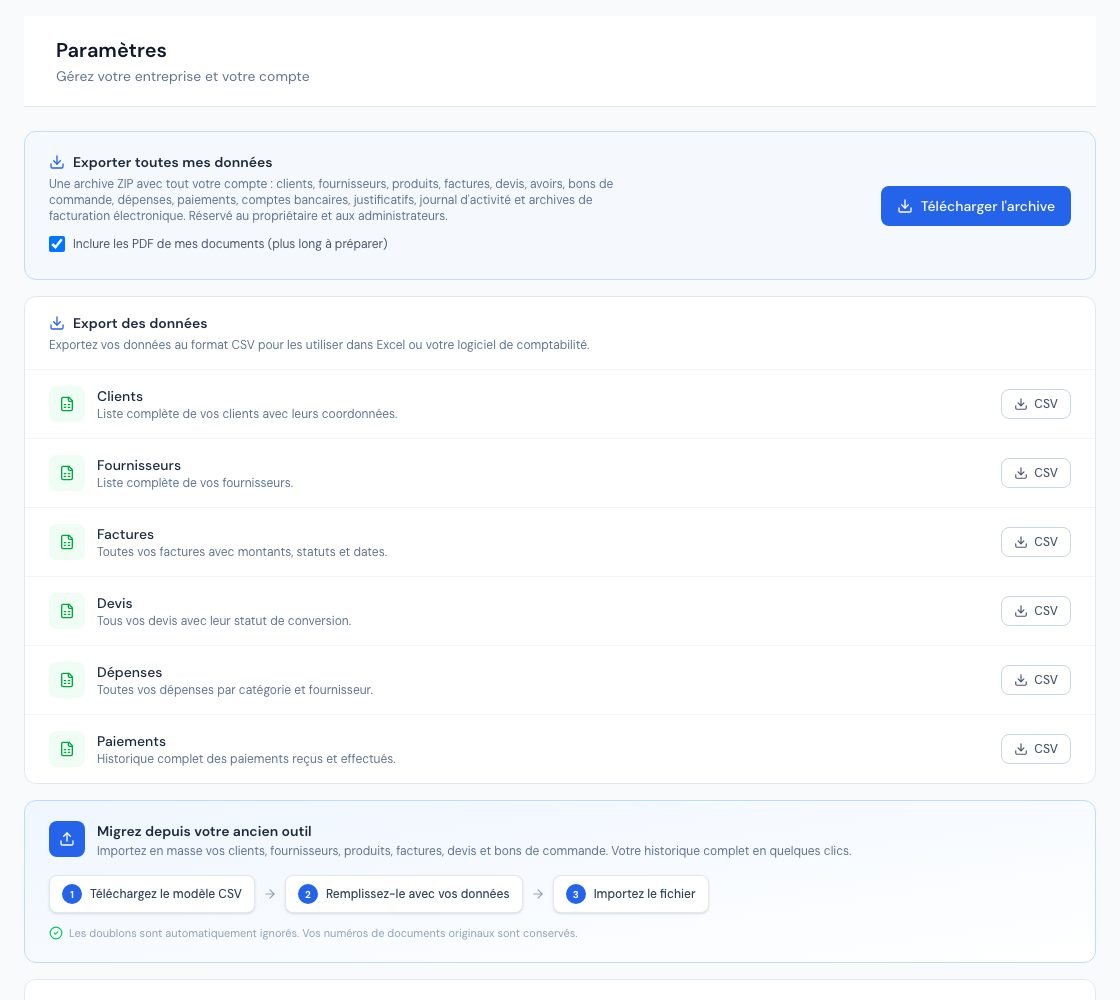 The import / export page with the CSV exports and the full archive.
3. How many exports can I run?
A full archive is heavy to prepare. After an export, wait a few minutes before starting another one (one every 5 minutes, at most 4 per hour); otherwise Billora replies « Un export vient d'être demandé pour ce compte. Patientez quelques minutes avant d'en lancer un nouveau. » (An export has just been requested for this account. Wait a few minutes before starting a new one.) Each full export is recorded in the activity log.
4. Export before your account is deleted
If the deletion of your account is scheduled, your data remains viewable read-only during the retention period, and the full archive remains available: this is the time to download it. Once erasure has started, export is no longer possible (« La suppression du compte a commencé : l'export n'est plus possible, une partie des données a déjà été effacée. », Account deletion has started: export is no longer possible, part of the data has already been erased). See How do I delete my account?
5. Who can export?
The full archive is « Réservé au propriétaire et aux administrateurs » (Reserved for the owner and administrators): it contains your bank details and your activity log. On this page, collaborators and viewers are read-only; the external accountant has no access to settings. Data import, on the same page, is described in Import your data from a file.
Frequently asked questions
Does the export contain my passwords?
No. « Aucune donnée sensible (mots de passe, tokens) n'est incluse » (No sensitive data — passwords, tokens — is included), and exports only contain your account's data.
Preparation is slow — is that normal?
Yes if you have many documents and PDFs are included. Keep the page open, or untick « Inclure les PDF de mes documents » to go faster.
The CSV looks wrong in Excel.
The files are UTF-8 with a semicolon as separator. Open them through Excel's data import, specifying these two settings.
Can I re-import the archive into Billora?
The archive is meant to keep your data. To re-import clients, products or invoices, use the CSV templates of the « Import des données » (Data import) card.
Next steps
Related articles
Was this article helpful?
Invoice compliantly, effortlessly
DGI-compliant invoices, quotes, credit notes, VAT and supplier tracking in a single tool.
Try it free