Browse help
What is it for?
The activity log keeps track of the actions taken in your account: who created, sent, cancelled or downloaded a document, who logged in, who invited a member… It helps you find the origin of a change and monitor your team's activity.
Example. Rachid, manager of an air-conditioning company in Fez, notices that an invoice was cancelled. He opens the activity log, sees « Facture annulée » (Invoice cancelled) in the name of his assistant Imane, yesterday at 4:40 pm, from the mobile app, and clicks the line to open the invoice.
1. Where is the log?
Click Journal d'activité (Activity log) at the bottom of the menu. The page shows the « Historique complet des actions sur votre compte » (Full history of actions on your account), from the most recent to the oldest.
2. How do I read an entry?
Entries are grouped under Aujourd'hui, Hier, Cette semaine and Plus ancien (Today, Yesterday, This week, Older). Each line shows:
- the action (for example « Facture envoyée par email » — invoice sent by email) followed by the item concerned (invoice number, client name…);
- the source: the Web or App mobile badge;
- the time (« il y a 2 heures » — 2 hours ago) and the person who acted;
- on a computer, the exact date and time on the right.
Clicking a line opens the item when possible: invoice, quote, credit note, expense, purchase order, client or supplier. For a product, the click leads to the product list; for a payment, to the payments page.
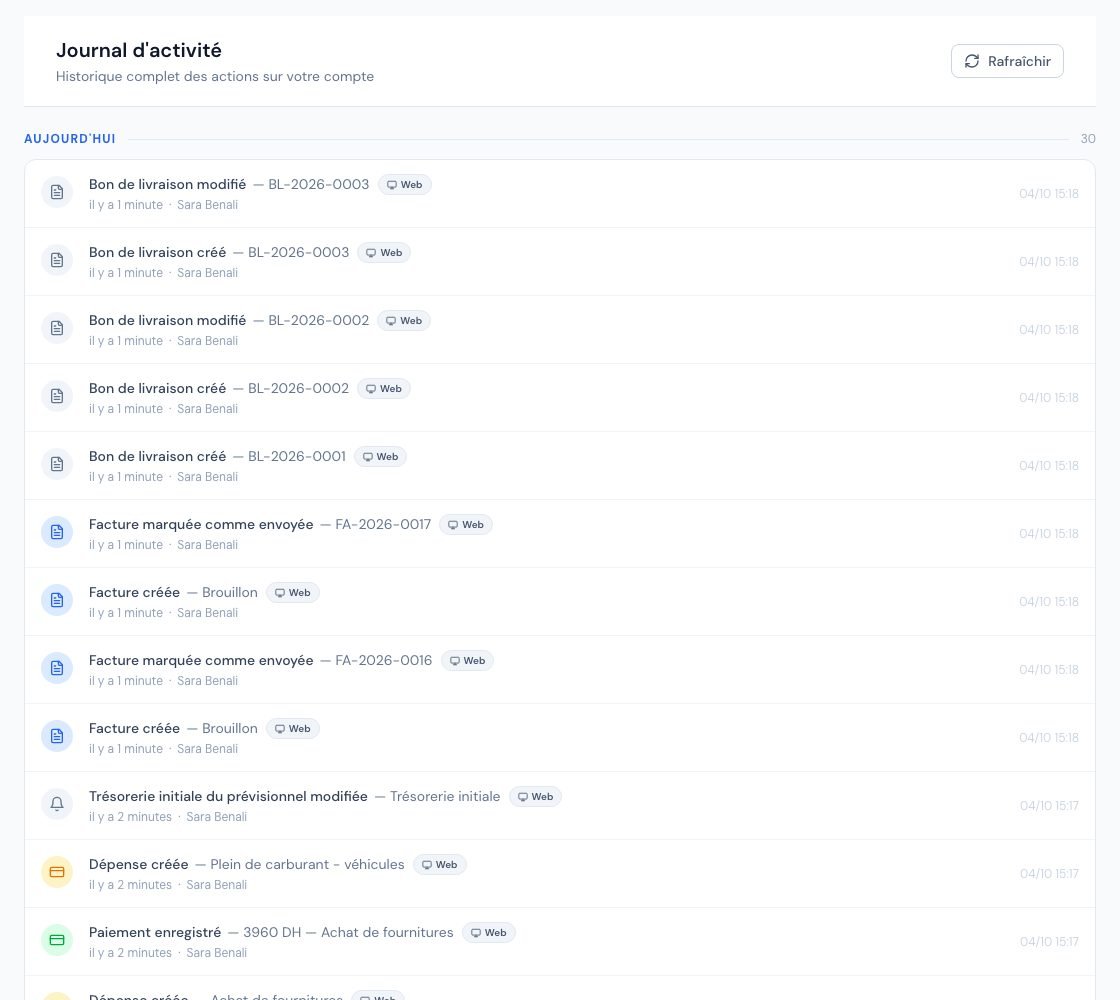 The « Journal d'activité » (Activity log) with the team's latest actions.
3. What is recorded?
Some examples of tracked actions:
- Logins: « Connexion » (Login), « Mot de passe réinitialisé » (Password reset), « Appareil déconnecté à distance » (Device logged out remotely);
- Documents: creation, edit, sending by email, marking as sent, cancellation, quote conversion, credit note issuing, PDF downloads (for example « Facture téléchargée (PDF) »), DGI submissions and responses for e-invoices;
- Payments and expenses: « Paiement enregistré » (Payment recorded), « Paiement annulé » (Payment cancelled), « Dépense créée » (Expense created), « Justificatif demandé » (Receipt requested)…;
- Clients and suppliers: creation, edit, deletion, client portal access;
- Team: « Invitation envoyée », « Invitation acceptée », « Rôle modifié », « Membre désactivé » (Invitation sent, accepted, Role changed, Member deactivated)…;
- Stock: « Stock bas détecté » (Low stock detected);
- Account: suspension or deletion requests, « Export complet des données téléchargé » (Full data export downloaded), changes to the SMTP or e-invoicing operator configuration.
Automatic reminders also appear (« Relance automatique envoyée » — automatic reminder sent).
4. How do I browse a long log?
- The page loads the 30 most recent entries; click Charger plus (Load more) at the bottom to go back in time.
- The Rafraîchir (Refresh) button at the top reloads the latest entries without leaving the page.
The general log has no search and no filter by person or type: it reads in chronological order. For the history of a specific document, open that document instead.
5. Who can view the log?
- The owner, the administrator, the collaborator and the viewer see the log of the whole account.
- The external accountant has no access: they are sent back to the Espace comptable (Accountant space). Their own consultations are visible to the owner in Paramètres → Membres (Settings → Members), in the Journal d'accès comptable (Accountant access log) block.
No one can edit or delete a log entry from the application.
6. How long are entries kept?
Entries older than the retention period set by Billora (one year by default) are deleted automatically. Export or note what you need before that.
When you switch from test mode to live mode (« Activer mon compte » — Activate my account), the activity log is part of the test data that is deleted. See Trial period and test mode.
Frequently asked questions
I do not see the « Journal d'activité » menu.
You are probably logged in with an external accountant role, which has no access. Ask the account owner.
The log says « Web » although I was on my phone.
The App mobile badge refers to the installed Billora app. If you used Billora in your phone's browser, the action is recorded as Web.
Can I erase a line from the log?
No. The log is a trail: it cannot be edited. Old entries are deleted automatically at the end of the retention period.
Can my accountant see what my team does?
No, the accountant has no access to the activity log. They only consult their Accountant space and the documents within their scope.
Next steps
Related articles
Was this article helpful?
Invoice compliantly, effortlessly
DGI-compliant invoices, quotes, credit notes, VAT and supplier tracking in a single tool.
Try it free