Browse help
What is it for?
The Espace comptable (Accountant space) gathers on a single page what your chartered accountant asks for at each closing: the company sheet, the period's tax summary, the sales journal, credit notes, the purchase journal and VAT returns, with export to PDF, Excel or CSV.
Example. Fatima Zahra's accounting firm in Rabat keeps the books of a travel agency in Meknes. Each quarter, she logs in with her accountant access, chooses « TVA trimestrielle · Période précédente » (quarterly VAT · previous period), checks the net VAT collected and the deductible VAT, then exports the sales journal to Excel.
The page is open to all roles, read-only. For the external accountant, it is their home page: they land on it directly when logging in. The owner can also use it to prepare exchanges with their firm. To invite your accountant, see Team roles and access (inviting an accountant depends on your subscription).
1. Where is the accountant space?
Menu Comptabilité → Espace comptable (Accounting → Accountant space). The same group contains Points d'attention (Attention points) and Justificatifs manquants (Missing receipts), the accountant's two other checking tools.
2. How do I choose the period?
- By default, the page shows Cette année (This year).
- Choose a preset (Ce mois, Mois dernier, Ce trimestre, Trimestre dernier, Cette année, Année dernière — this month, last month, this quarter, last quarter, this year, last year) or Personnalisé (Custom) for a free range.
- Or use the Exercice (Financial year) and Mois (Month) lists (« Tous les mois » — all months — for the whole year).
- If the company is VAT-registered, two buttons Période en cours and Période précédente (current / previous period) select the return period directly, monthly or quarterly depending on the company setting.
A range cannot exceed 731 days (24 months, for a long first financial year): beyond that, the page shows « La période ne peut pas dépasser 731 jours (24 mois). Choisissez une plage plus courte. » (The period cannot exceed 731 days. Choose a shorter range.)
3. What does the page contain?
- Fiche entreprise (Company sheet, collapsible): company name, legal form, capital, ICE, IF, RC, TP, CNSS, VAT regime and status, return frequency, address, phones, email, bank and RIB.
- Synthèse fiscale (Tax summary) for the period: CA HT net (ventes - avoirs) (net revenue excl. VAT, sales minus credit notes), TVA collectée nette (net VAT collected, after credit notes), Total achats HT (total purchases excl. VAT), TVA déductible (achats) (deductible VAT) and TVA nette à reverser (net VAT payable), or Crédit TVA (VAT credit) if deductible VAT exceeds collected VAT.
- A Résultat brut estimé (estimated gross result) calculation = net revenue excl. VAT − total expenses excl. VAT (« hors charges non comptabilisées » — excluding unrecorded expenses).
The page states: « Données à titre indicatif » (Data for information only). Billora is not accounting software: the VAT and result shown must be validated by your accountant before any return.
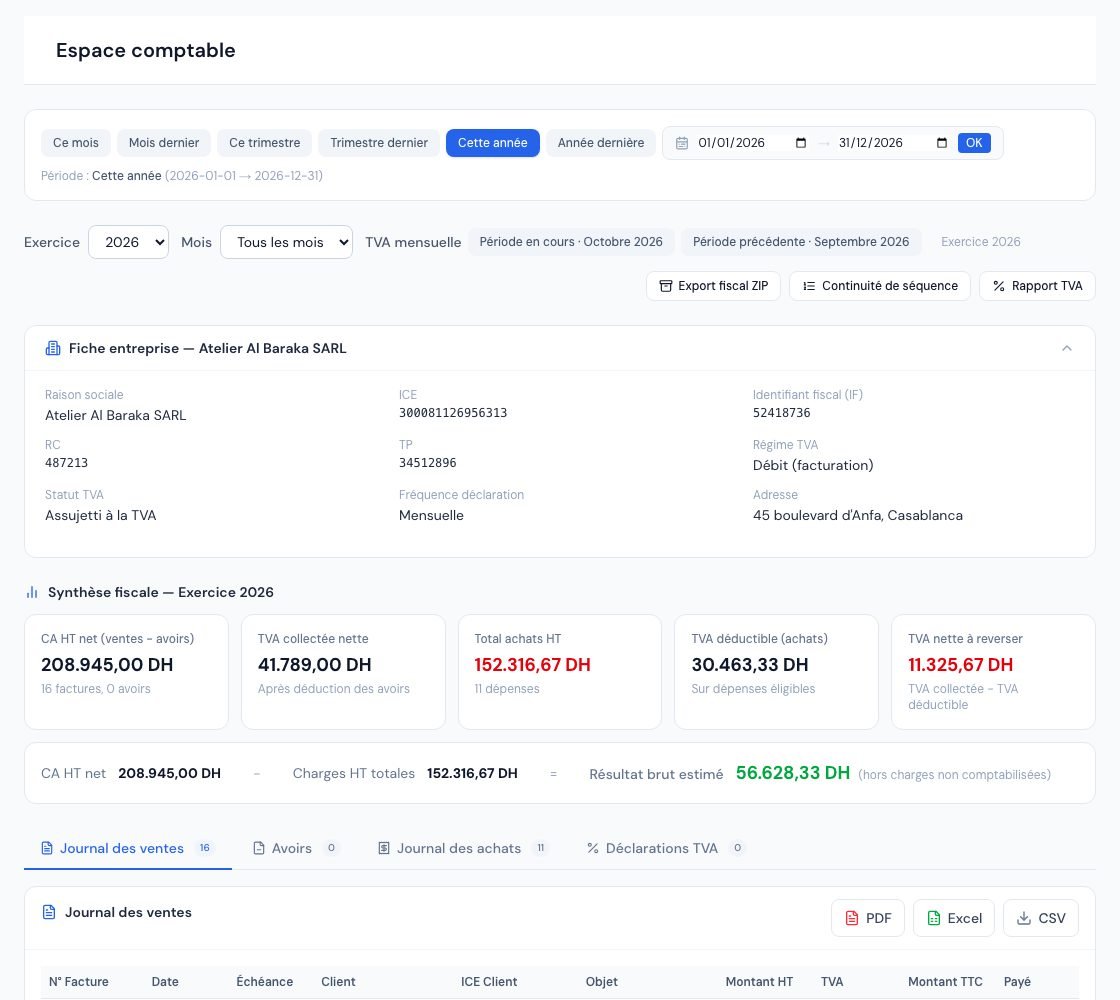 The « Espace comptable » (Accountant space) with the period, the key figures and the tabs.
4. The four tabs
| Tab | Content |
|---|---|
| Journal des ventes (Sales journal) | Invoices issued in the period (drafts and cancelled invoices excluded; an invoice cancelled by a credit note stays listed and its credit note is deducted at its own date): N° Facture, Date, Échéance, Client, ICE Client, Objet, Montant HT, TVA, Montant TTC, Payé, Solde, Statut. The number opens the invoice. |
| Avoirs (Credit notes) | Valid credit notes of the period (neither draft nor cancelled): N° Avoir, Date, Client, ICE Client, Facture liée, Montant HT, TVA, Montant TTC. |
| Journal des achats (Purchase journal) | Expenses of the period (excluding drafts): Date, Fournisseur, Catégorie, Référence, Description, Taux TVA, Montant HT, TVA, Montant TTC, TVA déductible. |
| Déclarations TVA (VAT returns) | VAT returns recorded in Billora: Période, Type, Statut (Déposée, Brouillon, Ajustée — filed, draft, adjusted), TVA collectée, TVA déductible, TVA nette, Crédit reporté, Déposée le. |
Each table ends with a Total line. A counter on each tab shows the number of lines.
5. How do I export for the firm?
- Open the tab to export.
- Click PDF (preview then download), Excel or CSV (semicolon separator, Excel-compatible).
- The file is named after the tab and the period's dates, for example espace-comptable-journal-des-ventes-2026-01-01-2026-03-31.
Three shortcuts complete the page: Export fiscal ZIP (document archives for the accountant or a tax audit), Continuité de séquence (Sequence continuity — checks numbering gaps) and Rapport TVA (VAT report).
The page recalls the obligation to keep supporting documents for 10 years (article 211 of the CGI, the Moroccan General Tax Code). For expenses without a receipt, see Missing receipts.
6. Going further: the accountant's checks
- Attention points: anomalies to fix before closing.
- Missing receipts: expenses without an attachment and the receipt request.
- Fiscal export and Sequence continuity.
Frequently asked questions
Can my accountant edit an invoice from this page?
No. The external accountant is read-only: they consult, open documents and export, but create or change nothing.
Why doesn't an invoice of the period appear in the sales journal?
Drafts and cancelled invoices are excluded. Also check the invoice's issue date: that is what counts, not the payment date.
Do the VAT returns shown change with the period?
No: the Déclarations TVA tab lists all returns recorded in Billora, whatever the period chosen.
The page shows « Aucune facture, aucun avoir ni aucune dépense sur cette période ».
No document matches the chosen dates (no invoice, credit note or expense in this period). Choose another period, for example Année dernière.
Is the net VAT shown the amount I must pay?
It is an estimate calculated from your documents (VAT collected − deductible VAT). The amount to declare must be validated by your accountant, especially under the cash-basis regime.
Next steps
Related articles
Was this article helpful?
Invoice compliantly, effortlessly
DGI-compliant invoices, quotes, credit notes, VAT and supplier tracking in a single tool.
Try it free