Browse help
What is this report for?
The revenue report shows you what you have invoiced, to whom, for which products, and what has already been collected. It helps you see your trends, spot your best clients and anticipate your receivables.
Example: "Studio Photo Marrakech" discovers that three clients account for 70% of its quarter's revenue and that its "wedding" packages earn more than its "portrait" sessions. It adapts its offer.
Open the report
- In the menu, open Rapports (Reports), then Chiffre d'affaires (Revenue).
- Choose the period: Ce mois (This month), Mois dernier (Last month), Ce trimestre (This quarter), Trimestre dernier (Last quarter), Cette année (This year), Année dernière (Last year), or Personnalisé (Custom) (your own dates).
- The report updates automatically. The chosen period is displayed as a subtitle.
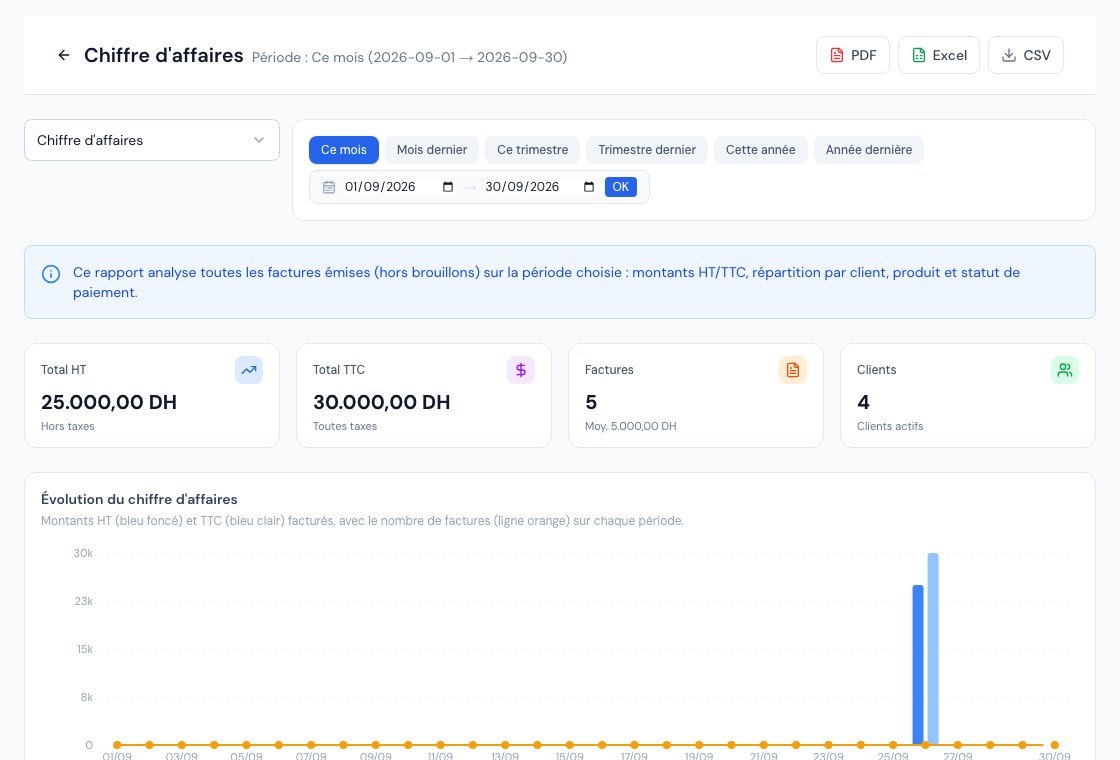 The revenue report.
If the report is not included in your subscription, a locked page indicates the plan from which it is available.
What you see
- Four key figures: Total HT (excl. VAT), Total TTC (incl. VAT), number of Factures (Invoices) (with the average invoice) and number of active Clients.
- Évolution du chiffre d'affaires (Revenue trend): a chart of the excl. VAT total, the incl. VAT total and the number of invoices, by day, week or month depending on the length of the period.
- Top clients: the clients generating the most revenue excl. VAT, with their percentage share.
- Par statut (By status): the breakdown of the invoiced total incl. VAT by payment state (paid, partial, sent, overdue…).
- Top produits et services (Top products and services): the items that weigh the most in revenue excl. VAT.
- Tableau mensuel (12 mois) (Monthly table (12 months)): month by month, with the number of invoices, excl. VAT, incl. VAT, Encaissé (Collected) (already settled) and Solde (Balance) (still to be received).
What is counted (and what is not)
The report analyses all invoices issued in the period, according to their issue date. Drafts and cancelled invoices do not appear in it: an invoice that has not been sent yet is not revenue.
- Invoices that are sent, partially paid, paid or overdue: counted.
- Credit notes (avoirs): a credit note is deducted from revenue on its issue date. An invoice cancelled by a credit note stays in the period in which it was issued, and the credit note is deducted in the period in which it is issued. If both fall in the same month, the net effect is nil.
- Drafts and cancelled invoices: ignored.
The VAT amounts displayed are indicative: Billora is not accounting software, have your returns validated by your accountant.
Export the report
At the top right, three buttons: PDF (a preview opens, which you can download or print), Excel and CSV. The PDF and Excel exports are subscription features: if one is missing, its button is greyed out and its tooltip indicates the plan from which it is available. The CSV export is free. The PDF suits your accountant, the Excel and CSV your own analyses.
Frequently asked questions
My invoice does not appear in the report.
It may still have the Draft status, be cancelled, or its issue date is not within the chosen period.
The report's revenue is lower than the sum of my invoices.
Credit notes have probably been deducted over the period. Open the list of credit notes to find the amounts concerned.
What is the difference between "CA" and "Encaissé"?
Revenue (CA) is what you have invoiced; "Encaissé" is what your clients have actually paid. The gap is your "Solde". For the detail of late payments, see the aged balance.
I cannot export to PDF or Excel.
The button is greyed out if your subscription does not include this export: hover over it to see from which plan it is available. CSV remains usable.
Next steps
Related articles
Was this article helpful?
Invoice compliantly, effortlessly
DGI-compliant invoices, quotes, credit notes, VAT and supplier tracking in a single tool.
Try it free