Browse help
What is this report for?
Your invoices must be numbered without interruption: FA-2026-0001, FA-2026-0002, FA-2026-0003… A missing number draws an inspector's attention, who may see it as a concealed invoice. This report checks the sequence of your invoice, credit note and quote numbers for a financial year and lists each gap.
Example. Youssef, a trader in Agadir, runs the report before sending his annual file to his accountant. The « Factures » (Invoices) block shows « 1 trou » (1 gap): number 0007 is missing between 0006 and 0008. He finds the explanation in his notes and passes it on to his accountant with the file.
Menu Rapports (Reports), section « Fiscal & conformité » (Tax & compliance), card « Continuité de séquence » (Sequence continuity). The page is read-only and available to every role, external accountant included.
1. Why is the report locked for me?
This report is part of the Electronic invoicing feature. Depending on your subscription, it may not be included: the page then shows « Cette fonctionnalité est disponible à partir du plan … » (This feature is available from the … plan; the plan name is read automatically), or « Cette fonctionnalité n'est pas disponible sur votre abonnement actuel. » (This feature is not available on your current subscription.). In test mode, it is open. To set up sending to the DGI, see Activate electronic invoicing.
2. How do I read the report?
- Choose the year in the « Exercice fiscal » (Financial year) list (the current year and the four previous ones).
- Read the three cards: « Documents émis » (Documents issued: numbered invoices, credit notes and quotes of the year), « Trous détectés » (Gaps detected) and « Statut » (Status): Conforme (Compliant) if there is no gap, Anomalie (Anomaly) if there is at least one, À vérifier (To check) if there is no gap but some numbers could not be analysed (see section 3).
If everything is compliant, a green « Séquence continue » (Continuous sequence) box confirms it; if some numbers could not be analysed, an orange « Format non analysable » (Format cannot be analysed) box says so instead. - Scroll down to the « Factures » (Invoices), « Avoirs » (Credit notes) and « Devis » (Quotes) blocks (a block only appears if the year contains at least one document of that type). Each shows the number of documents, your prefix and the expected format (for example « 42 documents · préfixe FA · format FA-AAAA-NNNN », where AAAA is the year and NNNN the counter), then a Continu (Continuous), N trous (N gaps) or Format non analysable badge.
- Under a block with an anomaly, each gap is numbered (Trou #1, Trou #2…, Gap #1, Gap #2…) with the full missing number, or the missing range (for example FA-2026-0007 → FA-2026-0009), and the number of missing numbers. Under a block without gaps, a line shows your actual first and last numbers: « Aucun trou — séquence continue de FA-2026-0001 à FA-2026-0042. » (No gap — continuous sequence from FA-2026-0001 to FA-2026-0042.)
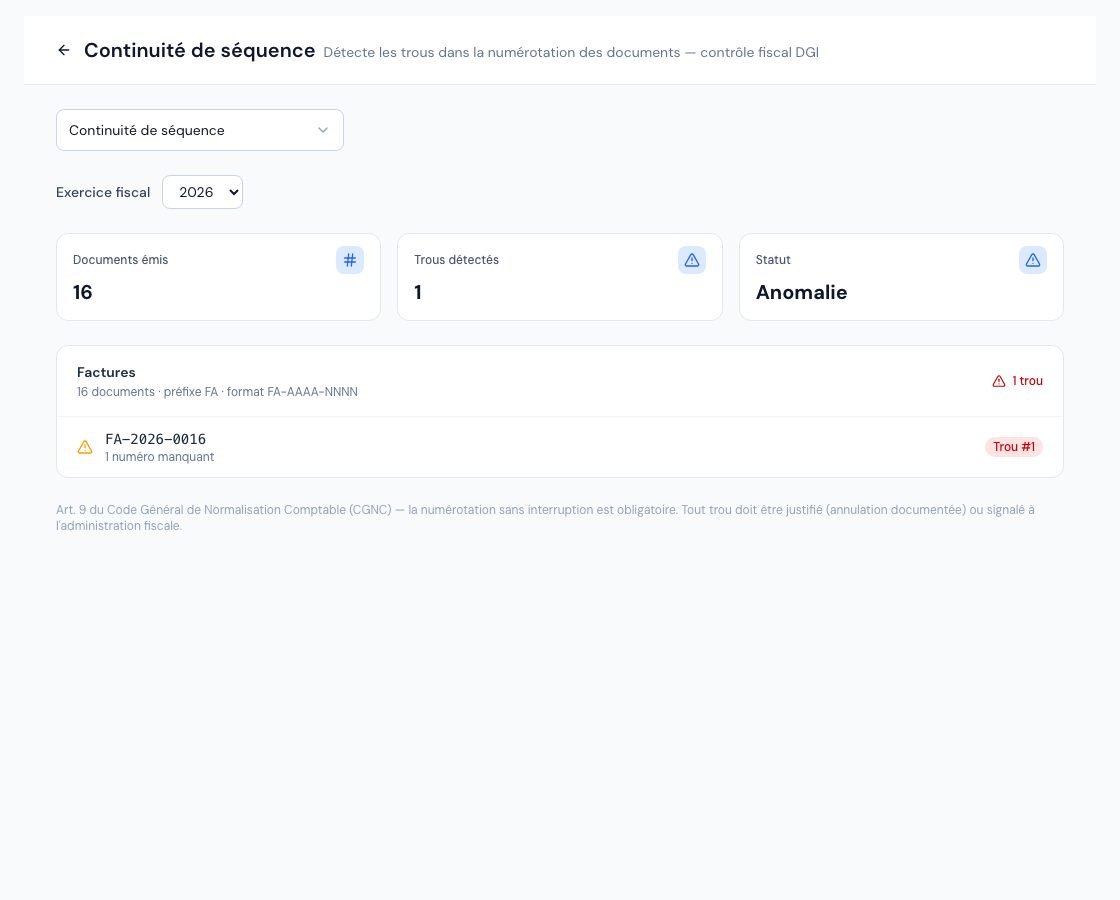 The « Continuité de séquence » (Sequence continuity) report with a gap detected in the numbering.
3. What counts as a gap?
- Billora takes every numbered document whose issue date is in the year, whatever its status: a cancelled invoice keeps its number and therefore does not create a gap.
- A gap is a number missing between two existing numbers. Numbers before the first document of the year or after the last one are not gaps: this is the case, for example, if you resumed your numbering at 0043 when you moved to Billora.
- The check follows your account's actual format, defined in your numbering settings: your prefixes (FA, AV, DE by default), your separator (hyphen, underscore or dot) and your reset. With a reset every month, each month forms its own series (FA-2026-03-0001, FA-2026-03-0002…); with « Jamais (continu) » (Never, continuous), the series has no year (FA-0001).
- If you changed format during the year, numbers still in the old default format (FA-2026-0007) are checked in their own series.
A number that follows neither your account's format nor the old default format (for example a document imported from other software with its own numbering) cannot be checked. The block concerned says so (« N numéros au format non analysable (ex. …) — continuité non vérifiée pour ces numéros », N numbers in a format that cannot be analysed (e.g. …) — continuity not checked for these numbers) and the report never shows « Continu » or « Conforme » in that case. Have your accountant check the sequence of these numbers.
4. What should I do when a gap appears?
An assigned number is never reused by Billora: you do not « fill » a gap by creating a document with that number. The page reminds you: « Art. 9 du Code Général de Normalisation Comptable (CGNC) — la numérotation sans interruption est obligatoire. Tout trou doit être justifié (annulation documentée) ou signalé à l'administration fiscale. » (Art. 9 of the General Accounting Standards Code — uninterrupted numbering is mandatory. Any gap must be justified (documented cancellation) or reported to the tax administration.)
- Note the missing number or range and the year.
- Find the cause: a document numbered in another tool, a test, a document cancelled outside Billora… The neighbouring documents (before and after the gap) help you date the event.
- Write a short justification and keep it with the year's records.
- Send it to your chartered accountant: they will tell you whether it must be reported to the tax administration.
The same check feeds the « Rupture de séquence » (Sequence break) alert of the accounting attention points, whose message gives the missing number with your real prefix and the two documents around it (for example « entre FA-2026-0006 et FA-2026-0008 », between FA-2026-0006 and FA-2026-0008).
Frequently asked questions
Does a cancelled invoice create a gap?
No. A cancelled invoice (or one cancelled by a credit note) keeps its number and is still counted in the sequence.
Are drafts checked?
Only documents that carry a number are analysed. A document without a number is not part of the check.
My numbering starts at 0043. Does the report flag numbers 0001 to 0042?
No: only numbers missing between two existing documents are gaps. Under the block, the line « Aucun trou — séquence continue de … à … » (No gap — continuous sequence from … to …) shows your actual first and last numbers of the year (for example from FA-2026-0043 to FA-2026-0091).
Are purchase orders and delivery notes checked?
No. The report only checks invoices, credit notes and quotes.
Next steps
Related articles
Was this article helpful?
Invoice compliantly, effortlessly
DGI-compliant invoices, quotes, credit notes, VAT and supplier tracking in a single tool.
Try it free