Browse help
You send a lot of quotes, but how many turn into orders, and how quickly? If your clients usually reply within four days, a quote left unanswered for three weeks deserves a phone call. This report gives you those benchmarks: the acceptance rate, the average response time and the pending amount.
Menu Rapports → Délais de validation des devis (Reports → Quote approval delays). Depending on your subscription, it may not be included: the page then tells you from which plan it is available.
1. What is counted
Quotes issued in the chosen period, except drafts (never sent). Each quote has an outcome:
- Accepted: accepted, or converted into an invoice (a converted quote has necessarily been accepted);
- Declined;
- Expired: sent, but its validity date has passed;
- Pending: sent and still valid.
2. The cards
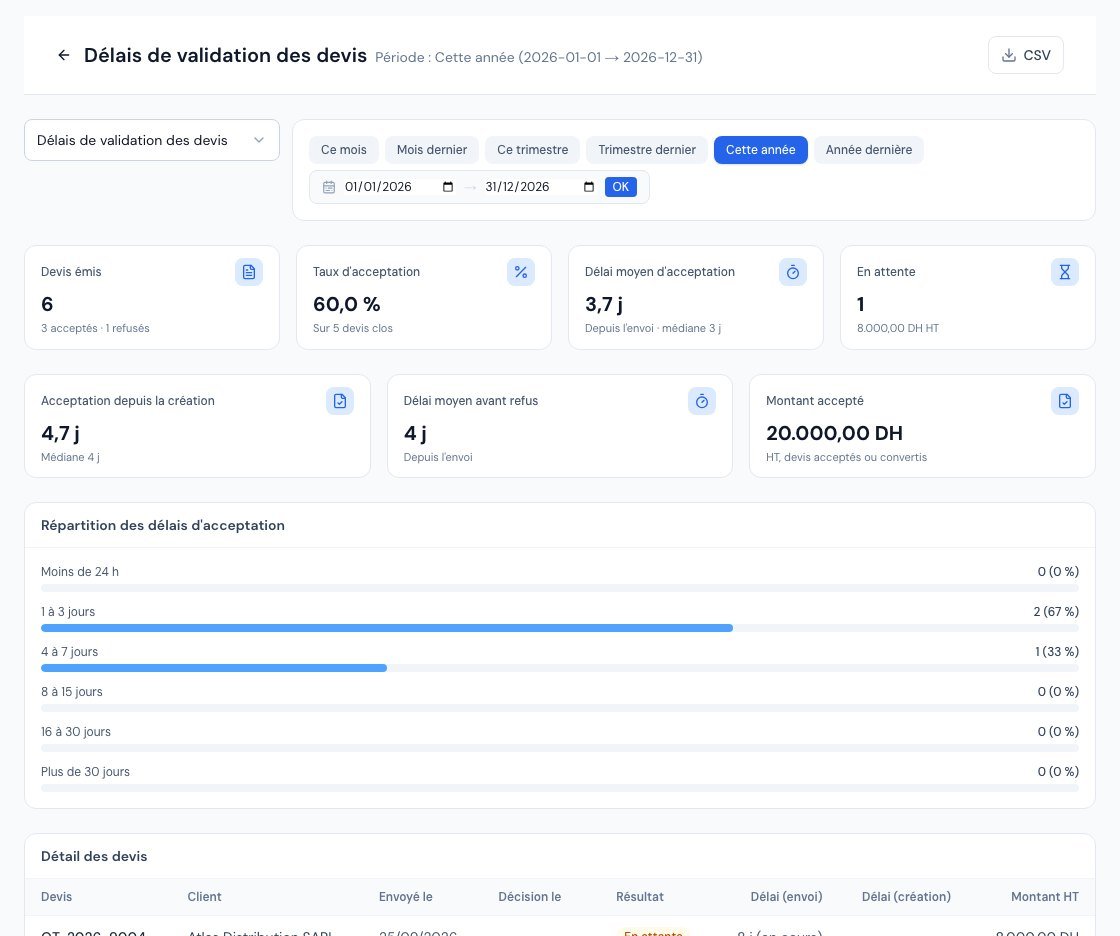 The Quote Approval Delays report with the acceptance rate.
| Card | What it means |
|---|---|
| Devis émis (Quotes issued) | The number of quotes, with the breakdown « acceptés · refusés » (accepted · declined). |
| Taux d'acceptation (Acceptance rate) | The share of accepted quotes among closed quotes (accepted, declined or expired). Quotes still pending are not counted: they have no answer yet. |
| Délai moyen d'acceptation (Average acceptance time) | The average number of days between the quote being sent and its acceptance, with the median. If there is no sent date, it is measured from creation. |
| En attente (Pending) | The number of quotes without an answer and their amount excl. VAT. |
| Acceptation depuis la création (Acceptance since creation) | The same delay, measured from the quote's creation. |
| Délai moyen avant refus (Average time before decline) | The average days before a decline, from sending. |
| Montant accepté (Accepted amount) | The total excl. VAT of accepted or converted quotes. |
A single quote left unanswered for three months pulls the average up. The median (the middle value) shows the "typical" delay: if it is 3 days, half of your quotes are accepted in less than 3 days.
3. The distribution and the quote table
Below the cards, a chart shows the distribution of acceptance delays: under 24 h, 1 to 3 days, 4 to 7 days, 8 to 15 days, 16 to 30 days, more than 30 days. It tells you at a glance whether your clients answer quickly or drag their feet.
For each quote: Devis (Quote number), Client, Envoyé le (Sent on), Décision le (Decision on), Résultat (Outcome), Délai (envoi) (Delay (sending)), Délai (création) (Delay (creation)) and Montant HT (Amount excl. VAT). Hover over a decision date: a tooltip shows where it comes from: Enregistrée (Recorded: date entered or the client's online signature), Journal d'activité (Activity log), or Date de conversion (au plus tard) (Conversion date (at the latest)) for an older converted quote with no acceptance date.
Only the most recent quotes are shown in the table: the « CSV » button exports all of those in the period.
If the report states that « N devis acceptés n'ont pas de date d'acceptation enregistrée » (N accepted quotes have no recorded acceptance date), they count in the totals but not in the delays: a delay cannot be measured without a date. This mostly concerns older quotes.
Frequently asked questions
My acceptance rate seems low: why?
Check the « Expiré » (Expired) quotes: an unanswered quote that goes past its validity counts as closed and not accepted. Follow up with your clients before the deadline.
Are draft quotes counted?
No, because they have not been sent. The page says so when there is nothing to display: « Les devis en brouillon ne sont pas comptés. » (Draft quotes are not counted.)
How can I get a reliable acceptance date?
Have your quotes signed online from the client portal: the date is recorded automatically.
Next steps
Related articles
Was this article helpful?
Invoice compliantly, effortlessly
DGI-compliant invoices, quotes, credit notes, VAT and supplier tracking in a single tool.
Try it free