See, invoice by invoice, the due date, the payment date and the days late of your clients over a financial year, then export everything to CSV to prepare the payment-terms declaration with your accountant.
Browse help
What is this report for?
Payment terms between businesses are regulated in Morocco, and sooner or later your accountant will ask you for the list of your invoices paid late. This report prepares it for you: for each invoice of a financial year, it shows the due date, the payment date, the amount still owed and the number of days late. A button exports it to CSV.
Example. Karim, who runs an engineering consultancy in Tangier, opens the report for the previous year. He sees that his invoice to Souss Agro SARL, due on 15 March, was settled by a transfer dated 2 May: the « Jours de retard » (Days late) column shows 48j. He exports the CSV and sends it to his accountant.
Menu Rapports (Reports), section « Fiscal & conformité » (Tax & compliance), card « Délais de paiement » (Payment delays). The page is read-only: every team member can view it, external accountant included.
1. Why is the report locked for me?
This report is part of the Electronic invoicing feature. Depending on your subscription, it may not be included: the page then shows « Disponible à partir du plan … » (Available from the … plan; the plan name is read automatically), the text « Ce rapport est disponible dans les plans avec la facturation électronique DGI. » (This report is available in plans with DGI electronic invoicing.) and a « Voir les plans disponibles » (See available plans) button. If no plan offers it, the page says « Non disponible sur votre abonnement actuel » (Not available on your current subscription).
During the trial period (test mode), every feature is open, this report included. To prepare sending your invoices to the DGI, read Activate electronic invoicing.
2. How do I read the report?
- Choose the year in the « Exercice : » (Financial year) list (the current year and the four previous ones).
The report reloads immediately. - Read the six cards at the top.
- Browse the invoice table, then export it if needed with « Exporter CSV » (Export CSV).
| Card | What it means |
|---|---|
| Factures (Invoices) | The number of invoices included for the year. |
| Total facturé (Total invoiced) | The sum of their amounts incl. VAT. |
| Total encaissé (Total collected) | What has already been paid on these invoices. |
| Solde restant (Remaining balance) | What is still to be collected (amount incl. VAT minus paid). |
| Factures en retard (Late invoices) | The number of invoices with at least one day late. |
| Retard moyen (Average delay) | The average number of days late, calculated only on late invoices (invoices paid on time do not lower the average). |
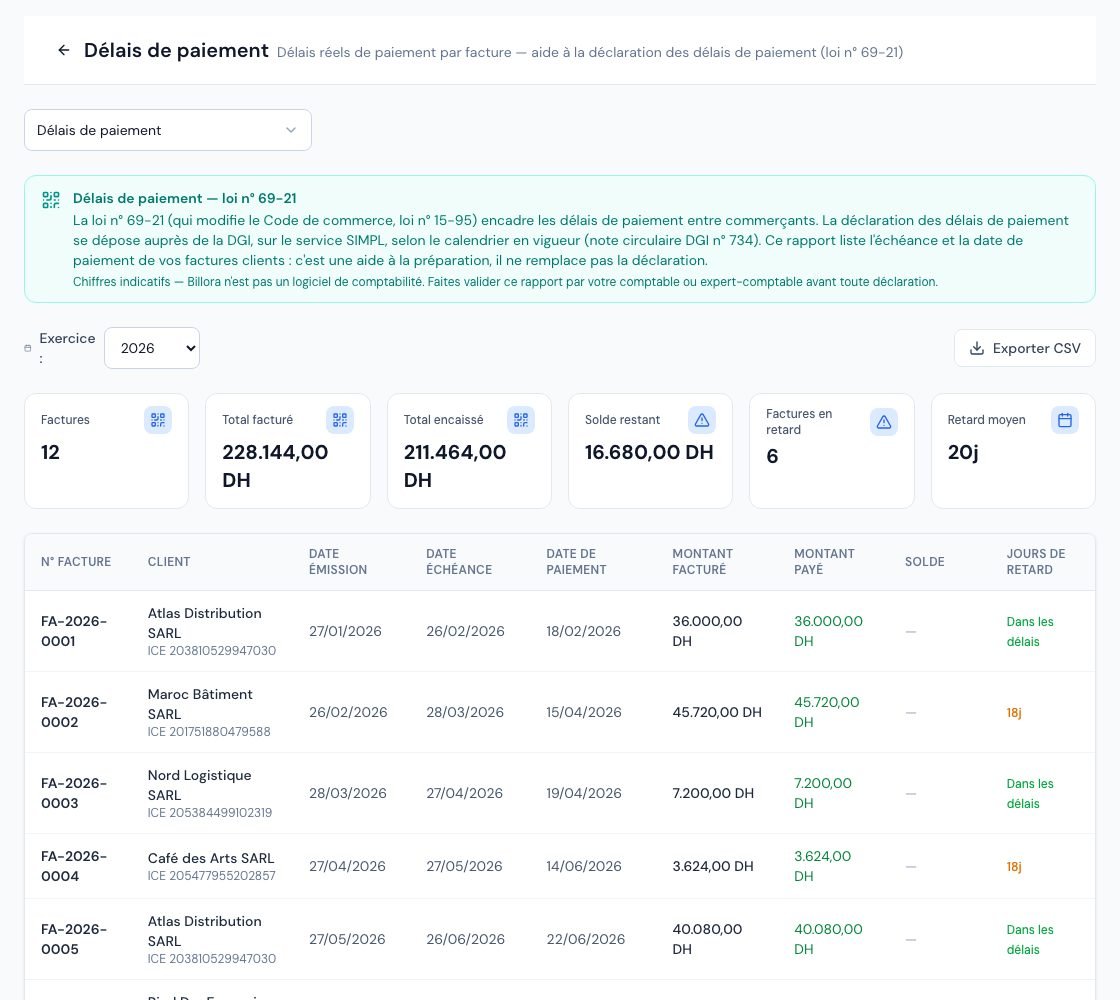 The « Délais de paiement » (Payment delays) report with the payment date and the days late of each invoice.
3. Which invoices are included?
Invoices whose issue date falls within the chosen year and whose status is « Payée » (Paid), « Partielle » (partially paid) or « En retard » (Overdue). Not included, therefore: drafts, cancelled invoices (including those cancelled by a credit note), and « Envoyée » (Sent) invoices that are neither paid nor overdue.
The report covers your sales (invoices to your clients), not your supplier expenses.
4. What do the table columns mean?
- N° Facture (Invoice no.) and Client (with their ICE when it is filled in on the client record).
- Date émission (Issue date) and Date échéance (Due date).
- Date de paiement (Payment date): the date of the last settlement that pays off the invoice, i.e. the date entered in that payment (not the day you recorded it). Cancelled payments are ignored. If the invoice was settled by applying a credit note after the last payment, the date of that application counts. For an old invoice with no known settlement date, Billora uses the day it was marked as paid. An invoice not yet settled (even partly paid) shows Non payée (Unpaid).
- Montant facturé (Amount invoiced), Montant payé (Amount paid) and Solde (Balance; a dash when everything is paid).
- Jours de retard (Days late): the gap between the due date and the payment date. For an invoice not yet settled, Billora counts up to today, so the figure grows every day. Dans les délais (On time) means 0 days late; a dash means the invoice has no due date (it is then never counted as late). The colour darkens with the delay: orange beyond 30 days, red beyond 90 days.
The report reads the date entered in each payment. If you record on 20 May a transfer received on 2 May, make sure to enter 2 May as the payment date: the delay will be counted up to 2 May, not up to the day you entered it. See Record a payment.
5. How do I export the report to CSV?
- Choose the year.
- Click « Exporter CSV » (Export CSV).
The file delais-paiement-2026.csv (with the chosen year) is downloaded.
The file uses the semicolon as separator (it opens directly in a French-language Excel) and contains the columns: N° Facture, Client, ICE Client, Date Émission, Date Échéance, Date de Paiement, Montant Facturé (DH), Montant Payé (DH), Solde (DH) and Jours de Retard. Dates use the YYYY-MM-DD format.
6. What is the legal obligation and when should I file?
At the top of the page, the « Délais de paiement — loi n° 69-21 » (Payment terms — law no. 69-21) box sets out the framework: law no. 69-21 (amending the Commercial Code, law no. 15-95) regulates payment terms between traders, and the payment-terms declaration is filed with the DGI, on the SIMPL service, according to the calendar in force (DGI circular note no. 734). It also states that this report helps you prepare and does not replace the declaration, then: « Chiffres indicatifs — Billora n'est pas un logiciel de comptabilité. Faites valider ce rapport par votre comptable ou expert-comptable avant toute déclaration. » (Indicative figures — Billora is not accounting software. Have this report validated by your accountant or chartered accountant before any declaration.)
Billora files nothing with the DGI: this report is a working basis. Who must file, how often (the calendar has changed: annually on a transitional basis, then quarterly) and for which invoices depends in particular on your turnover. Have your situation and the exact deadline confirmed by your chartered accountant before any filing.
Frequently asked questions
A paid invoice does not appear in the report. Why?
Check its issue date: the report uses the year of issue, not the year of payment. An invoice issued in December 2025 and paid in January 2026 appears in the 2025 financial year.
Why does an invoice without a due date show no delay?
Without a due date there is nothing to compare: the column shows a dash and the invoice is not counted as late. Remember to set a payment term on your invoices (or a default one on the client record).
Can the accountant view and export this report?
Yes. The report is read-only and available to every team role, external accountant included, if your subscription includes the feature.
How is it different from the aging report?
The aging report shows what is still to be collected today, by age bracket. This report traces, over a whole financial year, the actual delay of each invoice, including those already paid.
Next steps
Related articles
Was this article helpful?
Invoice compliantly, effortlessly
DGI-compliant invoices, quotes, credit notes, VAT and supplier tracking in a single tool.
Try it free