Browse help
What is the supplier record for?
The supplier record gathers everything you know about a company (or a person) that sells you goods or services: tax identifiers, bank details, contacts, and the whole history of your purchases. It is then used for your purchase orders and your expenses.
Example. Nadia runs a restaurant in Agadir. She creates the record of her fish wholesaler with its ICE and RIB: each fish purchase invoice is recorded as an expense of this supplier, and she sees at a glance what she still owes.
1. Create a supplier
- Menu Fournisseurs (Suppliers), then Ajouter un fournisseur (Add a supplier).
- Choose Entreprise (Company) or Particulier (Individual).
- For a company, enter the Raison sociale (Company name, required); for an individual, the Prénom (First name) and Nom (Last name, required).
- Fill in what you know (sections detailed below). You can also add people right away in Contacts (Ajouter (Add) button).
- Click Créer le fournisseur (Create the supplier). The record opens.
Depending on your subscription, as soon as 3 characters are typed in the company name, Billora suggests existing companies; picking one fills in the ICE, IF, RC and the other legal information. Manual entry is always possible. If the search is not included, the field says so (« Recherche automatique disponible à partir du plan … », automatic search available from the … plan).
Possible messages: « La raison sociale est requise » (The company name is required), « Le prénom est requis » (The first name is required), « Le nom est requis » (The last name is required), « Email invalide » (Invalid email).
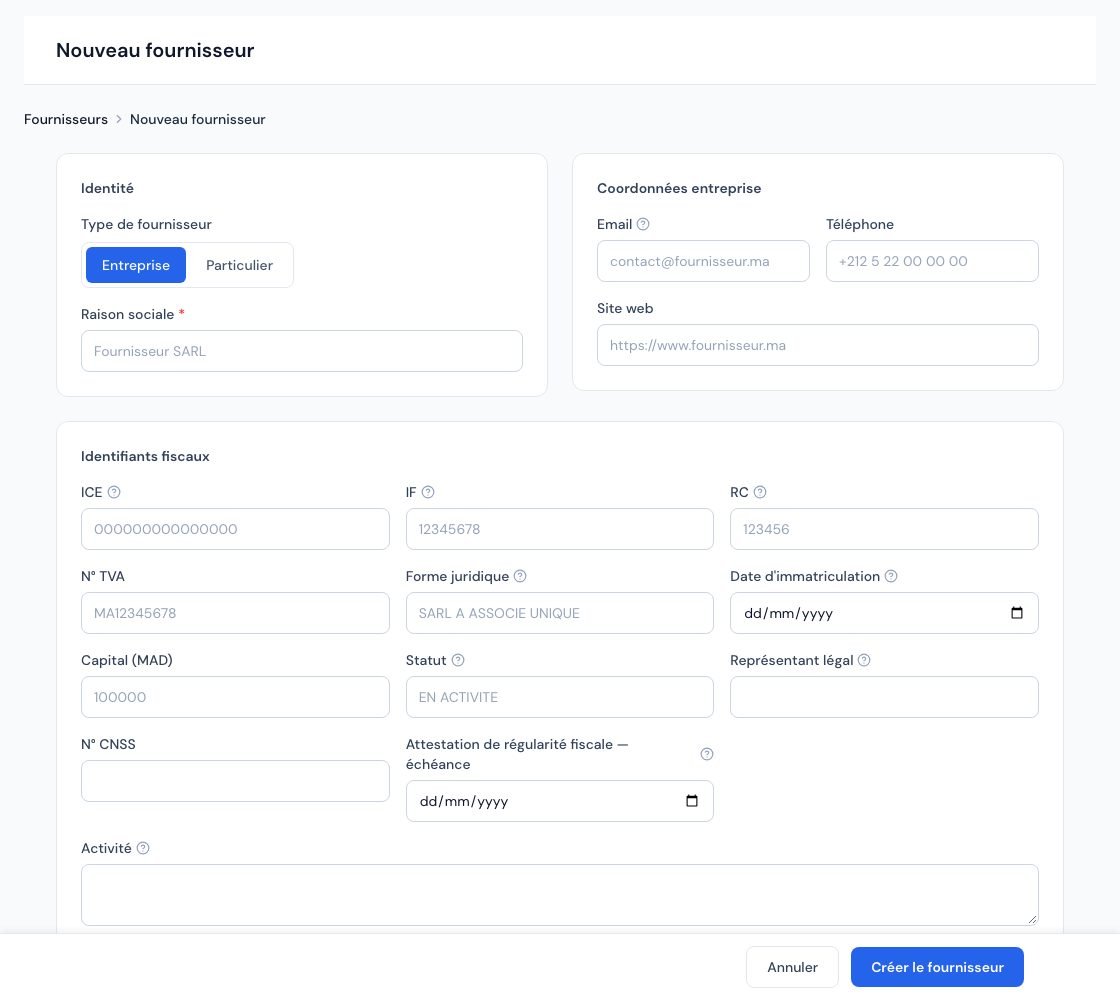 The « Nouveau fournisseur » (New supplier) form.
2. Tax identifiers
The Identifiants fiscaux (Tax identifiers) section includes: ICE, IF, RC, N° TVA (VAT no.), Forme juridique (Legal form), Date d'immatriculation (Registration date), Capital (MAD), Statut (Status, at the trade register), Représentant légal (Legal representative), N° CNSS, Attestation de régularité fiscale — échéance (Tax compliance certificate — expiry) and Activité (Activity).
- The ICE must have exactly 15 digits, otherwise: « L'ICE doit contenir exactement 15 chiffres » (The ICE must contain exactly 15 digits).
- If the trade register status indicates a deregistration, a liquidation or a cessation, the record shows a warning: « Statut au registre du commerce : … Vérifiez la situation de ce fournisseur avant de facturer ou de commander. » (Trade register status: … Check this supplier's situation before invoicing or ordering.)
To know when the ICE is required on your documents, see Is the ICE mandatory?.
3. Bank, RIB and foreign suppliers
- Coordonnées bancaires (Bank details): Banque (Bank) and RIB (24 digits, useful for your transfers). An incomplete RIB is refused: « Le RIB doit contenir exactement 24 chiffres » (The RIB must contain exactly 24 digits). On the record, the RIB is shown formatted with a button to copy it. While you type the bank, Billora suggests banks in Morocco; another bank can always be written.
- International: Devise de facturation (Billing currency), Taux de change (Exchange rate, when the currency is not MAD), N° fiscal étranger (Foreign tax no.), Langue préférée (Preferred language), IBAN and SWIFT / BIC.
4. Terms, addresses and notes
- Profil et conditions (Profile and terms): Secteur d'activité (Industry), Taille (Size), Délai de paiement par défaut (Default payment terms, used to calculate due dates), Responsable (the person on your team who follows this supplier, see Account managers) and Catégorie de dépense par défaut (Default expense category).
- Adresse principale (facturation) (Main address, billing) and Adresse de livraison (Delivery address) (« laissez vide si identique à l'adresse principale », leave empty if identical to the main address).
- Notes: Notes internes (Internal notes) are visible only to your team; Notes publiques (Public notes) may appear on purchase orders.
5. View a supplier record
- The tabs: Aperçu (Overview), Contacts, Commandes d'achat (Purchase orders), Dépenses (Expenses), Paiements (Payments), Documents (your attachments) and Journal d'activité (Activity log).
- The figures of the overview: Total acheté (Total purchased), Total payé (Total paid), Solde dû (Balance due), Commandes (Orders), Dépenses (Expenses).
- Actions rapides (Quick actions): Commande (new purchase order), Dépense (Expense), Appeler (Call) and Email (if filled in), Attestation (Certificate), Modifier (Edit), Archiver (Archive) and Supprimer (Delete). The « … » menu also offers Régler plusieurs dépenses (Pay several expenses) (see Grouped payment).
- Portail fournisseur (Supplier portal): a link to copy to give the supplier access to its orders.
The Attestation action emails your tax compliance certificate to the supplier (« Envoyer l'attestation de régularité fiscale », send the tax compliance certificate); it must first be uploaded (see Your tax compliance certificate). The Attestation de régularité fiscale — échéance field of the record concerns the supplier's certificate: Billora warns you before it expires (see Tax certificate expiry alerts).
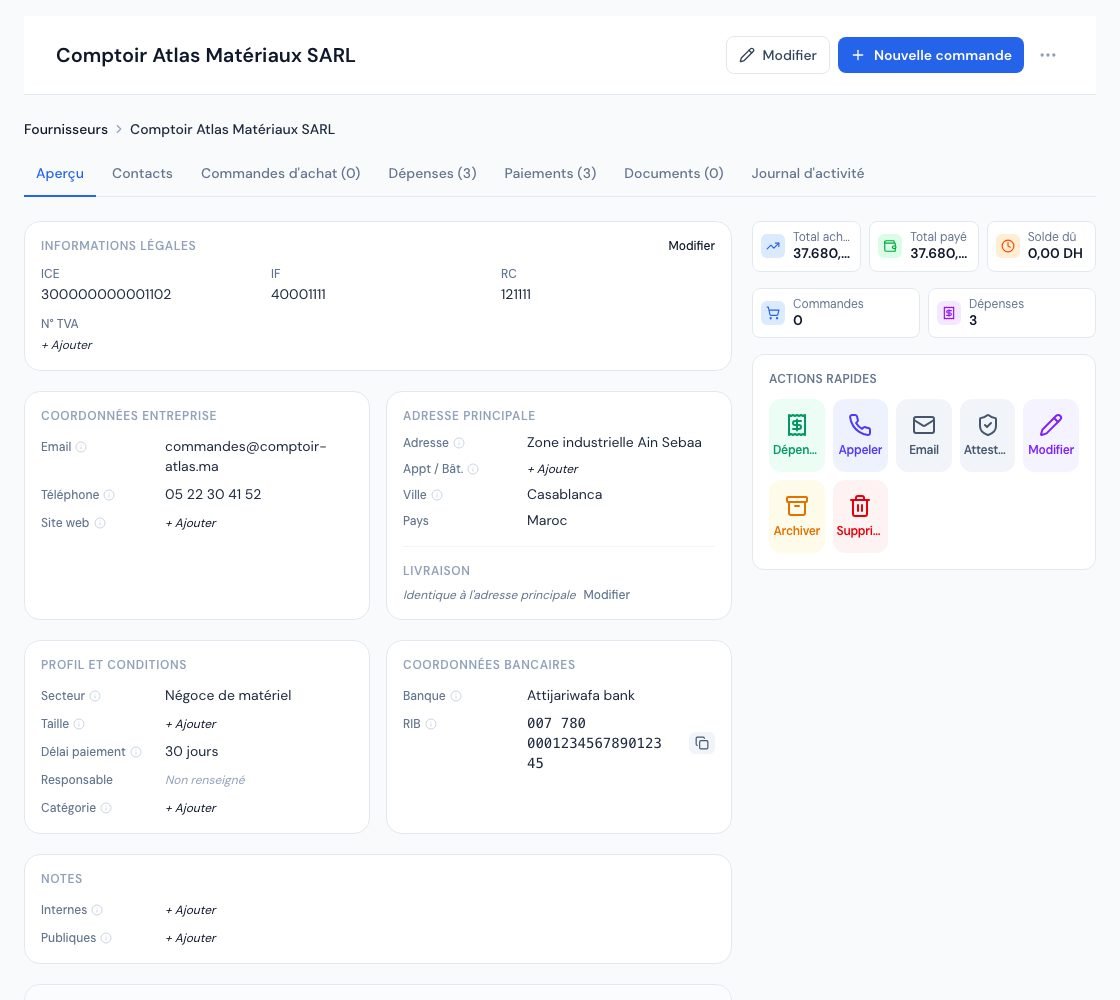 A supplier's page with its legal information, contact details, terms and RIB.
6. Search and filter your suppliers
- The counters: Total fournisseurs (Total suppliers), Fournisseurs actifs (Active suppliers), Total achats (Total purchases, excl. VAT, excluding drafts and cancelled expenses) and Impayés (Unpaid).
- The search « Rechercher par nom, email, ICE… » (Search by name, email, ICE…) and the Type, Statut (Status: Actifs / Archivés, Active / Archived), Attestation fiscale (Tax certificate: « À renouveler (expirée ou < 30 jours) », to renew: expired or < 30 days) and Responsable (including « Sans responsable », no account manager) filters.
- The columns: Nom (Name), Type, Email, Téléphone (Phone), Ville (City), Responsable, Statut. Tick several rows to archive or delete them in one go.
- The Importer CSV (Import CSV) button opens the bulk import (see Import data from CSV).
7. Archive or delete a supplier
- Archiver (Archive): the supplier is « masqué des listes actives mais ses données seront conservées » (hidden from active lists but its data will be kept). Find it with the Archivés filter and click Désarchiver (Unarchive) to restore it.
- Supprimer (Delete): final, and only possible if no expense or order is linked. Otherwise: « Impossible de supprimer un fournisseur ayant des dépenses ou commandes. Archivez-le à la place. » (A supplier with expenses or orders cannot be deleted. Archive it instead.). In a bulk deletion, these suppliers are skipped and the message tells you so.
Once deleted, the record cannot be recovered. For a supplier you no longer work with, archiving is enough and keeps the history.
8. Number of suppliers depending on your subscription
Your subscription may limit the number of suppliers. When the limit is reached, the « Limite atteinte — fournisseurs » (Limit reached — suppliers) box appears with the Mettre à niveau (Upgrade) button, and creation is refused. Archived suppliers count towards this limit; only a deletion frees a slot. In test mode, no limit applies (see Understanding plans and limits).
9. Who can manage suppliers?
- Owner, administrator and collaborator: create, edit, archive and delete.
- Viewer: views the records, with the read-only banner.
- External accountant: has no access to supplier records.
Frequently asked questions
Should I create the supplier before recording an expense?
It is recommended: an expense attached to a record feeds its balance due, its statistics and the suppliers report. From the record, the Dépense action pre-fills the supplier (see Record an expense).
Where do I add my supplier's sales rep or accountant?
In the Contacts tab of the record (title, first name, last name, position, email, phone, mobile). The record's email remains the company's main address.
Why can't I delete a supplier?
It has expenses or purchase orders. Archive it: it disappears from active lists without losing its history.
Does archiving a supplier free a slot in my limit?
No, an archived supplier is still counted. Only deletion frees a slot.
Next steps
Related articles
Was this article helpful?
Invoice compliantly, effortlessly
DGI-compliant invoices, quotes, credit notes, VAT and supplier tracking in a single tool.
Try it free