Browse help
What is numbering for?
Every invoice, quote, credit note, purchase order, delivery note, goods receipt, proforma invoice and expense gets a unique number. In Morocco, invoices must follow a continuous chronological series (art. 145 of the CGI, the General Tax Code): no gaps, no duplicates. Billora assigns these numbers automatically; the Paramètres → Numérotation (Settings → Numbering) page lets you choose how they look and, if you come from other software, the starting number.
Example. Hicham runs an air-conditioning company in Agadir. He invoiced in Excel until September and his last invoice was no. 87. When he moves to Billora, he sets the next invoice number to 88: his first Billora invoice continues his series, with no gap.
Changing the numbering and carrying over an existing series depend on your subscription. If they are not included, the settings are greyed out and a « Fonctionnalité avancée » (Advanced feature) box says: « Le format enregistré ci-dessous continue de s'appliquer à vos nouveaux documents, pour ne pas rompre la continuité de vos séries de numéros. Sa modification est disponible à partir du plan … » (The format saved below keeps applying to your new documents, so as not to break the continuity of your number series. Changing it is available from the … plan), with a Voir les plans → (See plans) link. The carry-over card shows « La reprise de numérotation est disponible à partir du plan … » (Numbering carry-over is available from the … plan). In test mode, everything is open.
If you had customised your prefixes or format and then changed subscription, Billora keeps applying the saved format: going back to the default format in the middle of the year would break the continuity of your series (art. 145 of the General Tax Code). Only changing it is locked, on screen as well as on the server. Your documents are still numbered automatically.
1. How is a number built?
A Billora number combines a prefix, the period (depending on the reset setting) and a counter, joined by a separator. By default: FA-2026-0001.
The Format de numérotation (Numbering format) card has three settings:
- Longueur du numéro (Number length): 3, 4, 5 or 6 digits (for example « 4 chiffres (0001) »).
- Remise à zéro (Reset): « Chaque année » (Every year,
FA-2026-0001), « Chaque mois » (Every month,FA-2026-10-0001) or « Jamais (continu) » (Never, continuous,FA-0001). - Séparateur (Separator): « Tiret (FA-2026-0001) » (Hyphen), « Underscore (FA_2026_0001) » or « Point (FA.2026.0001) » (Dot).
2. Change document prefixes
- Open Paramètres → Numérotation (Settings → Numbering).
- In Préfixes des documents (Document prefixes), change the prefix of each type (10 characters maximum). Default prefixes: invoices
FA, quotesDE, proforma invoicesFP, credit notesAV, purchase ordersBC, delivery notesBL, goods receiptsBR, expensesDEP. - Under each prefix, the preview shows the number as it will appear.
- Click Enregistrer (Save). The message « Numérotation mise à jour. » (Numbering updated) confirms it.
As the screen says, a change « N'impacte pas les documents existants — seuls les nouveaux en tiendront compte. » (Does not affect existing documents — only new ones will use it.) The counter carries on: if your last invoice is FA-2026-0042 and you switch to the prefix FAC, the next one will be FAC-2026-0043. The « Bons de réception » (Goods receipts) card only appears if this option is included in your subscription.
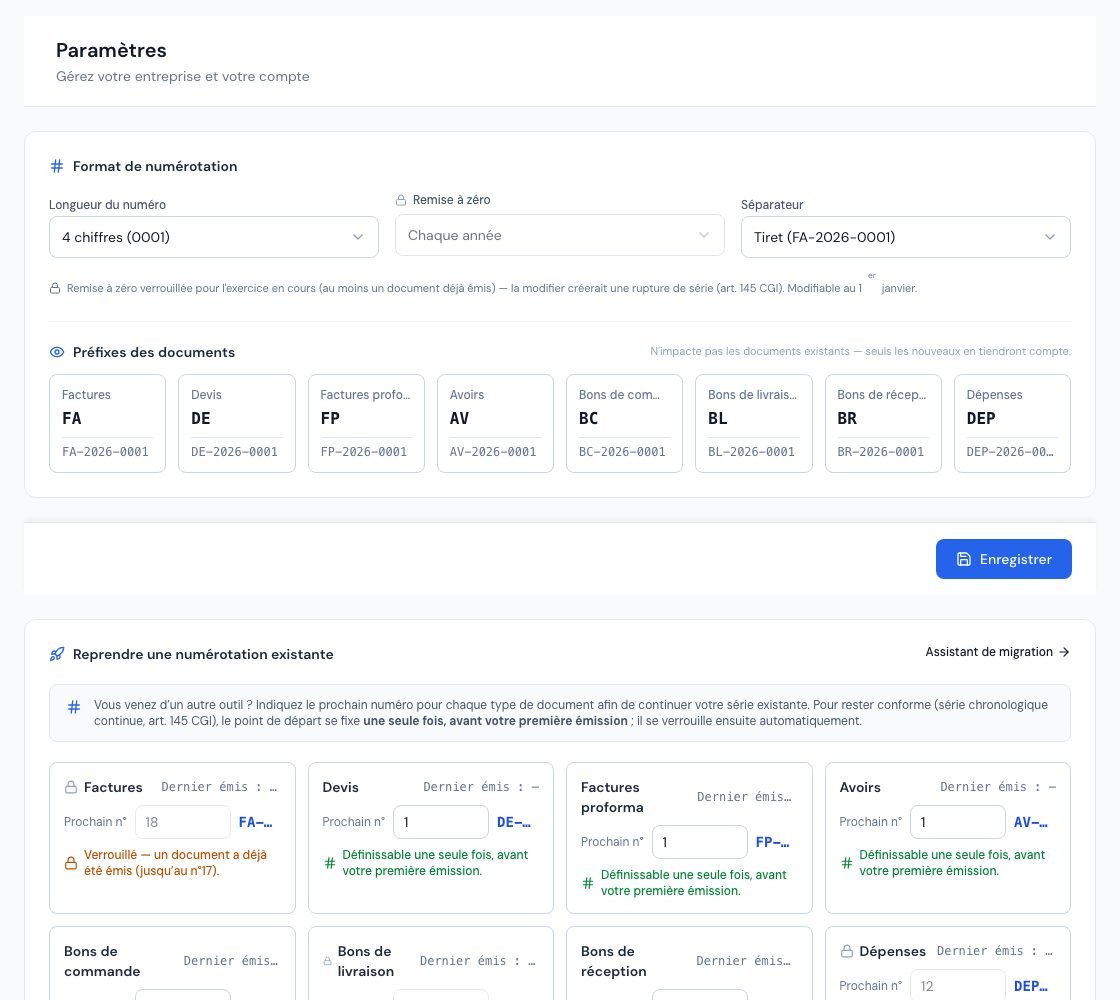 The « Numérotation » (Numbering) page with the document prefixes and the preview of the next number.
3. Why is the reset setting locked?
As soon as a document has been issued in the current year (in Billora or imported), the Remise à zéro (Reset) choice is greyed out with a padlock: « Remise à zéro verrouillée pour l'exercice en cours (au moins un document déjà émis) — la modifier créerait une rupture de série (art. 145 CGI). Modifiable au 1er janvier. » (Reset locked for the current year — at least one document already issued — changing it would break the series. Can be changed on 1 January.)
Changing the period mid-year would restart the counter at 1 in the middle of the financial year. To change it, do so at the start of the year, before issuing your first document of the year.
4. When does a document get its number?
- An invoice in draft has no number yet. It gets one when first issued (sent, or switched to the sent status) or when the first payment is recorded.
- The number is the next one in the counter of its type and period.
- An assigned number is never reused, even if the document is later cancelled: an issued invoice is corrected with a credit note, not renumbered (see Create a credit note).
- That is why an invoice that received its number but stayed as a draft (issued without being sent, failed sending, recurring invoice not sent, rejected by the DGI…) can no longer be deleted: it offers « Annuler » (Cancel) instead of « Supprimer » (Delete), and the cancelled invoice keeps its number.
5. Continue the numbering from previous software
The Reprendre une numérotation existante (Continue an existing numbering) card lets you set the next number for each document type, to continue the series of your previous tool.
- In the card, each type shows « Dernier émis : … » (Last issued) and a Prochain n° (Next no.) field, with a preview of the resulting number.
- Enter the next number for the types you want to continue (for example 88 for invoices).
- Optional: fill in Justification (for example « Ex. migration depuis Sage / dernière facture n°42 »). It is « Tracé dans le journal d'activité (utile en cas de contrôle) » (Recorded in the activity log — useful in case of an audit).
- Click Appliquer (Apply). The message « Numérotation reprise. » (Numbering carried over) confirms it.
The Assistant de migration (Migration assistant) link opens a guided version, « Reprendre ma numérotation » (Continue my numbering), with two choices:
- Importer mes anciennes factures (Import my old invoices): you import a CSV file (see Import your data from a file); the invoices keep their original numbers and the next number is pre-filled.
- Fixer seulement le prochain numéro (Only set the next number): without importing the history.
The starting point of a type is set before you issue your first document of that type; it then locks (« Verrouillé — un document a déjà été émis », Locked — a document has already been issued). If documents have been imported, the counter is also locked to keep the series continuous. If you try anyway, Billora replies: « Numérotation verrouillée : un document a déjà été émis. Le point de départ se fixe avant la première émission. » (Numbering locked: a document has already been issued. The starting point is set before the first issue.)
Carry-over is not offered while your account is in test mode: « La reprise de numérotation se définit une fois votre compte activé (mode réel). En mode test, les numéros sont réinitialisés au passage en réel. » (Numbering carry-over is set once your account is activated — live mode. In test mode, numbers are reset when switching to live.) Activate your account first (see Trial period and test mode).
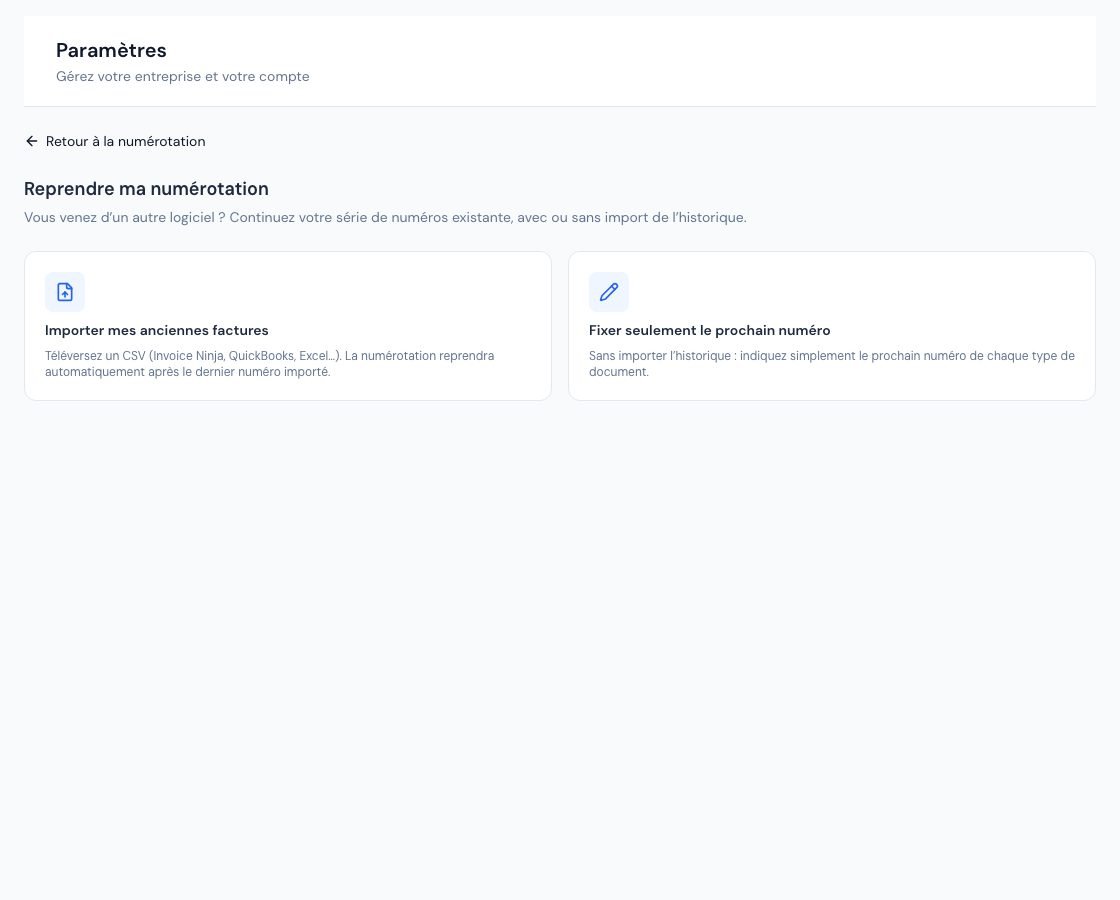 The « Reprendre ma numérotation » (Resume my numbering) page with the two ways to continue an existing series.
6. Who can change the numbering?
The owner and administrators. Collaborators and viewers see the page read-only. The external accountant has no access to settings. See Team roles and access.
Frequently asked questions
Can I renumber an invoice that has already been issued?
No. An assigned number is final and never reused. To correct an issued invoice, create a credit note.
My drafts have no number, is that normal?
Yes. An invoice gets its number when first issued: a draft without a number can be deleted without leaving a gap in the series. A draft that has already received a number, however, cannot be deleted: it is cancelled and keeps its number.
I can no longer change the « Prochain n° » (Next no.).
A document of this type has already been issued (or documents have been imported): the starting point is locked to keep the series continuous. This is intended.
How can I check that my series has no gaps?
Use the Sequence continuity report, which flags missing numbers.
Next steps
Related articles
Was this article helpful?
Invoice compliantly, effortlessly
DGI-compliant invoices, quotes, credit notes, VAT and supplier tracking in a single tool.
Try it free