Browse help
What is it for?
VAT (TVA, value-added tax) appears on almost all your documents. The TVA & Fiscalité (VAT & Taxation) setting tells Billora how your company is taxed: are you subject to VAT, when does VAT become due, and how often do you file it. These choices drive the VAT report and the return.
Example. Samira is an interior architect in Tangier. Her chartered accountant told her: "You are subject to VAT, on the cash-basis regime, with a quarterly return." She opens the setting and reproduces it as is: afterwards, her reports calculate VAT on payments actually received.
The regime and frequency result from your tax situation, not from a preference. Billora cannot guess them: confirm them with your chartered accountant before setting them.
1. Open the setting
- In the menu, click Paramètres (Settings).
- Open TVA & Fiscalité.
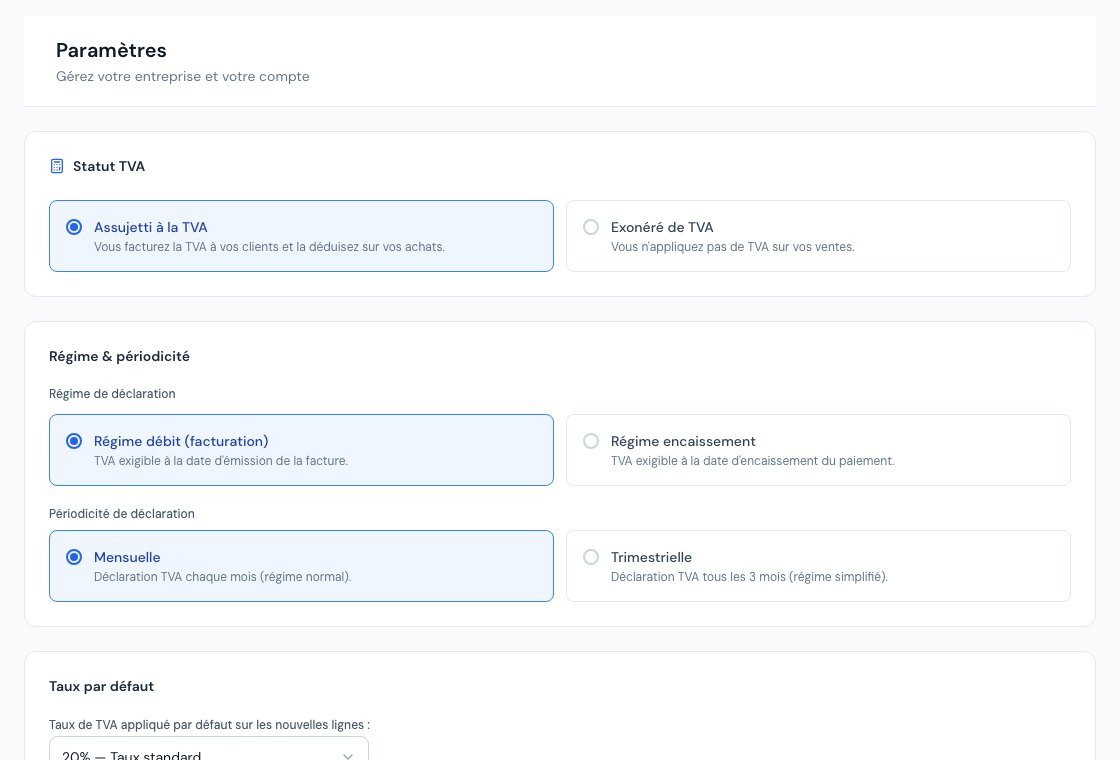 The VAT settings page.
This page is reserved for the owner and administrators: external accountants and viewers do not have access to company settings.
2. VAT status
In the Statut TVA (VAT status) block, choose one of the two cards:
- Assujetti à la TVA (Subject to VAT): "Vous facturez la TVA à vos clients et la déduisez sur vos achats." (You charge VAT to your clients and deduct it on your purchases.)
- Exonéré de TVA (Exempt from VAT): "Vous n'appliquez pas de TVA sur vos ventes." (You do not apply VAT on your sales.)
If you choose Exonéré, an orange box states: "En mode exonéré, aucune TVA ne sera calculée sur vos documents." (In exempt mode, no VAT will be calculated on your documents.) The next two blocks disappear. In the VAT report, all amounts are then zero and Billora refuses to record a return ("Entreprise exonérée de TVA" (Company exempt from VAT)).
3. Regime and frequency
The Régime & périodicité (Regime & frequency) block only appears for a company subject to VAT.
Filing regime
| Choice | What the screen says | Consequence in your reports |
|---|---|---|
| Régime débit (facturation) (Invoice-basis regime) | VAT due on the invoice issue date. | The VAT collected for a period is that of the invoices issued in the period, even if unpaid. Expenses count on their date. |
| Régime encaissement (Cash-basis regime) | VAT due on the date the payment is received. | VAT collected is calculated in proportion to the payments received in the period; deductible VAT, in proportion to the payments made. |
Filing frequency
- Mensuelle (Monthly): "Déclaration TVA chaque mois (régime normal)." (VAT return every month (normal regime).)
- Trimestrielle (Quarterly): "Déclaration TVA tous les 3 mois (régime simplifié)." (VAT return every 3 months (simplified regime).)
This frequency sets the period that Billora suggests in the VAT return and the annual tracking grid.
As soon as invoices have been transmitted to the DGI or payments have been declared, the two regime cards are greyed out and a blue box explains: "Le régime de TVA ne peut plus être modifié… Un changement de régime se prépare avec votre expert-comptable : contactez le support Billora." (The VAT regime can no longer be modified… A change of regime is prepared with your chartered accountant: contact Billora support.) The frequency remains editable.
4. Available rates
Billora offers the following rates (in the expense form, they are displayed with the label below; in document lines, simply "20%", "14%"…):
| Rate | Label displayed |
|---|---|
| 20% | Taux standard (Standard rate) |
| 14% | Taux intermédiaire (Intermediate rate) |
| 10% | Taux réduit (Reduced rate) |
| 7% | Taux super réduit (Super-reduced rate) |
| 0% | Zéro / Exonéré (Zero / Exempt) |
Which rate applies to which product or service? That is a matter of tax regulation: Billora does not choose for you, ask your accountant for advice.
The "Taux par défaut" (Default rate)
The Taux par défaut block (shown when you are "Assujetti à la TVA", i.e. subject to VAT) saves your usual rate ("Taux de TVA appliqué par défaut sur les nouvelles lignes :" — VAT rate applied by default on new lines). Here is exactly what it changes:
- Where? On the web and in the mobile app, every new line without a product on an invoice, quote, proforma invoice, credit note, purchase order or recurring invoice starts at this rate.
- Line linked to a product. As soon as you select a product, the line takes the rate from the product record, not the default rate. If you remove the product, the line goes back to the default rate.
- Rate already chosen. If you pick a rate on a free line and then type its name, the rate you picked is kept.
- Existing documents. Lines that are already saved do not change. A duplicated document, an invoice created from a quote, or a credit note created from an invoice keep the rates of the original document.
- No setting saved. As long as you have not saved anything, the default rate is 20%.
- CSV import. When importing invoices, quotes or purchase orders, a line whose VAT column is empty receives this default rate. An unrecognised value also receives this rate, and a warning appears in the import report.
If you are "Exonéré de TVA" (VAT-exempt), the Taux par défaut block is not displayed: new sales lines (invoices, quotes, proformas, credit notes, recurring invoices) start at 0%. Purchase orders, which concern your purchases, keep the saved default rate (20% if you have never saved one).
The setting is edited from the web; in the mobile app it is shown read-only. In all cases you can change a line's rate, and we advise you to check the rate of every line before issuing a document.
5. Save
Click Enregistrer (Save) at the bottom of the page. The message "Configuration TVA mise à jour." (VAT configuration updated.) confirms the change.
6. The breakdown by rate on your invoices
A document can mix several rates. The PDF then displays a Récapitulatif de la TVA (VAT summary) table with, for each rate, the Base and the VAT Montant (Amount), which is required on an invoice. Billora builds it from the rates of each line: make sure they are correct.
Frequently asked questions
Why do my new lines not start at 20%?
Because the "Taux par défaut" saved in Paramètres → TVA & Fiscalité applies to new lines without a product (for example 14% if that is the rate you chose). If you are "Exonéré de TVA", new sales lines start at 0%. A line linked to a product takes the rate from the product record. You can always change a line's rate.
I am a sole proprietor (auto-entrepreneur): what should I choose?
The choice depends on your actual tax status. If your accountant tells you that you are not subject to VAT, choose Exonéré de TVA; otherwise, Assujetti à la TVA.
Why can I no longer change regime?
Because invoices have already been transmitted to the DGI or payments declared: a change of regime is prepared with your chartered accountant and Billora support.
What does the frequency change?
The period that Billora suggests in the return and the annual tracking grid (months or quarters) follow the chosen frequency.
Are these figures legally binding?
No. Billora is not accounting software: the amounts are indicative and must be validated by your accountant.
Going further
Related articles
Was this article helpful?
Invoice compliantly, effortlessly
DGI-compliant invoices, quotes, credit notes, VAT and supplier tracking in a single tool.
Try it free