Browse help
A tax audit or your accountant does not look at random: they check that invoices carry the client's ICE, that numbering is continuous, that VAT (TVA) is consistent, and that expenses have their supporting document. The « Points d'attention » (Attention points) page does this pre-audit for you, automatically, and takes you straight to the document to fix.
This page flags what deserves a look; it does not certify the compliance of your accounting. Billora is not accounting software: have these points validated by your accountant.
1. Open the page
In the menu, group Comptabilité → Points d'attention (Accounting → Attention points). Choose the period to check (« Cette année » (This year) by default).
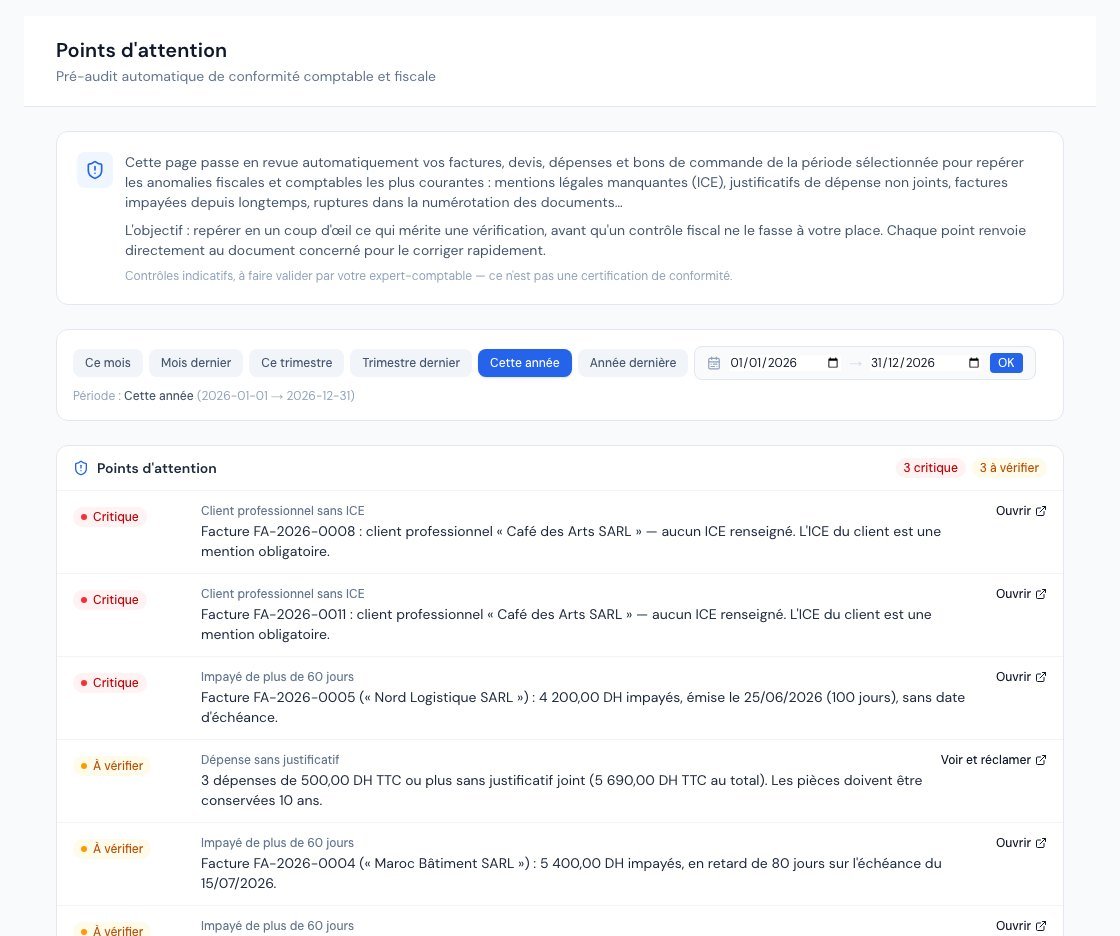 The Points d'attention (Attention points) page with alerts sorted by severity.
Each alert shows a severity badge, the type of check, a message in plain French, and a link (« Ouvrir » (Open), « Voir le rapport » (View the report) or « Voir et réclamer » (View and claim)) to the document or report concerned. Alerts are sorted from most to least serious:
- Critique (Critical): to fix first;
- À vérifier (To check): to examine;
- Information: good to know.
The page shows the first eight alerts; a button « Afficher les N autres points » (Show the N other points) unfolds the rest. When everything is in order: « Aucun point d'attention » (No attention points).
2. The six checks
| Check | What it detects | Severity |
|---|---|---|
| Rupture de séquence (Sequence break) | A gap in the numbering of invoices, credit notes or quotes (for example FA-2026-0007 then FA-2026-0009). See also the « Continuité de séquence » (Sequence continuity) report. | Critical (invoices, credit notes); Information (quotes) |
| Client professionnel sans ICE (Business client without ICE) | An invoice issued to a business client whose ICE is empty, incomplete (fewer or more than 15 digits) or made of zeros. The client's ICE is a mandatory mention. | Critical if empty; To check otherwise |
| Dépense sans justificatif (Expense without supporting document) | Expenses of 500 DH incl. VAT or more with no attachment, grouped into a single alert (number and total incl. VAT). The « Voir et réclamer » link opens the Justificatifs manquants (Missing receipts) page. | To check |
| TVA incohérente (Inconsistent VAT) | A rate outside the Moroccan scale (20, 14, 10, 7, 0%), VAT that does not match base × rate, totals (excl. VAT + VAT) that do not add up to the total incl. VAT, or VAT charged by an exempt company. | To check; Critical for an out-of-scale rate on an invoice or credit note, and for VAT charged by an exempt company |
| Impayé de plus de 60 jours (Unpaid for more than 60 days) | An open invoice more than 60 days past its due date (or issued more than 60 days ago if it has no due date). Same definitions as the aged balance. | To check; Critical beyond 90 days |
| Écart avec la déclaration de TVA (Gap with the VAT return) | A recorded VAT return whose amounts differ from the VAT recalculated from your journals: documents may have been modified since it was filed. | To check; Critical from a 100 DH gap |
- For each type of check, only the most serious alerts are listed (50 at most). A message says so, with the total number of points.
- Unpaid invoices are assessed as of today's date, whatever the chosen period.
- A 15-digit ICE whose check key is wrong is not flagged here.
3. What to do about an alert?
- Click the alert's link: you land directly on the invoice, expense or report concerned.
- Fix it: add the client's ICE to their record, attach the supporting document, follow up with the late client…
- Go back to the page: the alert has disappeared.
Some fixes are not possible: a numbering gap, for example, cannot be "repaired", because an assigned number is never reused. Keep a written explanation (cancelled document, test…) to show your accountant.
Frequently asked questions
Who can see this page?
All team members, accountant included. It is read-only: nothing is corrected directly there, you follow the links.
Why don't my expenses under 500 DH appear?
The 500 DH incl. VAT threshold is the alert threshold. To see all expenses without a document, whatever their amount, open the Justificatifs manquants (Missing receipts) page and uncheck « ≥ 500 DH ».
I corrected an invoice but the alert remains.
Reload the page. For VAT, check that the correction was actually saved (an invoice that has already been sent cannot be edited: use a credit note).
Next steps
Related articles
Was this article helpful?
Invoice compliantly, effortlessly
DGI-compliant invoices, quotes, credit notes, VAT and supplier tracking in a single tool.
Try it free