Download your invoices, credit notes and purchase orders (PDF + CSV) as one ZIP archive for your accountant, or the DGI-validated originals (signed UBL, QR codes, audit manifest) for a tax audit.
Browse help
What is the tax export for?
The General Tax Code requires you to keep your documents for ten years. The tax export gathers the documents of a period into a single ZIP archive: either for your accountant (PDFs and CSV tables), or for the tax administration (DGI-validated originals with their integrity proofs).
Example. Salma, who heads a communications agency in Rabat, is closing her financial year. She chooses « Documents comptables » (Accounting documents), clicks « Année précédente » (Previous year) then « Télécharger l'archive ZIP » (Download the ZIP archive), and sends the file to her accounting firm in Fez.
Menu Rapports (Reports), section « Fiscal & conformité » (Tax & compliance), card « Export fiscal (Art. 211 CGI) » (Tax export). Every team member can download the archive, external accountant included.
1. Why is the export locked for me?
The tax export is part of the Electronic invoicing feature. Depending on your subscription, it may not be included: the page then shows « Cette fonctionnalité est disponible à partir du plan … » (This feature is available from the … plan; the plan name is read automatically), or « Cette fonctionnalité n'est pas disponible sur votre abonnement actuel. » (This feature is not available on your current subscription.) if no plan offers it. In test mode, it is open.
The « Contrôle fiscal DGI » (DGI tax audit) mode also requires your invoices to have been validated by the DGI: see Activate electronic invoicing.
2. How do I download the archive?
- Under « Pourquoi avez-vous besoin de cet export ? » (Why do you need this export?), choose « Documents comptables » (Accounting documents) or « Contrôle fiscal DGI » (DGI tax audit).
The « Contenu du ZIP » (ZIP contents) block immediately lists what the archive will contain. - In the « Période » (Period) block, click a shortcut (« Cette année » (This year), « Année précédente » (Previous year), « Ce trimestre » (This quarter), « Ce mois » (This month)) or enter a « Date de début » (Start date) and a « Date de fin » (End date).
- Click « Télécharger l'archive ZIP » (Download the ZIP archive).
The button shows « Génération en cours… » (Generating…): PDFs are produced one by one, which can take a while over a long period. The file is named, for example, export-documents-2026-01-01-2026-12-31.zip.
The button stays greyed out as long as the start date is after the end date. Each download is recorded in the activity log (« Archive fiscale exportée (ZIP) », Tax archive exported). The export does not change any document and sends no e-mail.
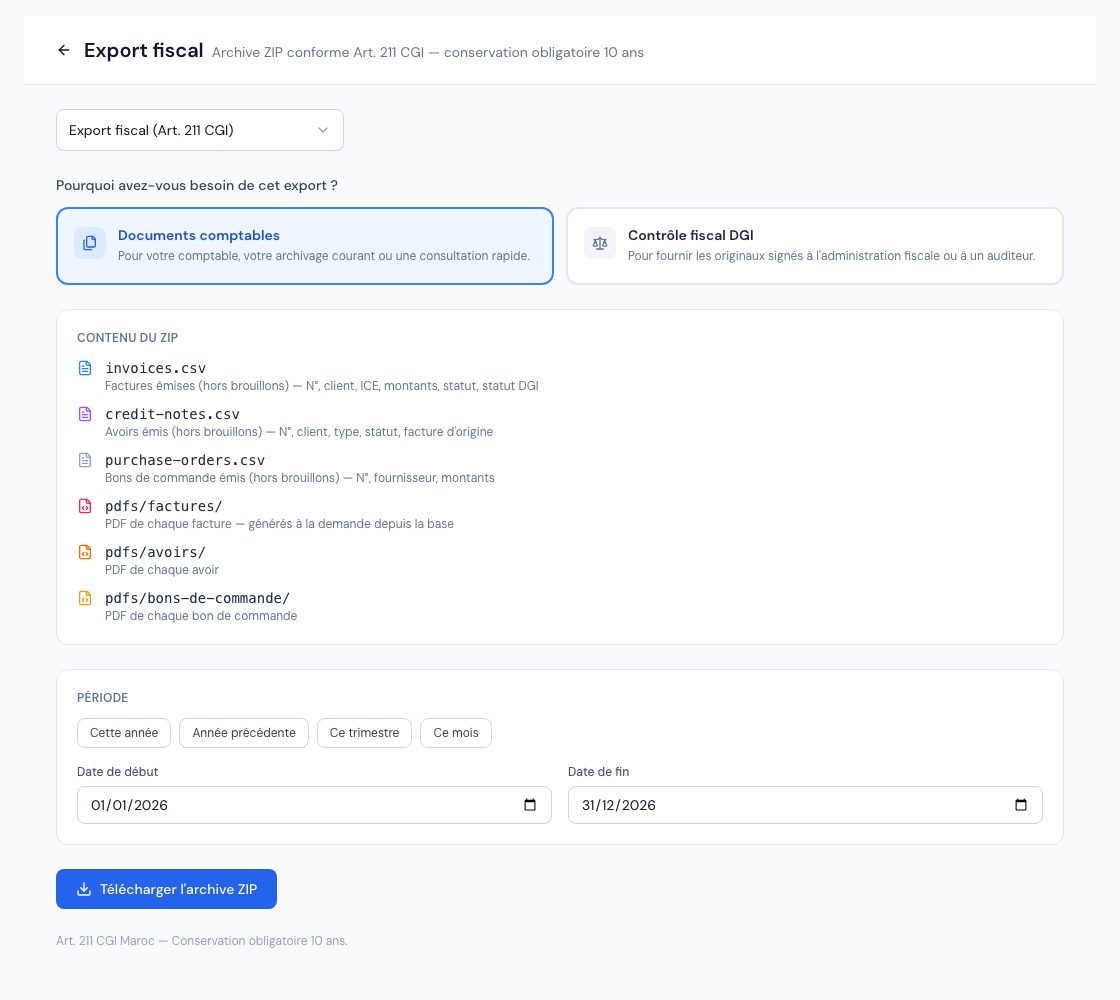 The « Export fiscal » (Tax export) page with the two archives to download.
3. What does the « Documents comptables » archive contain?
It includes the issued invoices and credit notes whose issue date is within the period, and the issued purchase orders according to their order date. Drafts and documents without a number are not exported: they are not accounting documents. Cancelled documents, on the other hand, are included, with their status.
- invoices.csv: one row per invoice (N° Facture, Client, ICE Client, issue, due and payment dates, Statut, Total HT, Total TVA, Total TTC, Montant Payé, Solde, Statut DGI, Archive DGI).
- credit-notes.csv: one row per credit note (N° Avoir, Client, Date Émission, Type, Statut, totals, Montant Utilisé, Statut DGI, Archive DGI, Facture d'origine).
- purchase-orders.csv: one row per purchase order (N° Bon de commande, Fournisseur, Date Émission, Statut, totals).
- pdfs/factures/, pdfs/avoirs/, pdfs/bons-de-commande/: the PDF of each document, generated at export time (files FAC-…, AV-…, BDC-…).
The CSV files use the semicolon as separator. The « Statut » and « Type » columns are in French, as on screen: for example « Payé » (Paid), « Partiel » (Partial), « En retard » (Overdue), « Annulé » (Cancelled) for a status, « Annulation totale » (Full cancellation) or « Remise / Geste commercial » (Discount / Goodwill gesture) for a credit note type. An invoice past its due date with a balance to pay appears as « En retard », as in the invoice list.
4. What does the « Contrôle fiscal DGI » archive contain?
It only includes the invoices and credit notes of the period validated by the DGI. If there are none, the export stops with the message « Aucune facture ou avoir validé DGI sur cette période. » (No DGI-validated invoice or credit note for this period.)
- pdfs/factures/ and pdfs/avoirs/: a single PDF per document (FAC-…pdf, AV-…pdf): the copy archived at DGI validation when it exists, otherwise a PDF generated at export time.
- ubl/: the signed UBL XML files, as archived at DGI validation (UBL-….xml).
- qr-codes/: the QR codes in PNG format (QR-….png).
- archive-manifest.json: the audit manifest, one entry per document.
Billora does not recreate any UBL or QR code at export time: it uses those kept in its archive storage (called « R2 » on screen). A document whose UBL was not found remains listed in the manifest with ublSource: "absent". Report it to support before handing the archive to an inspector.
For each document, the manifest gives: type (facture or avoir, i.e. invoice or credit note), numero, archiveRef (identifier assigned by the DGI), validatedAt (validation date), integrityHash (invoices) and ublHash (integrity fingerprints), ublSource (« r2 » or « absent »), pdfSource (origin of the PDF: « archive » for the archived copy, « generated » for a PDF generated at export, « missing » if it could not be produced), qrPresent, retentionExpiresAt (end of the retention period) and, for a credit note, factureRef (the original invoice).
5. How long must these documents be kept?
The page reminds you: « Art. 211 CGI Maroc — Conservation obligatoire 10 ans » (Art. 211 of the Moroccan General Tax Code — mandatory 10-year retention). For a DGI-validated document, Billora sets the end of retention at 31 December of the issue year + 10 years: an invoice dated 15 March 2026 must be kept until 31 December 2036. This is the retentionExpiresAt date of the manifest.
Download the archive at each year-end closing and store it safely, in addition to your Billora account. Retention periods and terms are to be validated by your accountant.
Frequently asked questions
Which mode should I choose for my accountant?
« Documents comptables »: they receive the PDFs and CSV tables for the whole period. « Contrôle fiscal DGI » is used to hand the signed originals to the tax administration or an auditor.
Are drafts included in the « Documents comptables » archive?
No. Only issued, numbered documents are exported. Cancelled invoices, however, are in the archive with the status « Annulé » (Cancelled) or « Annulée (avoir) » (Cancelled by credit note).
Is the PDF of an invoice in the « Contrôle fiscal DGI » archive the original?
It is the copy archived at DGI validation when it exists; otherwise, a PDF generated at export time. The manifest's pdfSource field tells you which (« archive » or « generated »). In an audit, the archived copy and the signed UBL are the reference.
Can I export my clients, products or payments here?
No: this export covers invoices, credit notes and purchase orders. For a full copy of your account, see Export your data.
Next steps
Related articles
Was this article helpful?
Invoice compliantly, effortlessly
DGI-compliant invoices, quotes, credit notes, VAT and supplier tracking in a single tool.
Try it free