Browse help
What is the Product margins report for?
An item that sells a lot does not necessarily earn a lot. This report calculates, for each item sold, the margin: the selling price excl. VAT minus the purchase price excl. VAT. You can see what really makes money for your business.
Example. Hicham runs a hardware store in Fez. His drills bring in his largest revenue, but the report shows him a margin rate of 12%, against 45% for screws and bolts. He decides to highlight screws and bolts in his quotes.
Menu Rapports → Marges par article (Reports → Product margins), in the « Produits » (Products) section of the reports overview. This report depends on your subscription, with the same right as the profitability report: if it is not included, it does not appear in the submenu, its card in Rapports → Vue d'ensemble (Reports → Overview) shows a padlock with the name of the plan that offers it, and the page shows « Disponible à partir du plan … » (Available from the … plan) and a « Voir les plans disponibles » (See available plans) button. All team roles can view it, including the external accountant in read-only mode.
1. How is the margin calculated?
For each invoice line linked to a catalogue item:
- Sale excl. VAT = the line total excl. VAT (line discount already applied), reduced by its share of the document's global discount, spread pro rata across the lines.
- Purchase cost = quantity × the « Prix d'achat HT » (Purchase price excl. VAT) entered in the item's record.
- Margin = sale excl. VAT − purchase cost.
- Margin rate = margin ÷ sale excl. VAT, in %. It only covers sales whose purchase price is known.
All amounts are in dirhams excluding VAT: no VAT appears in this report.
The purchase price is not recorded on invoice lines: Billora uses the one in the item record at the moment you open the report. If you change a purchase price, the margin of past sales changes too. The page reminds you: « Le prix d'achat utilisé est celui de la fiche article aujourd'hui : s'il change, la marge des ventes passées change aussi. » (The purchase price used is the one in the item record today: if it changes, the margin of past sales changes too.)
2. Which sales are taken into account?
- The lines of issued invoices whose issue date falls within the period: drafts and cancelled invoices are excluded.
- Valid credit notes issued in the period are deducted (quantity, sale and cost as negatives), on the credit note's issue date. An invoice cancelled by a credit note therefore stays in its period, and the credit note offsets it on its own date.
- Comment lines are ignored.
- Free lines (entered without choosing an item) and items without a purchase price have no margin: their revenue is counted separately, in the « Sans prix d'achat » (Without purchase price) column.
3. Reading the report
- Choose the period at the top of the page: « Ce mois » (This month), « Mois dernier » (Last month), « Ce trimestre » (This quarter), « Trimestre dernier » (Last quarter), « Cette année » (This year, the default), « Année dernière » (Last year) or « Personnalisé » (Custom).
The subtitle recalls the period and its exact dates. - Read the four cards: « Ventes HT » (Sales excl. VAT, net of credit notes and discounts), « Coût d'achat » (Purchase cost, items with a purchase price), « Marge » (Margin, on sales with a purchase price) and « Taux de marge » (Margin rate, margin / sales with a purchase price).
- Choose the grouping with the « Article » (Item), « Famille » (Family) or « Marque » (Brand) tabs.
- Read the table: Qté (Qty), Ventes HT (Sales excl. VAT), Coût d'achat (Purchase cost), Marge (Margin), Taux (Rate) and Sans prix d'achat (Without purchase price). A positive margin is shown in green, a negative margin in red; « — » means the margin cannot be calculated.
Rows are sorted by decreasing margin. Those whose margin is unknown (no purchase price) come last, by decreasing revenue. In the « Article » view, the table shows at most 300 items: a message then tells you how many are shown out of the total, and the CSV export contains them all.
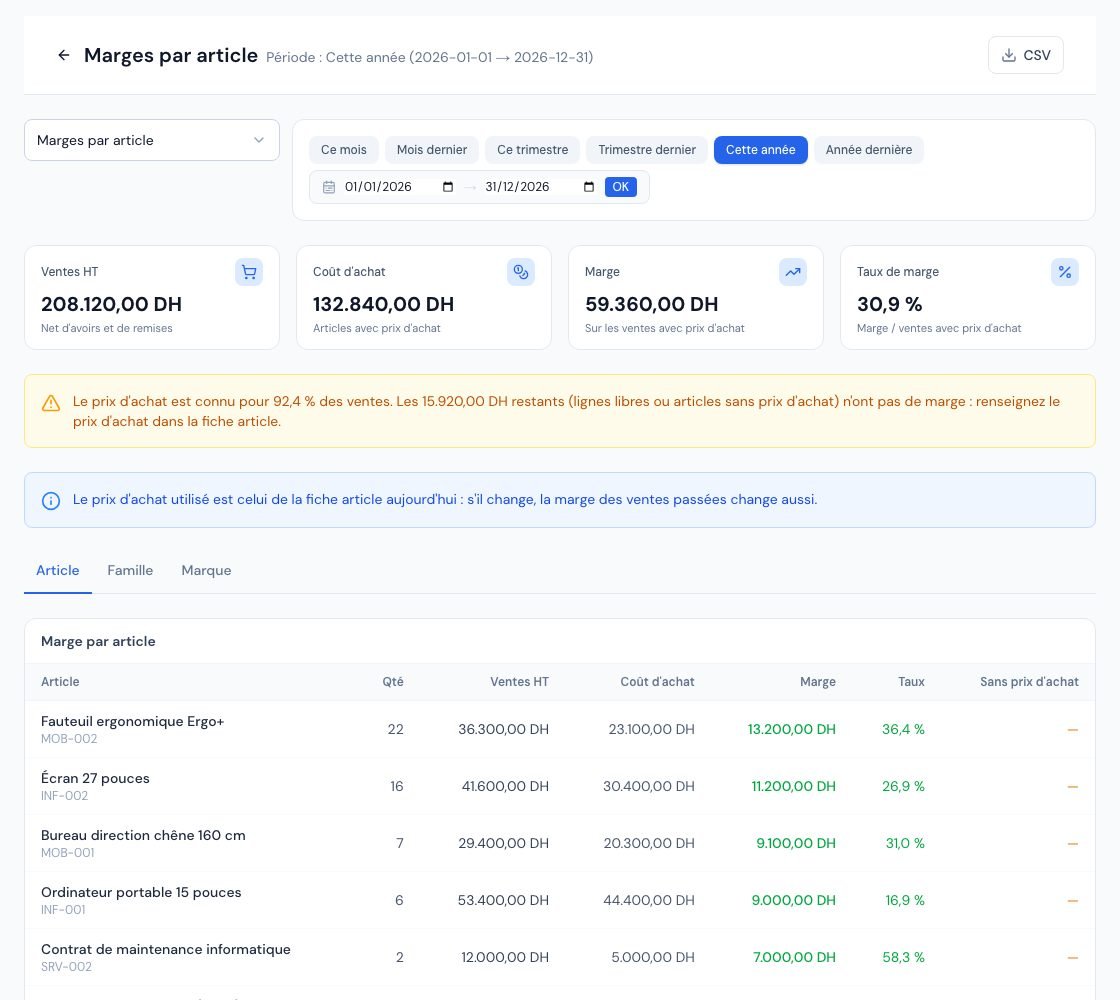 The « Marges par article » (Margins by item) report with the summary cards and the margin table.
4. Item, family or brand: where do the groupings come from?
| Tab | Grouping | "Catch-all" row |
|---|---|---|
| Article (Item) | Each catalogue item (with its code if it has one). | « Lignes libres (sans article) » (Free lines, without item) |
| Famille (Family) | The « Catégorie » (Category) field of the item record. | « Sans famille » (No family) |
| Marque (Brand) | The « Marque / Fabricant » (Brand / Manufacturer) field of the item record. "Bosch", "bosch" and "BOSCH" form a single brand (ignoring capital letters, accents and extra spaces). | « Sans marque » (No brand) |
The grouping follows the current item record: if you change an item's category or brand, its past sales change group.
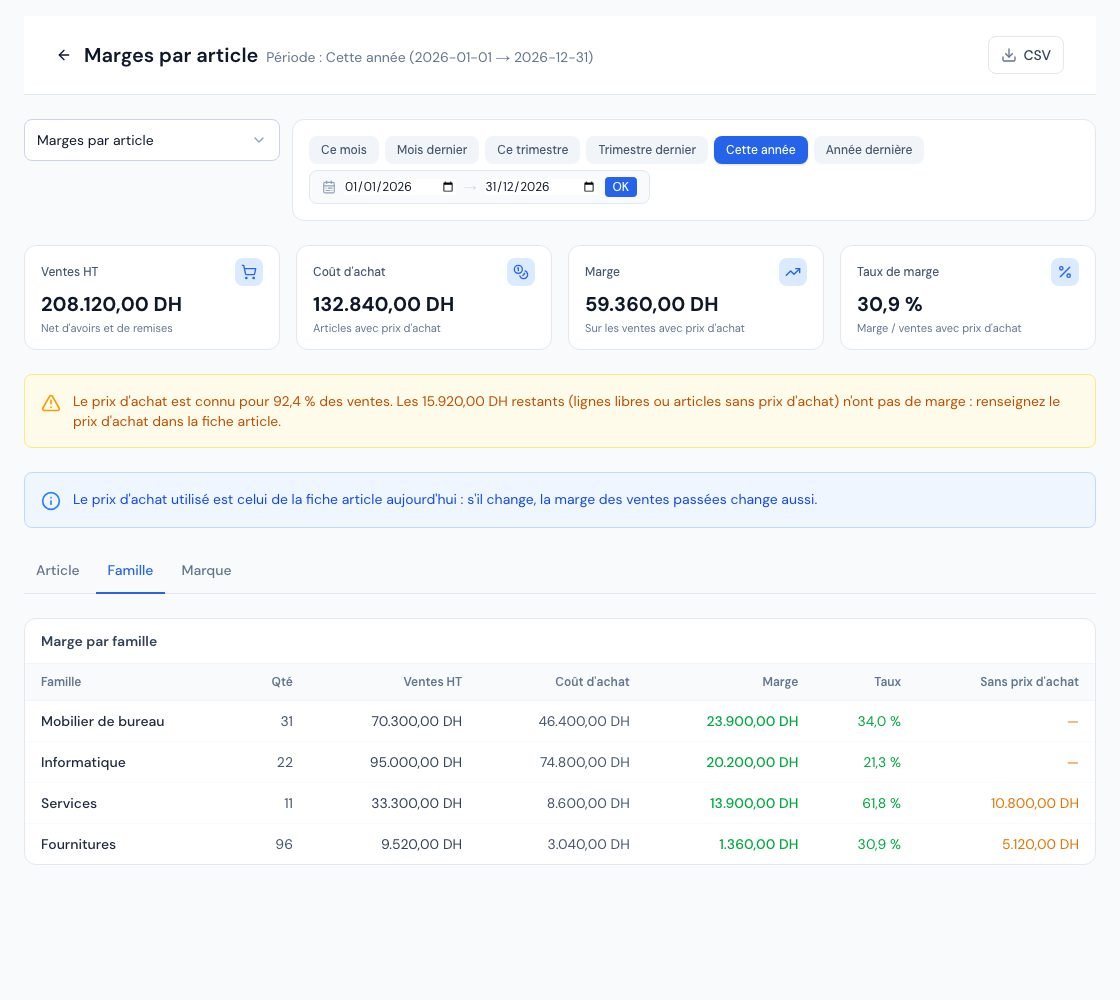 The « Marges par article » (Margins by item) report grouped by « Famille » (Family).
5. What to do about the message « Le prix d'achat est connu pour … des ventes »?
When part of the sales has no purchase price, an orange banner says so (« Le prix d'achat est connu pour … des ventes », The purchase price is known for … of sales) with the amount concerned. The margin rate then only covers the known part.
- Go to the « Article » tab and spot the amounts in the « Sans prix d'achat » column.
- Open each item concerned in the catalogue and fill in the « Prix d'achat HT » field (see Create your products and services).
- Come back to the report: the margin is recalculated immediately, including on past sales.
For free lines, there is no record to complete: choose a catalogue item in your next invoices if you want to track their margin.
6. Exporting the report
The « CSV » button, at the top right, downloads the displayed grouping (item, family or brand) with all its rows: quantity, sales excl. VAT, purchase cost, margin, margin rate and sales without a purchase price, in dirhams. The file opens directly in Excel. This report does not offer a PDF or Excel export.
Frequently asked questions
Why does an item show a negative margin?
The net selling price (after line discounts and global discount) is lower than quantity × purchase price. Check the purchase price in the record, the discounts granted, or a credit note issued in the period without a matching sale.
Is a purchase price of 0 treated as "without purchase price"?
No. A purchase price of 0 is a known price: the margin is then 100% of the sale. Leave the field empty if you do not know the purchase price.
Why does the page say « Aucune vente sur cette période »?
« Aucune vente sur cette période » (No sales in this period): margins are calculated from the lines of issued invoices, excluding drafts and cancelled invoices. Choose another period or issue your invoices first.
Does this report replace my accounting?
No. It is a sales management tool based on the purchase price in your item records, not on your accounting cost price. Have any profitability analysis validated by your accountant.
Next steps
Related articles
Was this article helpful?
Invoice compliantly, effortlessly
DGI-compliant invoices, quotes, credit notes, VAT and supplier tracking in a single tool.
Try it free