Browse help
To work faster, Billora offers a command palette and keyboard shortcuts. They never trigger while you are typing text, or when a window is open.
1. The command palette
Ctrl+K (⌘+K on Mac) opens the palette: type the name of a customer, an invoice, a quote… or an action (« Nouvelle facture » (New invoice), « Registre des chèques » (Cheque register)). It also shows the shortcut for each action.
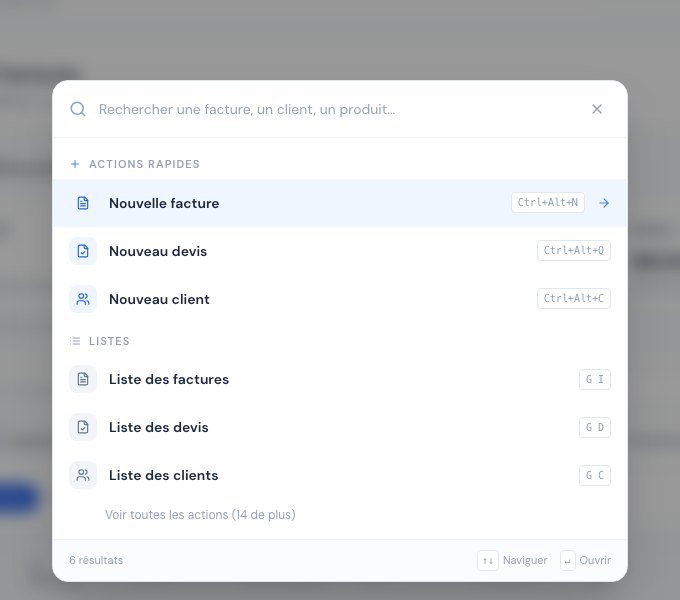 The command palette: each action shows its shortcut on the right.
2. Create: Ctrl + Alt + letter
| Shortcut | Action |
|---|---|
| Ctrl+Alt+N | New invoice |
| Ctrl+Alt+Q | New quote |
| Ctrl+Alt+A | New credit note |
| Ctrl+Alt+O | New purchase order |
| Ctrl+Alt+E | New expense |
| Ctrl+Alt+C | New customer |
| Ctrl+Alt+F | New supplier |
| Ctrl+Alt+P | New product |
On Mac, use ⌘+Option. The classic Ctrl+N shortcut is not used: it is reserved by your browser.
3. Navigate: G then letter
Press G, release, then (within a second) press the letter of the page:
| Keys | Page | Keys | Page |
|---|---|---|---|
| G I | Invoices | G F | Suppliers |
| G D | Quotes | G P | Products |
| G A | Credit notes | G H | Cheque register |
| G O | Purchase orders | G B | Bank deposits |
| G L | Delivery notes | G R | Collections |
| G E | Expenses | G M | Payment promises |
| G C | Customers | G T | Dashboard |
The shortcuts to the cheque register, bank deposits and collections lead to the "available from the plan…" screen if the feature is not included in your subscription.
Related articles
Was this article helpful?
Invoice compliantly, effortlessly
DGI-compliant invoices, quotes, credit notes, VAT and supplier tracking in a single tool.
Try it free