Browse help
What is the Unsold items report for?
An item that does not sell ties up money (its stock) and clutters your catalogue. This report lists the active items with no sales over the chosen period, with their stock and the corresponding tied-up value.
Example. Youssef runs a car parts shop in Agadir. Over the year, the report flags 14 unsold items, 6 of them still in stock for a value of 18,400 DH. He decides to offer them on promotion before restocking.
Menu Rapports → Articles invendus (Reports → Unsold items). This report depends on your subscription, with the same right as the Products & services report: if it is not included, it does not appear in the submenu, its card in Rapports → Vue d'ensemble (Reports → Overview) shows a padlock with the name of the plan that offers it, and the page shows « Disponible à partir du plan … » (Available from the … plan) and a « Voir les plans disponibles » (See available plans) button. It does not appear in the external accountant's menus.
1. What is an "unsold" item?
An active catalogue item is unsold when its net quantity sold over the period is not positive:
- we add up the quantities of issued invoices in the period (excluding drafts and cancelled invoices);
- we subtract the quantities of valid credit notes issued in the period.
Consequences: an item sold and then fully taken back by a credit note is unsold; an item whose only transaction in the period is a credit note (on an older sale) is unsold too. Deactivated items are never listed. Only lines linked to a catalogue item count: a free line bearing the same name is not a sale of the item.
2. Reading the report
- Choose the period (« Cette année », This year, by default). The shorter the period, the longer the list.
- Filter with the « Tous les articles » (All items), « Produits » (Products) or « Services » tabs.
- Read the four cards, then the « Articles sans vente sur la période » (Items with no sales in the period) table.
| Card | What it means |
|---|---|
| Articles invendus (Unsold items) | The number of unsold items, and their share among active items (according to the chosen tab). |
| Jamais vendus (Never sold) | Unsold items that have never appeared on an issued invoice. |
| Invendus en stock (Unsold in stock) | Unsold items whose stock tracking is enabled and whose stock is positive. |
| Valeur immobilisée (Tied-up value) | The sum, for these items, of stock × purchase price. |
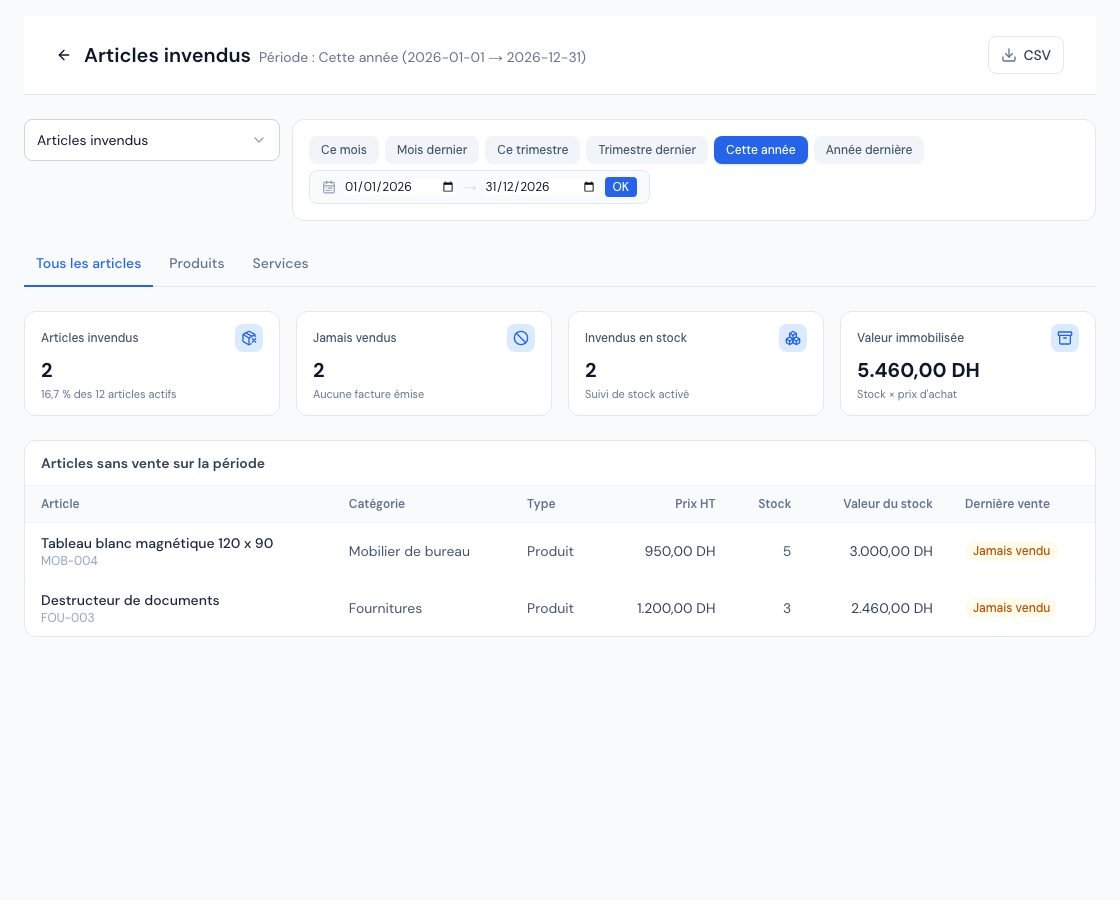 The « Articles invendus » (Unsold items) report with the list of items not sold during the period.
3. The table columns
- Article (Item, with its code), Catégorie (Category), Type (Produit or Service) and Prix HT (Price excl. VAT: selling price from the record).
- Stock: the stock available today, shown only if the « Suivre le stock de ce produit » (Track this product's stock) option is enabled in the record (depending on your subscription). Otherwise « — ».
- Valeur du stock (Stock value): stock × « Prix d'achat HT » (Purchase price excl. VAT) from the record, only if the stock is positive and the purchase price is filled in.
- Dernière vente (Last sale): the date of the last issued invoice containing the item, up to the end of the period (so it can be before the period), or the « Jamais vendu » (Never sold) tag.
The table is sorted by decreasing stock value, then by stock, then alphabetically: the most tied-up capital appears first. It shows at most 500 items; beyond that, a message says so and the CSV export contains all unsold items.
If unsold items in stock have no purchase price, a banner says so: « … n'ont pas de prix d'achat : leur valeur n'est pas comptée dans la valeur immobilisée. » (… have no purchase price: their value is not counted in the tied-up value.) Fill in the « Prix d'achat HT » field of these records for an accurate value. This value is a management indicator, not an accounting valuation of your stock.
4. What to do with unsold items?
- Start at the top of the table: these are the items that tie up the most money.
- For an item that is still useful, offer it to your clients (discount, bundled quote) or avoid restocking it.
- For a discontinued item, deactivate it in the catalogue: inactive items do not appear in this report, and your already issued invoices are not changed (see Create your products and services).
5. Exporting the list
The « CSV » button downloads all unsold items of the chosen tab, with: item, code, category, type, selling price excl. VAT, stock, stock value and last sale (or « Jamais vendu »). This report does not offer a PDF or Excel export.
Frequently asked questions
Why does the page show « Aucun article actif »?
« Aucun article actif » (No active items): your catalogue contains no active item of the chosen type. Create products or services in the catalogue to track their sales, or switch tabs.
A service sold through a free line appears as unsold.
The report only recognises lines linked to a catalogue item. Choose the item from the list when creating your invoices.
Is the stock shown the one at the end of the period?
No, it is the current stock of the item record, whatever the period chosen.
What does « Tous vos articles actifs ont été vendus sur cette période » mean?
(All your active items were sold in this period.) No item is unsold: each active item has at least one positive net sale in the period.
Next steps
Related articles
Was this article helpful?
Invoice compliantly, effortlessly
DGI-compliant invoices, quotes, credit notes, VAT and supplier tracking in a single tool.
Try it free