Browse help
Chasing payments case by case is no longer enough when several customers are late. Collections (recouvrement) groups, for each debtor customer, their unpaid invoices, the history of your actions and the reminder level to apply.
Menu Paiements → Recouvrement (Payments → Collections). It is part of the advanced reminders of your subscription: if it is not, the screen indicates the plan that includes it. The rules are configured in Paramètres → Recouvrement (Settings → Collections).
1. One file per customer
As soon as a customer has an unpaid invoice, their file appears (it is created when the page is opened). The file is automatically resolved when all its invoices are settled. You can also create a file by hand with Créer une relance (Create a reminder).
2. The three levels
A file's level depends on how late the customer's oldest unpaid invoice is. By default:
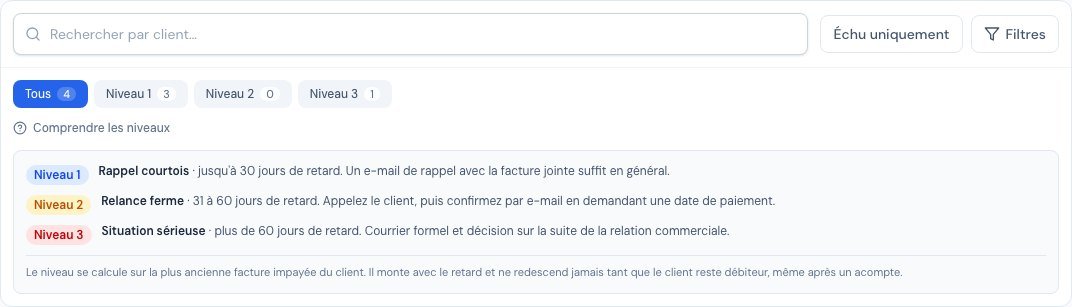 The « Comprendre les niveaux » (Understanding the levels) legend: the tone, the lateness and the advice for each level, with your own thresholds.
| Level | Tone | Lateness (default) |
|---|---|---|
| Niveau 1 (Level 1) | Courteous reminder | up to 30 days |
| Niveau 2 (Level 2) | Firm reminder | 31 to 60 days |
| Niveau 3 (Level 3) | Serious situation | more than 60 days |
Hover over a "Niveau X" badge to see its meaning, or click Comprendre les niveaux below the filters: the legend shows the lateness thresholds of your company.
In Paramètres → Recouvrement, each level 2 and level 3 rule has a field Passe à ce niveau après (jours de retard) (Moves to this level after (days late)): set 15 and 45 if your customers pay quickly, 60 and 120 if your cycles are long. The level 3 threshold must stay higher than the level 2 threshold; a « Règles par défaut » (Default rules) button restores 30 and 60 days. A modified threshold applies to future files and never moves an already-escalated file back down.
As long as the customer remains in debt, their level can only rise or stay stable, even if they pay part of the debt. A resolved file that becomes indebted again restarts at the level matching its current lateness.
3. The list of files
Summary cards (total receivables, files to handle, customers concerned, overdue invoices, invoices to chase), search by customer, level badges with counters, an Échu uniquement (Overdue only) button, Responsable (Person in charge) and Statut du dossier (File status) filters, and sorting by column.
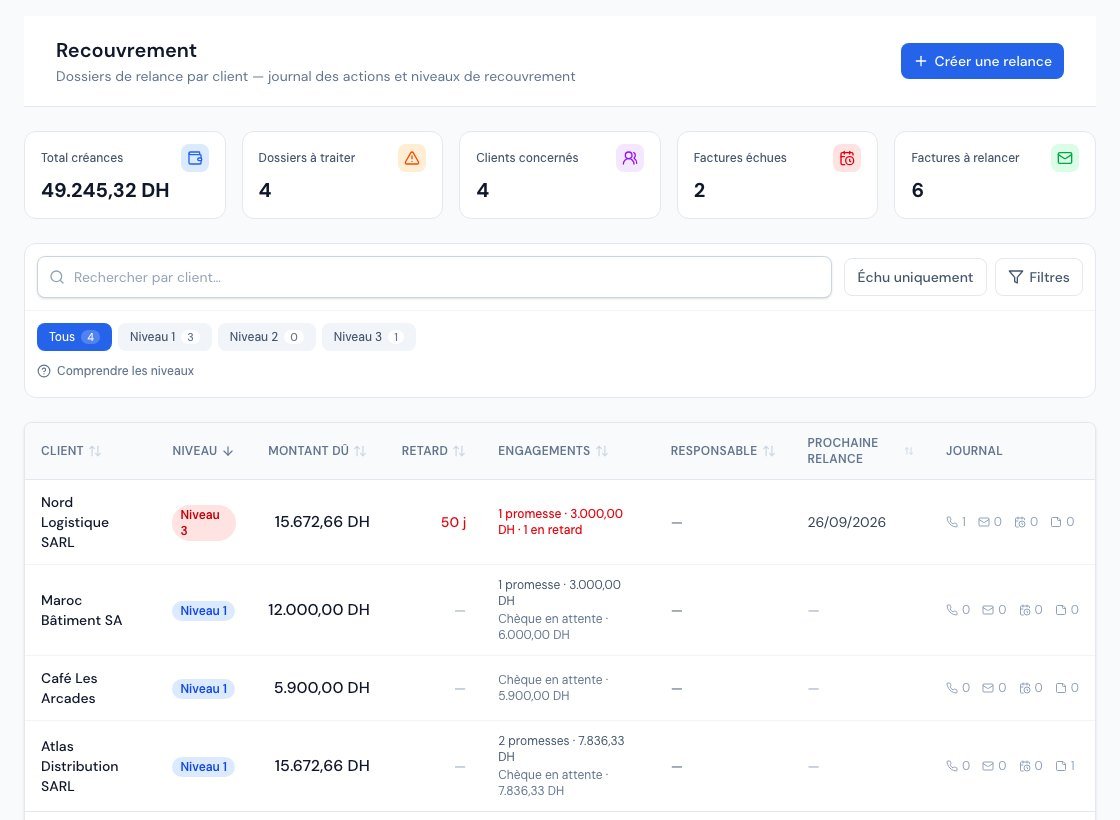 The list of files: level, amount due, lateness, commitments (payment promises and pending cheques), person in charge and next reminder.
The Engagements (Commitments) column avoids unnecessary reminders: it shows the customer's current payment promises (and how many are overdue) as well as their cheques awaiting collection.
4. A customer's file
Click a row to open the file:
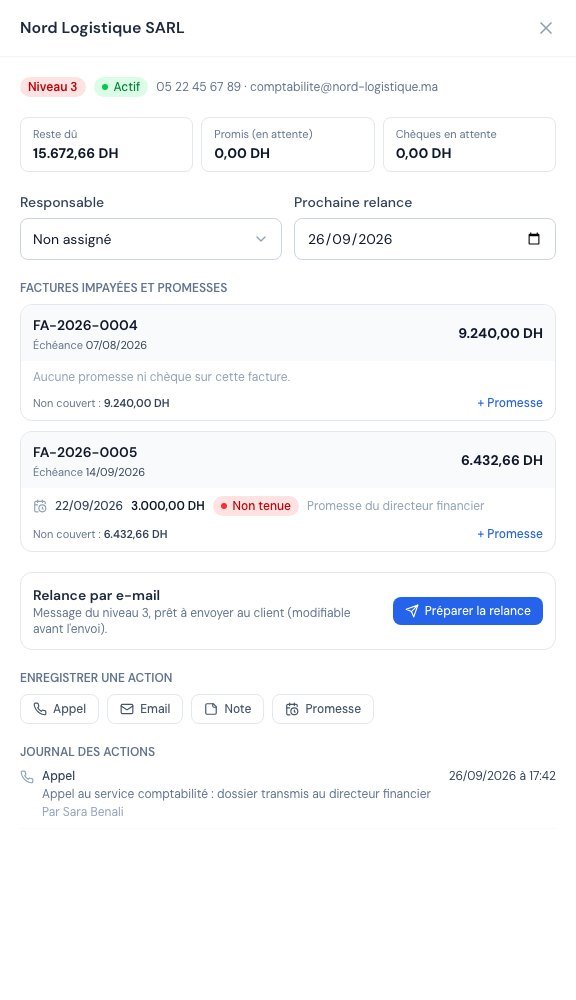 A customer's file: summary, person in charge, unpaid invoices with the detail of each promise, and action log.
- the person in charge of follow-up and the planned next reminder;
- the customer's unpaid invoices (clickable);
- the log: record a call, an email or a note, or a promise — the latter creates a real payment promise attached to the invoice, subject to the same balance cap;
- the complete history of actions, with their author.
The drawer closes with the cross or the Esc key.
5. Send the reminder by email
In the file, the Relance par e-mail (Email reminder) block prepares the message for the file's level:
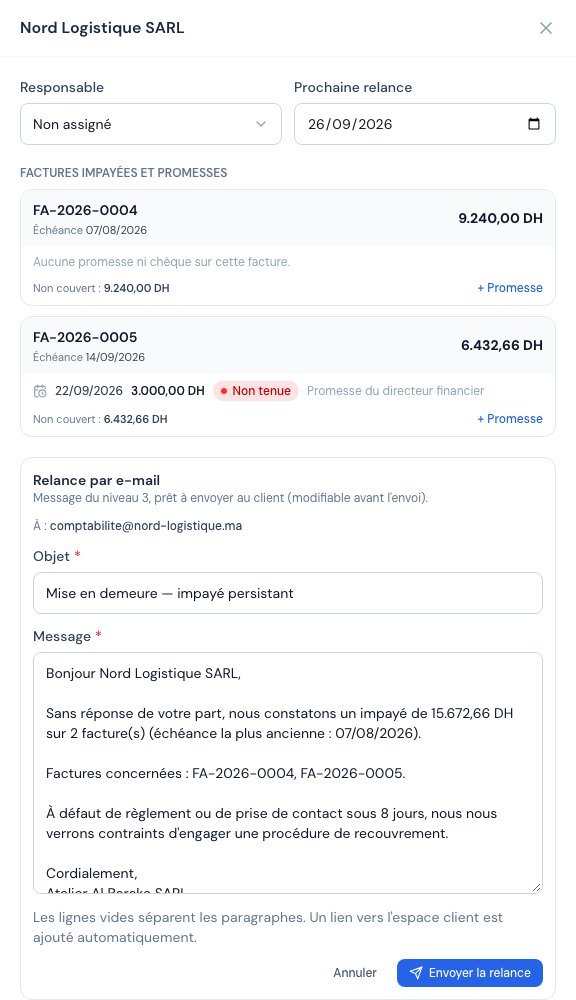 « Préparer la relance » (Prepare the reminder) fills in the subject and message for the level; you review, edit if needed, then send.
- Click Préparer la relance (Prepare the reminder): the subject and message of the level's rule are displayed, with the contact's name, the amount due, the list of invoices and your company's signature already filled in.
- Review and edit the subject and text freely (blank lines separate paragraphs).
- Click Envoyer la relance (Send the reminder): the email leaves from your sending address (the one configured in Paramètres → E-mail), with a link to the customer portal. It is automatically recorded in the file's log.
- The customer must have an email address on their record; otherwise sending is blocked and the block tells you so.
- A second reminder for the same file is refused for one minute (protection against double clicks).
- If the level's rule is deactivated in the settings, the template is still offered with a warning.
- Scheduled automatic reminders (Paramètres → Relances) remain a separate system.
6. Message rules
In Paramètres → Recouvrement, three rules (one per level) define the name, the subject, the message and, for levels 2 and 3, the lateness threshold. The message accepts variables: {{nom_societe}} (your company, for the signature), {{nom_client}}, {{nom_contact}}, {{nombre_factures}}, {{montant_total}}, {{date_echeance_plus_ancienne}} and {{liste_factures}}. Click a variable to insert it at the cursor, and use Voir un aperçu avec un client fictif (View a preview with a fictitious customer) to check the result. An indicator flags unsaved changes. You can deactivate a rule (the « Active » switch) or go back to the default values. Only the owner and administrators can edit them.
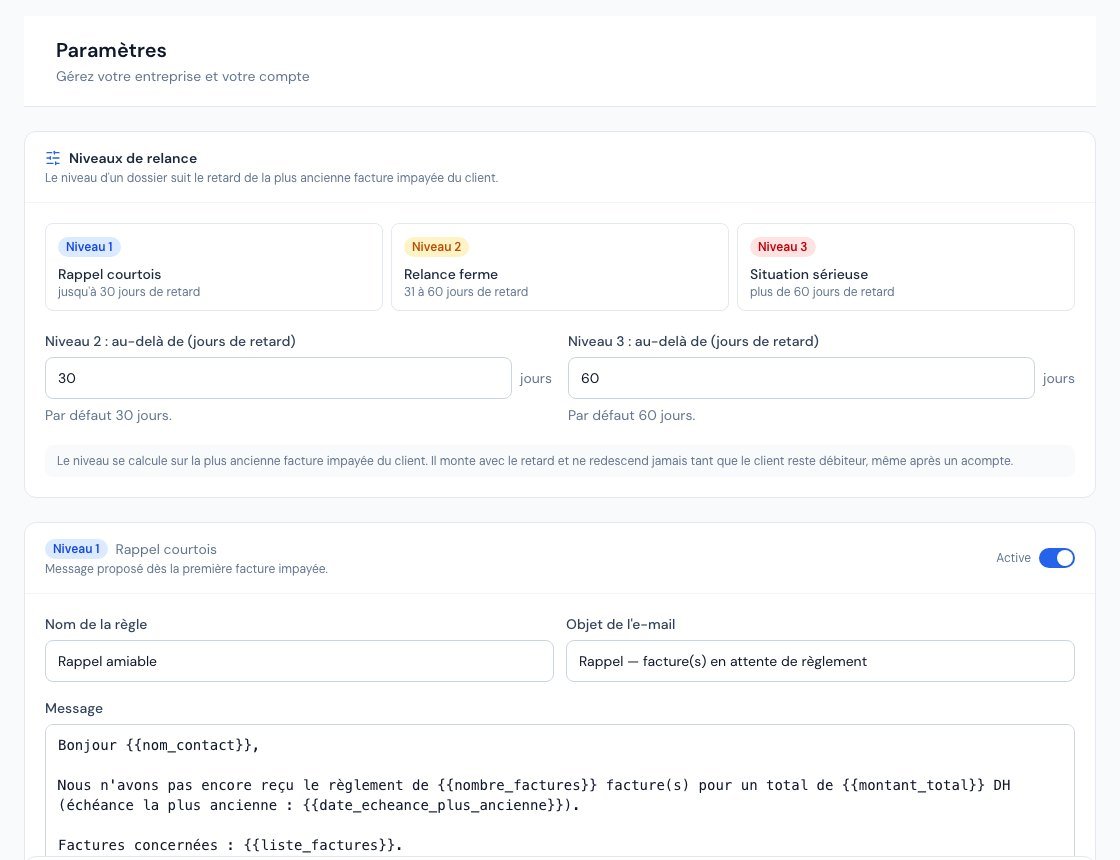 Paramètres → Recouvrement (Settings → Collections): lateness thresholds for levels 2 and 3, then the message template for each level.
7. On the dashboard
The Promesses et recouvrement (Promises and collections) widget summarises the day: promises due today, broken promises to chase, upcoming promises, the rate of promises kept over 90 days and, if your subscription includes collections, the number of files to handle.
8. On the mobile app
Collections are available in the Billora mobile app: Plus → Recouvrement tab (the entry only appears if your subscription includes collections).
- The list shows the summary cards, search by customer, level badges, Échu uniquement (Overdue only), Comprendre les niveaux (Understanding the levels) and a shortcut to Promesses clients. Tap a file to open it; swipe it or long-press it to Préparer la relance (Prepare the reminder), Enregistrer une action (Log an action) or Voir le client (View the customer). The Créer une relance (Create a reminder) button opens a file for the chosen customer (next reminder and assignee optional), then Créer le dossier (Create the file).
- The file shows the level, the Reste dû (amount due), the Promis (en attente) (promised, pending) amount, the Chèques en attente (pending cheques), the assignee and the next reminder, then each unpaid invoice with its promises (+ Promesse button) and the action log.
- Relancer (Remind) prepares the e-mail for the file's level, editable before sending, then Envoyer la relance (Send the reminder), with the same safeguards as on the web: the customer's e-mail is required, and no second send within a minute.
- Action logs an Appel (call), an Email, a Note or a Promesse (promise). The « … » menu also offers Suivi du dossier (File follow-up: assignee and next reminder) and Appeler le client (Call the customer) when their number is filled in.
The message rules and level thresholds can only be set on the web, in Paramètres → Recouvrement. The accountant and the viewer see the files without the Relancer or Action buttons.
Related articles
Was this article helpful?
Invoice compliantly, effortlessly
DGI-compliant invoices, quotes, credit notes, VAT and supplier tracking in a single tool.
Try it free