Browse help
What is the Net profit report for?
The « Résultat net (P&L) » (Net profit) report is a simplified income statement: it sets what you invoiced (income) against what you spent (expenses) and calculates the difference. If it is positive, it is a profit; if it is negative, a loss.
Example. Hicham runs a communication agency in Rabat. In the first quarter, he invoiced 180,000 DH excl. VAT and recorded 125,000 DH excl. VAT of expenses (rent, subcontracting, advertising). The report shows him a net profit of 55,000 DH and a net margin of 30.6%. By switching to the « Encaissement » (Cash) basis, he sees how much of that money has actually come in.
Menu Rapports (Reports), Ventes (Sales) section, « Résultat net (P&L) » card. Depending on your subscription, this report may not be included: the page then shows « Disponible à partir du plan … » (Available from the … plan) with the name of the plan that offers it, and the « Voir les plans disponibles » (See available plans) button. In test mode, it is accessible.
1. Choosing the period and the calculation basis
- Open the report. By default, it covers « Cette année » (This year).
The subtitle recalls the period and its exact dates, for example « Période : Cette année (2026-01-01 → 2026-12-31) ». - Choose another period with the « Ce mois » (This month), « Mois dernier » (Last month), « Ce trimestre » (This quarter), « Trimestre dernier » (Last quarter), « Cette année » (This year) or « Année dernière » (Last year) buttons. For free dates, enter the start date and the end date in the block on the right, then click « OK ».
- Next to it, in the « Base : » (Basis) block, choose « Facturation » (Invoicing, the default) or « Encaissement » (Cash).
The report is recalculated immediately.
The drop-down list at the top of the page lets you jump straight to another report without going back to the menu.
2. « Facturation » or « Encaissement » basis: what is the difference?
| Basis | Income taken into account | Expenses taken into account |
|---|---|---|
| Facturation (Invoicing) | The total excl. VAT of the invoices issued in the period, minus the credit notes issued in the period. | The total excl. VAT of the expenses dated in the period. |
| Encaissement (Cash) | The payments received whose payment date falls in the period, converted to excl. VAT in proportion to the invoice they settle, minus the credit notes issued in the period (only for the part already collected, see section 3). | The payments made on your expenses whose payment date falls in the period, converted to excl. VAT in proportion to the expense settled. |
The chosen basis applies to the whole top of the page: the « CA HT » (Revenue excl. VAT; subtitle « Facturé », invoiced, or « Encaissé », collected), « Dépenses HT » (Expenses excl. VAT; subtitle « Total charges », total expenses, or « Payées », paid), « Résultat net » (Net profit) and « Marge nette » (Net margin) cards; the « Évolution du résultat » (Profit trend) chart; the expenses line and the « Résultat net » line of the income statement; the « Dépenses par catégorie » (Expenses by category) block (subtitle « Datées dans la période », dated in the period, or « Payées dans la période », paid in the period); and the « Indicateurs clés » (Key indicators). Only the « Compte de résultat par nature » (Income statement by nature) block always stays on the invoicing basis (it says so: « Base facturation — HT »).
On the Cash basis, it is the payment date that counts, not the date of the invoice or expense: a payment received in March for a December invoice is counted in March. Cancelled payments are ignored. The report thus shows the money actually received and paid out during the period, excluding VAT. To tick off payments one by one, use the Reconciliation report; to look ahead, the Cash forecast.
3. What is counted in the report?
- Invoices (Invoicing basis): all issued invoices whose issue date falls in the period. Drafts and cancelled invoices are excluded.
- Credit notes: each issued credit note (including partly used, applied or refunded) is deducted at its own issue date. On the Invoicing basis, it is deducted in full; an invoice cancelled by a credit note stays in the revenue of its period and it is the credit note that offsets it, in its own period. On the Cash basis, the credit note is only deducted up to what had already been collected on the original invoice: a credit note on an unpaid invoice removes nothing, since nothing had been collected.
- Expenses: on the Invoicing basis, the expenses dated in the period; on the Cash basis, the payments of the period linked to expenses. In both cases, drafts and cancelled expenses are excluded. Refunding a credit note to a client is not an expense: it is already taken into account through the credit note deduction.
- Purchase orders, quotes, pro formas: they are not counted. Only invoices, credit notes, expenses and their payments feed this report.
Amounts collected and paid are converted to excl. VAT in proportion to the excl./incl. VAT ratio of each document, and so are unpaid amounts. Billora is not accounting software: this report is a management tool and its figures should be validated by your accountant.
4. Reading the cards and the income statement
At the top of the page, four cards, calculated on the chosen basis:
| Card | What it shows |
|---|---|
| CA HT (Revenue excl. VAT) | The revenue excl. VAT of the period, net of credit notes: invoiced (« Facturé ») or collected (« Encaissé »). |
| Dépenses HT (Expenses excl. VAT) | The expenses excl. VAT of the period: dated in the period (« Total charges ») or paid in the period (« Payées »). |
| Résultat net (Net profit) | Revenue excl. VAT minus expenses excl. VAT, with the label « Bénéfice » (Profit) or « Perte » (Loss). |
| Marge nette (Net margin) | The net profit divided by the revenue excl. VAT of the card (« Sur CA HT », on revenue excl. VAT). |
The « Évolution du résultat » (Profit trend) chart shows revenue (green bars), expenses (red bars) and profit (blue line), on the chosen basis. The breakdown adapts to the period: by day up to 31 days, by week up to 90 days, by month beyond.
The « Compte de résultat » (Income statement) block states its basis in its header (« Base facturation — HT » or « Base encaissement — HT ») and details:
- « CA facturé HT » (Revenue invoiced excl. VAT): the invoices issued in the period, net of credit notes;
- « CA encaissé HT » (Revenue collected excl. VAT): the payments received in the period, excl. VAT, net of credit notes (same definition whatever the basis);
- « Impayés HT » (Unpaid excl. VAT): what remains to be collected, converted to excl. VAT, on the invoices issued in the period (an invoice cancelled by a credit note no longer has a balance);
- « Total dépenses HT » (Total expenses excl. VAT, Invoicing basis) or « Dépenses payées HT » (Expenses paid excl. VAT, Cash basis);
- « Résultat net » (Net profit).
Next to it, « Dépenses par catégorie » (Expenses by category) splits your expenses by category, with their share as a percentage: the expenses dated in the period on the Invoicing basis, the expense payments of the period on the Cash basis. An expense without a category is filed under « Autres » (Other).
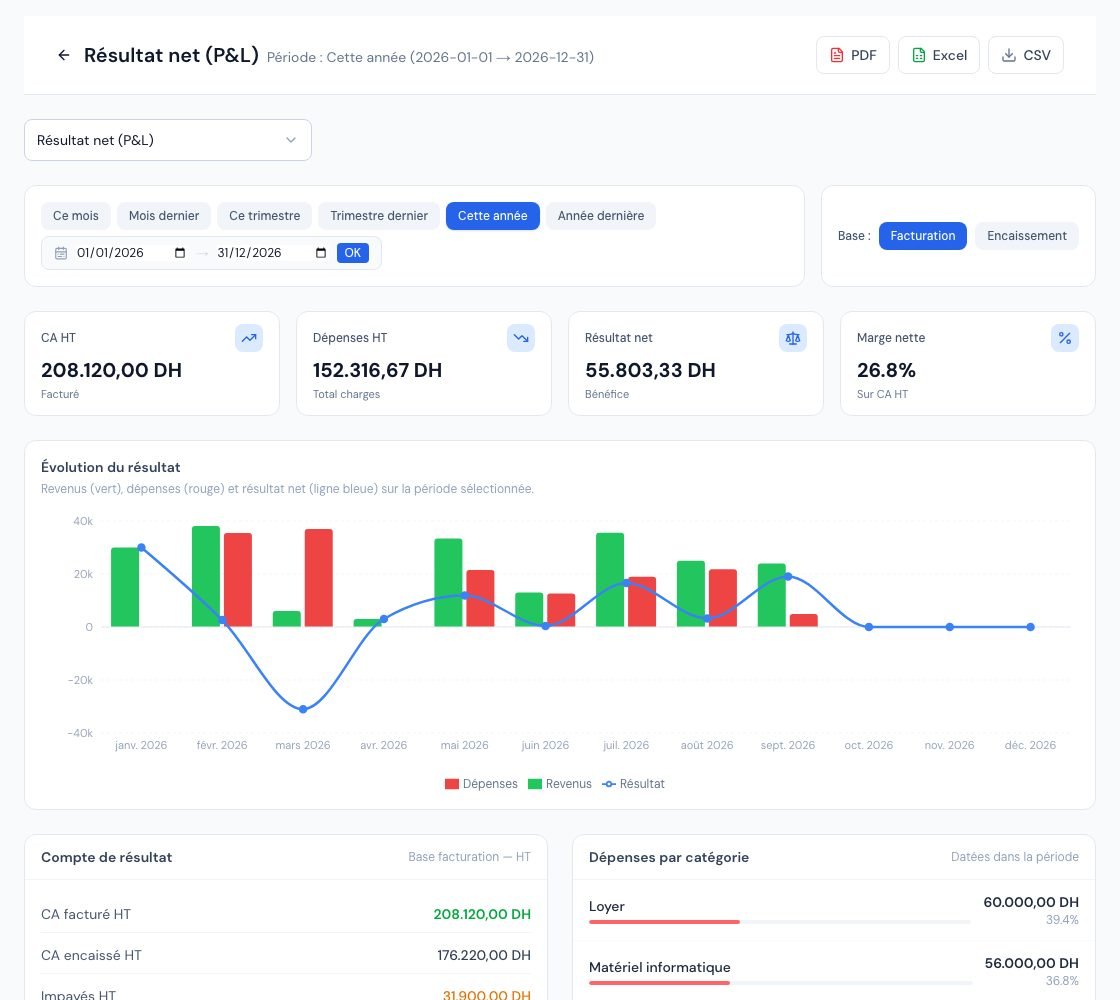 The « Résultat net » (Net result) report with the calculation basis, the cards and the income statement.
5. The income statement by nature
The « Compte de résultat par nature » (Income statement by nature) block (always « Base facturation — HT », invoicing basis excl. VAT) classifies:
- Income (« Produits ») by the category of the products sold. Lines without a product, or whose product has no category, are grouped under « Services / lignes libres » (Services / free lines). Credit notes are deducted in the same way;
- Expenses (« Charges ») by expense category; without a category, they go to « Autres charges » (Other expenses).
It ends with « Total produits HT », « Total charges HT » and « Résultat net par nature ». When an invoice has a global discount, it is spread pro rata over its lines: the total stays correct.
For a useful classification, put your products and expenses into categories (see Categories and units). This classification is not a chart of accounts: it does not replace your accountant's bookkeeping.
6. The key indicators
Four indicators, all calculated on the chosen basis:
- « Ratio dépenses » (Expense ratio): the share of revenue absorbed by expenses.
- « Marge nette » (Net margin): the net profit divided by the revenue. Billora does not separate the cost of goods sold from other expenses: the report therefore does not calculate a gross margin. For the margin of each item, use the Margins by item report.
- « Croissance CA » (Revenue growth) and « Évol. dépenses » (Expense change): the change compared with the previous period of the same length (for example the previous quarter), on the same basis. They show 0% when the previous period is empty.
7. Exporting the report
Three buttons at the top right export the figures displayed (current period and basis). Each export states the basis used, so that an « Invoicing » file is not confused with a « Cash » file:
- « PDF »: opens a preview, with the « Imprimer » (Print) and « Télécharger » (Download) buttons. The title shows « Base : Facturation » or « Base : Encaissement ».
- « Excel »: a workbook with the « Résumé » (Summary, which starts with the « Base » line), « Tendance mensuelle » (Monthly trend), « Dépenses par catégorie » (Expenses by category) and « Résultat par nature » (Profit by nature) tabs (and a « Société » (Company) tab with your name and address).
- « CSV »: the basis, the income statement with the net margin, the expenses by category and the breakdown by nature, as semicolon-separated text.
PDF and Excel exports depend on your subscription: if they are not included, the button is greyed out and its tooltip says « Disponible à partir du plan … » (Available from the … plan). The CSV export is always available.
Frequently asked questions
Why does my profit change when I switch to the Cash basis?
Because only the payments received and made during the period are taken into account, whatever the date of the invoices and expenses settled. If your clients have not paid yet, the profit on the cash basis is lower than on the invoicing basis; if they settled older invoices during the period, it can be higher.
I issued a credit note in April on a March invoice. Where does it appear?
On the Invoicing basis, the invoice stays in March and the credit note is deducted in April, at its issue date. On the Cash basis, the credit note is also deducted in April, but only for the part of the invoice already collected by then.
My supplier purchase orders are not in the expenses. Is that normal?
Yes. Only expenses are counted. A received purchase order can be turned into an expense; it then appears in the report.
Who can view this report?
It is read-only and changes no data. Team members who have access to the reports can view it; see Team roles and access.
Next steps
Related articles
Was this article helpful?
Invoice compliantly, effortlessly
DGI-compliant invoices, quotes, credit notes, VAT and supplier tracking in a single tool.
Try it free