Browse help
What is the cash forecast for?
This report answers a simple question: how much money will I have in the bank at the end of each month? It adds up what has already come in and gone out, then what should come in (invoices falling due, cheques handed over, payment promises, recurring invoices) and go out (expenses to pay). You can thus spot in advance a month when your cash would become negative.
Example. Salma runs a cleaning company in Tangier. She enters 85,000 DH of cash on 1 January. In March, the report warns her of a negative balance at the end of July, because of large equipment expenses. She chases her late clients and postpones a purchase to September.
- Menu Rapports (Reports), Trésorerie (Cash) section, « Trésorerie prévisionnelle » (Cash forecast) card.
- Depending on your subscription, this report may not be included: the page then shows « Disponible à partir du plan … » (Available from the … plan). In test mode, it is accessible.
- The owner, administrators, collaborators and viewers can view it. Only the owner and administrators can enter the opening cash balance and the targets. The external accountant has no access to it.
1. Entering your starting cash balance
Without a starting point, Billora can only show the flows (money in and out). To get the balance of each month:
- Open the report. On your first visit, the « Comment ça marche ? » (How does it work?) window opens; click « Renseigner maintenant → » (Fill in now) or close it with « J'ai compris » (Got it).
- In the « Trésorerie initiale » (Opening cash) block, enter the « Solde de trésorerie (DH) » (Cash balance): the total of your bank accounts and your cash box. A negative amount is accepted in case of an overdraft.
- Enter « À la date du » (As of): the date of that balance.
- Click « Enregistrer » (Save).
The summary cards, the balance curve and the « Solde au 1er du mois » (Balance on the 1st of the month) and « Solde cumulé » (Cumulative balance) lines appear.
To correct this starting point later, click « Modifier la trésorerie initiale » (Edit opening cash) below the cards. Each change is recorded in the activity log.
Payments recorded before this date are considered already included in the balance you entered: they are not added a second time. Months before the starting date are shown with a dash « — ». So choose a date for which you know your exact balance, for example that of your latest bank statement.
2. Reading the summary and the chart
Once the opening cash is entered, four cards are displayed:
| Card | What it shows |
|---|---|
| Solde actuel estimé (Estimated current balance) | The balance at the start of the current month, plus the receipts and minus the payments already recorded this month. The subtitle recalls your starting point. |
| Recettes de l'année (Receipts for the year) | Everything that comes in over the displayed year: « Réel + attendu » (Actual + expected). |
| Dépenses de l'année (Expenses for the year) | Everything that goes out over the displayed year: « Réel + attendu ». |
| Mois le plus serré (Tightest month) | The lowest end-of-month balance among the current month and the coming months. In red if it is negative. |
An « À retenir » (Key takeaway) box sums up the situation: either « Attention : d'après vos échéances, votre trésorerie deviendrait négative fin … » (Warning: based on your due dates, your cash would become negative at the end of …), or « Bonne nouvelle : votre trésorerie reste positive sur les mois à venir » (Good news: your cash stays positive over the coming months), with the tightest month.
The « En un coup d'œil » (At a glance) chart shows receipts (green bars), expenses (red bars) and the end-of-month balance (blue curve, solid for actual, dotted for forecast). Below the 0 line, your cash is negative.
To change the year, use the list at the top right (from two years before to three years after the current year).
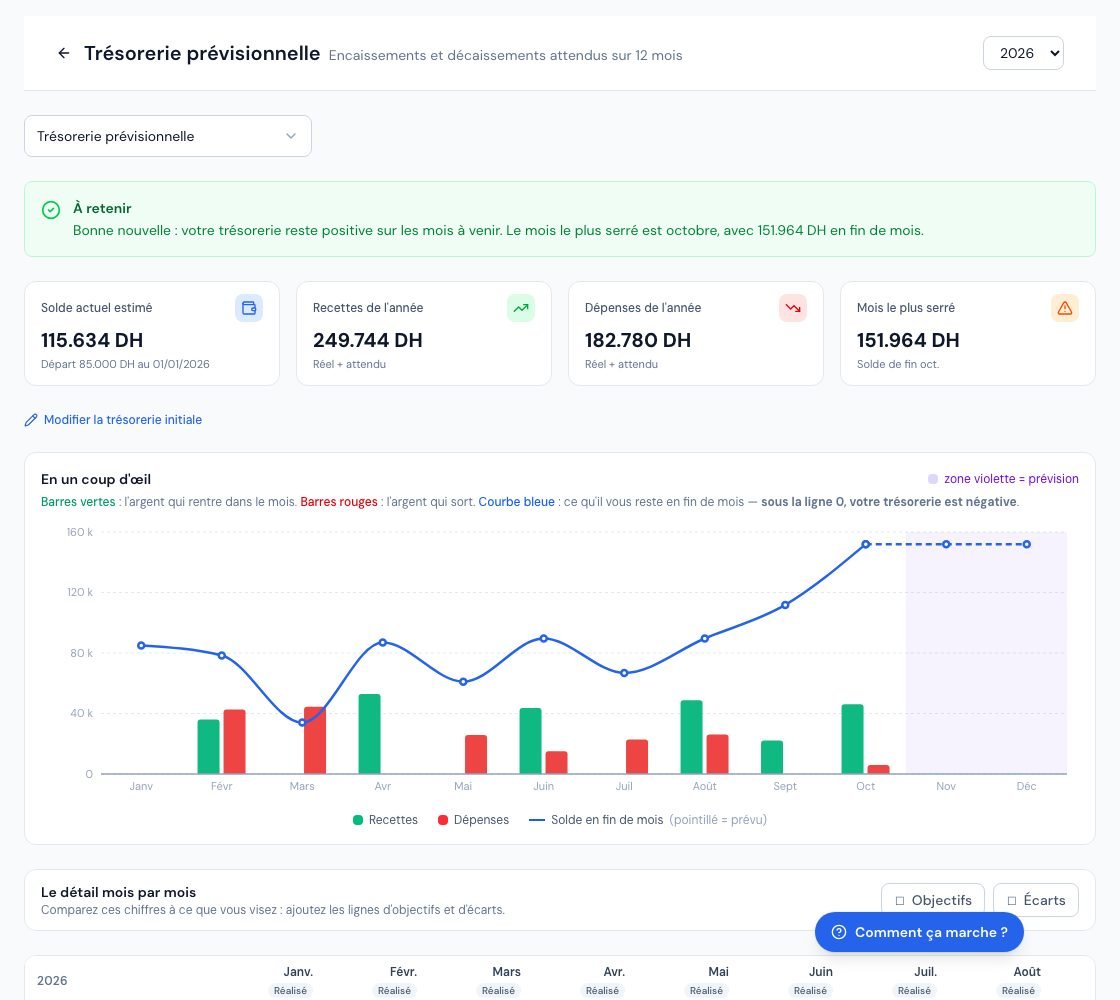 The cash flow forecast: key takeaway, summary cards and chart.
3. Understanding the month-by-month table
Each column is a month, marked « Réalisé » (Actual, finished month), « En cours » (Current) or « Prévu » (Forecast). The last column gives the total for the year. Hover over the « i » icon of a row for its explanation.
| Row | What it contains |
|---|---|
| Solde au 1er du mois (Balance on the 1st of the month) | The end balance of the previous month. |
| Encaissements réels (Actual receipts) | Client payments actually recorded that month (past months and current month). |
| Factures à échéance (Invoices falling due) | The amount still due on your invoices, placed at their due date. A late invoice is counted in the current month. Without a due date: issue date + 30 days. |
| dont chèques reçus en cours (of which cheques received in progress) | The part already paid by a cheque not yet cashed, dated at the cheque's due date (already included in the row above). |
| dont promesses de paiement (of which payment promises) | The part the client has committed to pay on a specific date, dated at the promised date (already included in the row above). |
| Factures récurrentes (Recurring invoices) | The next issues of your active recurring invoices, collected after their payment term. |
| Total recettes (Total receipts) | Actual + forecast. |
| Décaissements réels (Actual payments) | Payments to suppliers and expenses actually recorded that month. |
| Dépenses à échéance (Expenses falling due) | The amount still to pay on your expenses, placed at their due date; late ones are counted in the current month. |
| dont chèques émis en cours (of which cheques issued in progress) | The part already paid by an issued cheque not yet debited, dated at its expected debit date. |
| Total dépenses (Total expenses) | Actual + forecast. |
| Solde du mois (Month balance) | Receipts minus expenses for the month. In red, the month consumes cash. |
| Solde cumulé (Cumulative balance) | What you will have left at the end of the month. In red: negative cash. |
The « dont… » (of which) rows only appear if they contain an amount in the year. Amounts include VAT: this is the money that actually moves.
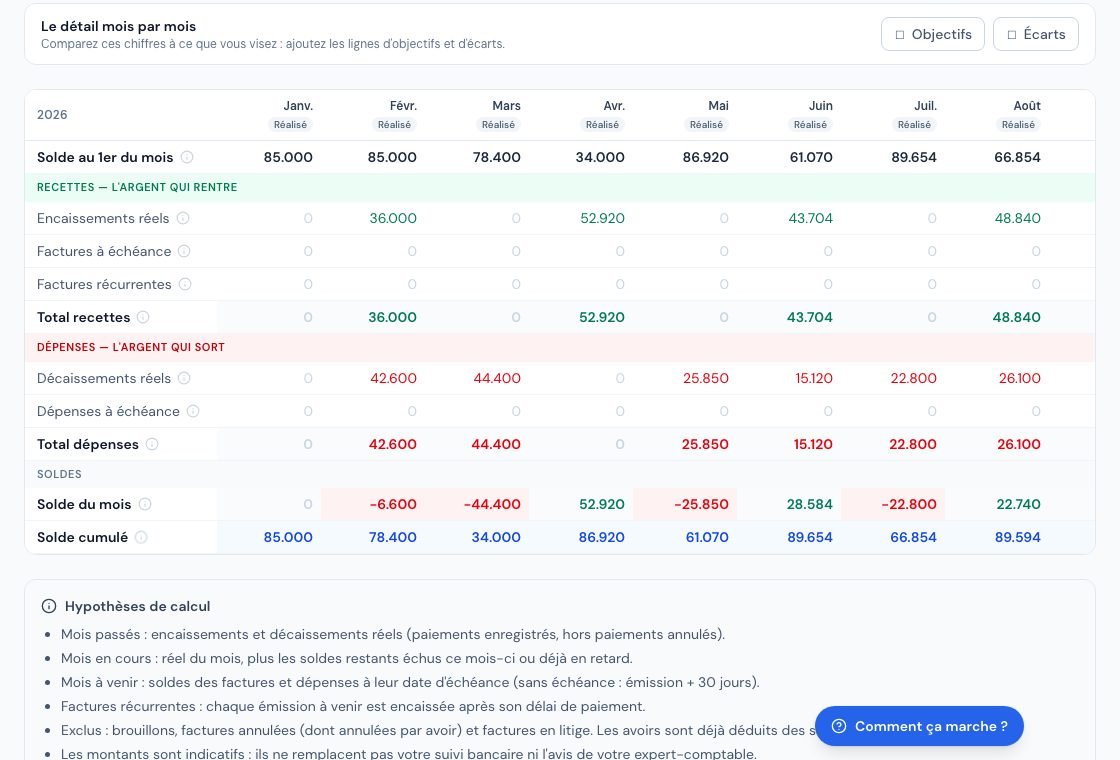 The month-by-month table of the cash flow forecast.
4. Which calculation rules are applied?
The « Hypothèses de calcul » (Calculation assumptions) block, at the bottom of the page, recalls them:
- Past months: actual only, that is, recorded payments, excluding cancelled payments.
- Current month: the month's actual, plus the balances due this month or already overdue.
- Coming months: the balances of invoices and expenses at their due date, plus recurring invoices.
- Excluded: drafts, cancelled invoices (including those cancelled by a credit note) and disputed invoices. Credit notes are already deducted from balances.
- Cheques: as long as a cheque in the register is not cashed, its payment does not count as actual money; the amount is forecast at the cheque's due date.
- Promises: only pending promises are taken into account. Cheques come before promises, so the same sum is never counted twice.
The forecast depends on the quality of your data: correct due dates, recorded payments, entered expenses. It replaces neither your bank monitoring nor your accountant's advice. This report has no export button.
5. Setting targets and reading the variances
- Above the table, in « Le détail mois par mois » (The month-by-month detail), tick « Objectifs » (Targets).
The « Objectif recettes » (Receipts target) and « Objectif dépenses » (Expenses target) rows appear; for the owner and administrators, they are fields to fill in. - Enter, month by month, the receipts you are aiming for and the expense ceiling you set yourself. Leave a month without a target empty.
- Click « Enregistrer les objectifs » (Save targets).
The message « Objectifs enregistrés. » (Targets saved.) confirms the operation. A negative or invalid amount shows « Un objectif n'est pas un montant valide (nombre positif). » (A target is not a valid amount (positive number).). - Tick « Écarts » (Variances) to compare: « Écart recettes » (Receipts variance: green if you exceed the target, red if you are below) and « Écart dépenses » (Expenses variance: green if you stay under the ceiling, red if you exceed it).
The total of the variances only covers the months that have a target. Targets are saved per year: changing the year shows those of the chosen year.
Frequently asked questions
The report shows no balance, only amounts. Why?
The opening cash has not been entered. The owner or an administrator must enter it in the « Trésorerie initiale » (Opening cash) block.
An invoice three months overdue appears in the current month. Is that normal?
Yes. A sum due that has not come in yet is still expected: it is placed in the current month, not in the past. To recover it, see collections.
I recorded a cheque payment, but it is not in the actual receipts.
The cheque has not been cashed yet in the cheque register. It appears in « dont chèques reçus en cours », in the month of its due date. It moves to the actual once cashed.
A disputed invoice does not appear. Why?
Disputed invoices are deliberately excluded: their payment is too uncertain to be forecast.
Next steps
Related articles
Was this article helpful?
Invoice compliantly, effortlessly
DGI-compliant invoices, quotes, credit notes, VAT and supplier tracking in a single tool.
Try it free