Browse help
What is the Revenue by sector, city and country report for?
This report answers two questions: in which sectors and in which cities or countries do you make your revenue? It groups revenue excl. VAT according to the information in your clients' records.
Example. Nadia sells IT equipment from Tangier. The report shows her that 62% of her revenue comes from clients in Casablanca and that the "BTP" (construction) sector comes second. She plans a sales tour in Casablanca.
Menu Rapports → CA par secteur, ville et pays (Reports → Revenue by sector, city and country), in the « Ventes » (Sales) section. This report depends on your subscription, with the same right as the revenue report: if it is not included, it does not appear in the submenu, its card in Rapports → Vue d'ensemble (Reports → Overview) shows a padlock with the name of the plan that offers it, and the page shows « Disponible à partir du plan … » (Available from the … plan) and a « Voir les plans disponibles » (See available plans) button. All team roles can view it, including the external accountant in read-only mode.
1. What is counted
- The total excl. VAT of invoices issued in the period, excluding drafts and cancelled invoices.
- Minus valid credit notes issued in the period, each on its issue date. An invoice cancelled by a credit note stays in its period; the credit note offsets it on its own date.
- The grouping uses the « Secteur d'activité » (Industry), « Ville » (City) and « Pays » (Country) fields of the current client record. If you change a client's city, its whole history changes city in the report.
Amounts are in dirhams excluding VAT: no VAT is shown.
2. Reading the report
- Choose the period (« Cette année », This year, by default).
- Choose the grouping with the « Secteur d'activité », « Ville » or « Pays » tabs.
- Read the cards: « CA HT » (Revenue excl. VAT, net of credit notes), « Clients facturés » (Invoiced clients, with the number of invoices), « Segments » (number of different values, excluding « Non renseigné ») and « Premier segment » (Top segment: the one that weighs the most, with its amount and share).
- Read the table: # (rank), the segment, Clients, Factures (Invoices), CA HT (Revenue excl. VAT) and Part du CA (Share of revenue, with a bar).
"Casablanca", "casablanca" and "CASABLANCA" form a single segment: Billora ignores capital letters, accents and extra spaces. The name displayed is the most frequent spelling. However, "Casa" and "Casablanca" remain two different segments: harmonise your records.
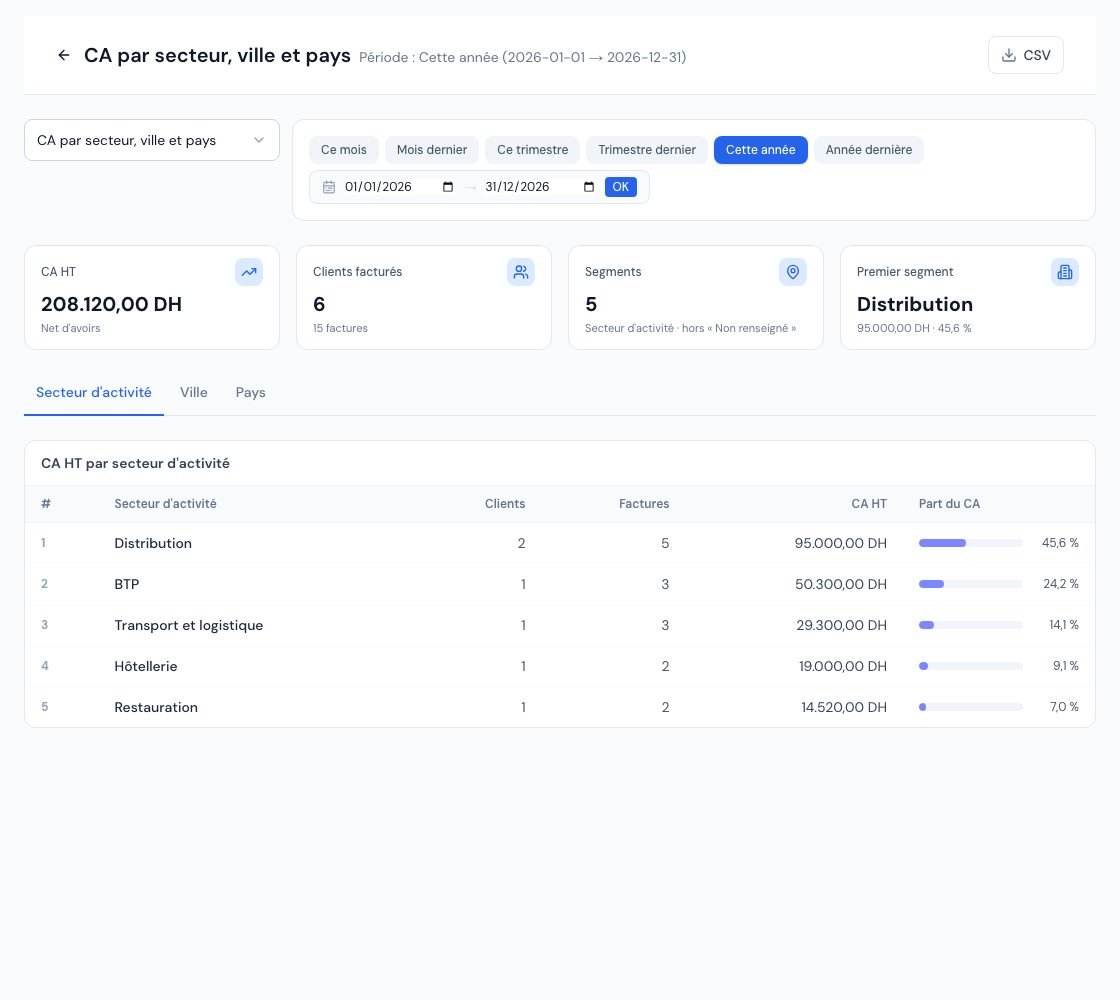 The « CA par secteur, ville et pays » (Revenue by sector, city and country) report.
3. Reducing the « Non renseigné » share
Clients whose field is empty are grouped under « Non renseigné » (Not specified), and a banner shows the share of revenue concerned (for example « 18,5 % du CA (…) provient de clients dont la ville n'est pas renseignée. Complétez leurs fiches pour affiner ce rapport. », 18.5% of revenue comes from clients whose city is not specified. Complete their records to refine this report.).
- Open the record of your main clients (see Create and manage your clients).
- Click « Modifier » (Edit) and fill in « Secteur d'activité », « Ville » and « Pays ».
- Come back to the report: the grouping is updated immediately, including for past invoices.
4. Exporting the report
The « CSV » button downloads the displayed grouping (sector, city or country) with, for each segment: clients, invoices, revenue excl. VAT and share of revenue. This report does not offer a PDF or Excel export.
Frequently asked questions
Why is a client counted in a segment without an invoice?
The « Clients » column counts clients who have an invoice or a credit note in the segment over the period. A client who only received a credit note is therefore counted, with negative revenue.
The page shows « Aucune facture sur cette période ».
(No invoices in this period.) Revenue is calculated from issued invoices (excluding drafts and cancelled ones). Choose another period.
Is the total the same as in the revenue report?
Yes, the definitions are the same (invoices excluding drafts and cancelled ones, minus credit notes): only the grouping changes. See the revenue report.
Next steps
Related articles
Was this article helpful?
Invoice compliantly, effortlessly
DGI-compliant invoices, quotes, credit notes, VAT and supplier tracking in a single tool.
Try it free