Browse help
In Morocco, the cheque remains a common means of payment between businesses. The problem: a cheque you have received is not money until it has been cashed. Billora's cheque register keeps track of every cheque received or issued, from entry to collection, and prevents an invoice from being counted as paid when its cheque has not yet cleared.
Menu Paiements → Chèques (Payments → Cheques). The feature depends on your subscription: if it is not included, the page tells you which plan it is available from.
1. Record a cheque payment
The register fills itself: you just need to record a payment with the Chèque (Cheque) method, from anywhere a payment can be entered (invoice page, expense page, Payments page, mobile app).
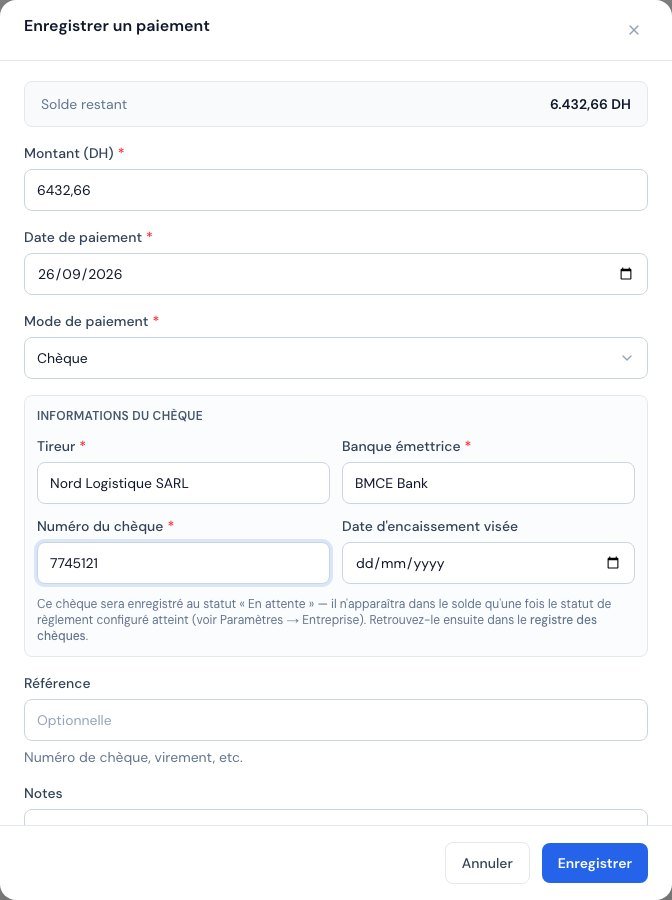 The « Informations du chèque » (Cheque details) block appears as soon as you choose the Cheque method: drawer, issuing bank, number and target collection date.
- Open the invoice (or the expense) and click Paiement (Payment).
- Choose the Chèque method: a Informations du chèque (Cheque details) block appears.
- Fill in the tireur (drawer, the person who signed the cheque), the banque émettrice (issuing bank) and the cheque number.
- If you wish, enter the issue date and the target collection date (the cheque's due date, useful for post-dated cheques).
- Save.
The drawer, the bank and the number are mandatory: without them, the cheque cannot be found in the register. For a cheque that you issue to a supplier, your company name is suggested by default, along with the choice of bank account.
2. Cheque statuses
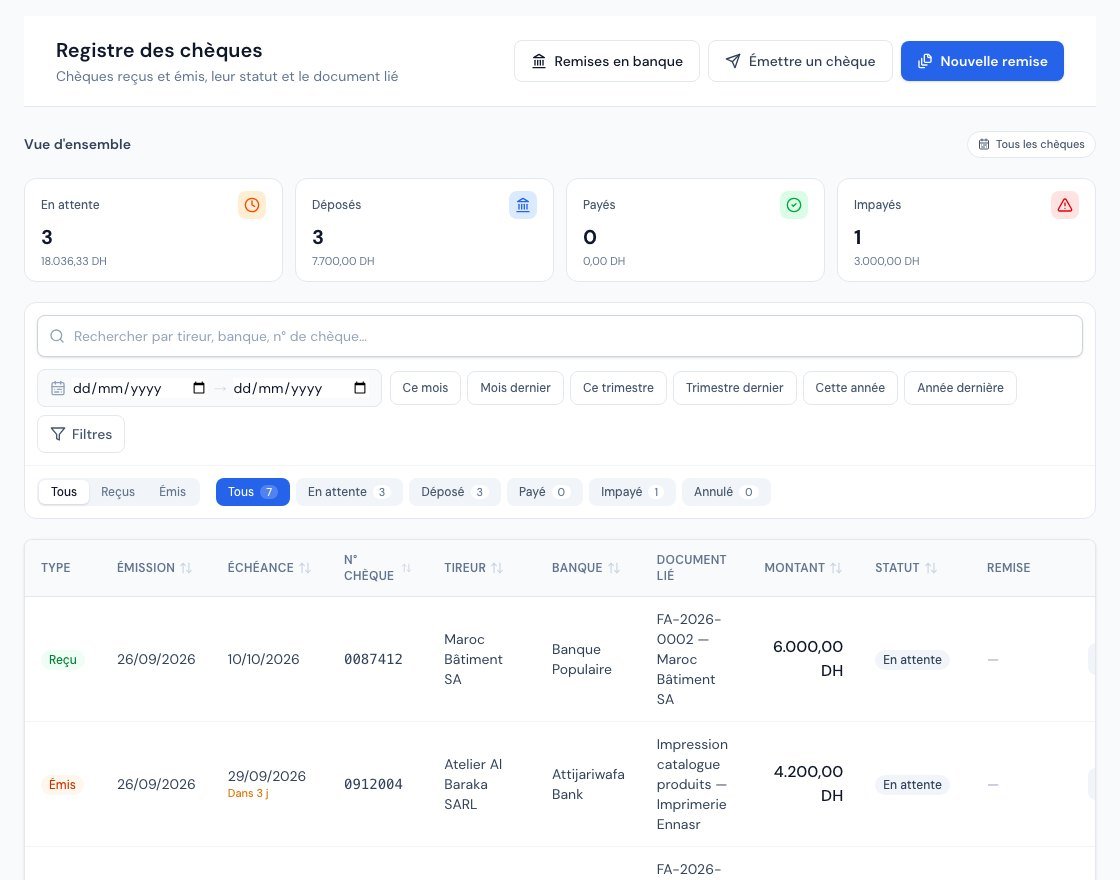 The register: cards by status, All / Received / Issued selector, badges with their counters, and a sortable table (the due date turns amber, then red).
| Cheque received from a customer | Cheque issued to a supplier | What it means |
|---|---|---|
| En attente (Pending) | En attente (Pending) | The cheque is recorded but not yet handed over. |
| Déposé (Deposited) | Remis au fournisseur (Handed to supplier) | The cheque has been deposited at the bank, or handed to the supplier. |
| Payé (Paid) | Débité (Debited) | The money has moved: the cheque is cashed (or debited from your account). |
| Impayé (Bounced) | Rejeté (Rejected) | The bank refused the cheque. |
| Annulé (Cancelled) | Annulé (Cancelled) | The cheque is abandoned before having taken effect. |
Status changes are made from the list (the row's action buttons) or from the cheque's page. The heavier decisions — Impayé and Annulé — ask for confirmation.
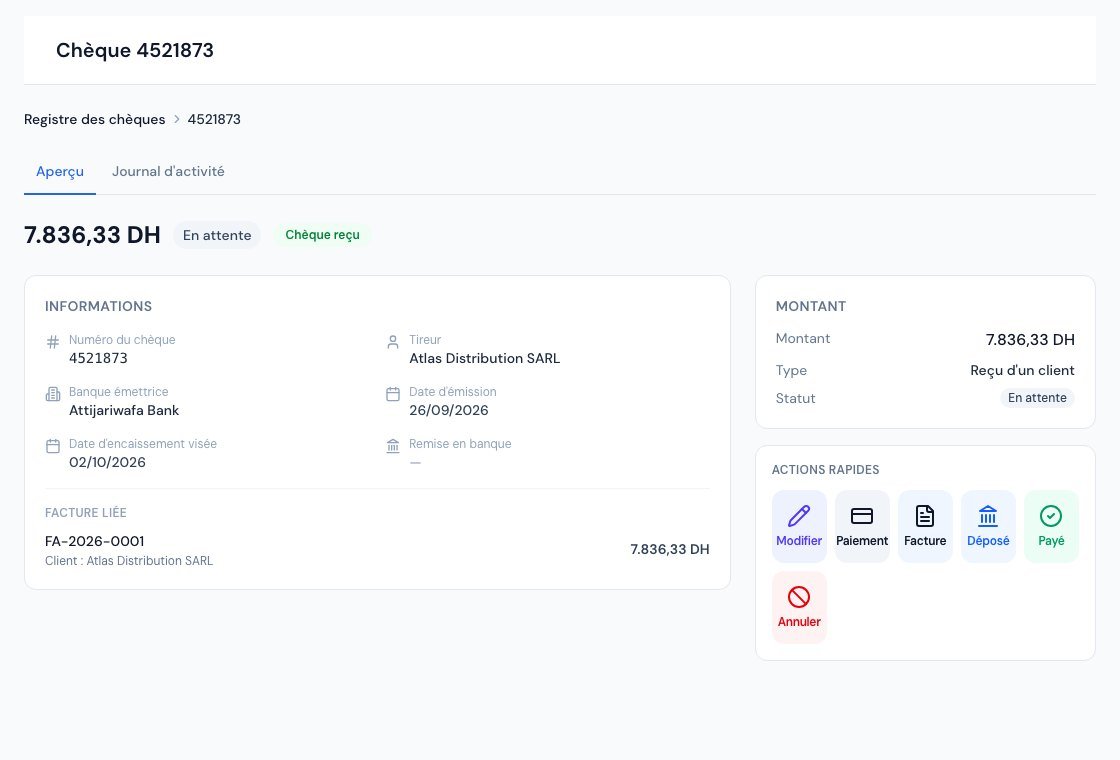 A cheque page: status, details, linked document and status-change buttons.
3. When is the invoice really paid?
This is the core of the register: a pending cheque does not settle the invoice. The invoice stays "unpaid" (or partially paid), and the cheque amount is simply reserved: it is no longer offered as an amount left to pay, to avoid recording the same payment twice.
 On the invoice page, the « Chèques » card shows the cheques in progress and their status: the invoice stays unpaid until they are cashed.
- The payment counts as a real payment when the cheque moves to Payé (or Débité for an issued cheque). The invoice then changes status, its balance decreases and the collection statistics are updated.
- If the cheque becomes Impayé after having been cashed, the payment is cancelled: the invoice balance is restored exactly.
- While the cheque is in progress, it does not appear as money collected: neither in the Payments page statistics, nor on the dashboard, nor in cash-basis VAT (encaissement).
If cheques in progress already cover the entire balance of an invoice, Billora no longer lets you enter a new payment against it. A banner explains this in the payment window, and the suggested amount takes into account what is already committed.
4. The list, filters and sorting
- Reçus / Émis / Tous (Received / Issued / All): the selector at the top of the list separates your customers' cheques from those you have handed to your suppliers.
- Status badges with their counters, a search (drawer, bank, number), a period, the issuing bank and a due date filter (overdue, within 7 days, within 30 days).
- Click a column header to sort (issue, due date, number, drawer, bank, amount, status); a second click reverses the order.
- The Échéance (Due date) column turns red when the date has passed and amber within 3 days.
5. Issue a cheque to a supplier
From the list, the Émettre un chèque (Issue a cheque) button opens an expense payment window with the Cheque method already selected. Choose the expense, complete the cheque details and save: the expense is only settled once the cheque is Débité.
6. Due-date alerts
Billora notifies you in the notification centre:
- for an issued cheque: 3 days before the due date, on the day itself, then the next day if it is still in progress — remember to fund your account;
- for a received cheque: on the due date, then the next day if it has not been deposited.
7. On the dashboard and in the cash flow forecast
- The Chèques à suivre (Cheques to follow up) widget shows what needs to be deposited, what is being cashed, what needs to be provisioned, recent bounced cheques and the net cheque balance.
- The cash flow forecast dates the part of an invoice covered by a cheque at the cheque's due date, and isolates it on a line "of which cheques received / issued in progress".
8. Who can do what?
The owner and administrators record and edit cheques. The external accountant and the viewer can consult the register without being able to modify it. A payment linked to a cheque cannot be deleted or edited directly: you go through the cheque's status (for example Impayé).
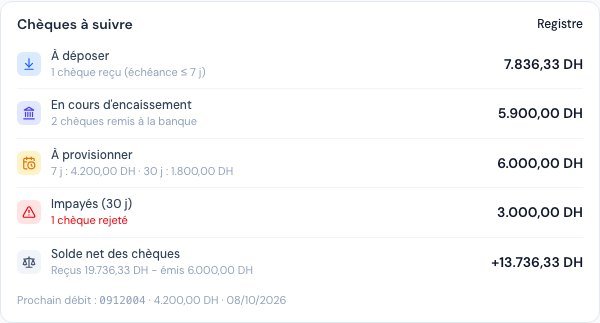 The « Chèques à suivre » widget: what is being cashed, what to provision, bounced cheques and the net balance.
Frequently asked questions
Why is my invoice not paid when I have received the cheque?
Because the cheque has not been cashed yet. Move it to Déposé and then Payé once it has cleared at the bank: the invoice will then be settled.
I don't have the Cheques menu
The register depends on your subscription. The message shown on the page indicates which plan includes it.
Related articles
Was this article helpful?
Invoice compliantly, effortlessly
DGI-compliant invoices, quotes, credit notes, VAT and supplier tracking in a single tool.
Try it free