Browse help
One record per customer
Every customer you create is linked to their invoices, quotes, credit notes and payments. A well-filled record saves you from re-entering the same information on every document: address, ICE, payment term, contacts to write to.
Example. Nadia, a chartered accountant in Oujda, adds her first customer: a pharmacy. She enters the company name, the ICE, the address, the pharmacist's contact and a 30-day payment term. Later, every invoice to this pharmacy will pick all of this up on its own.
Create a new customer
- In the menu, open Répertoire → Clients (Directory → Customers).
- Click « Ajouter un client » (Add a customer). The form opens on a dedicated page.
- « Identité » (Identity) card: choose the Type de client (Customer type), « Entreprise » (Company) or « Particulier » (Individual). A company is identified by its Raison sociale (Company name); an individual by their Prénom (First name) and Nom (Last name). This is the only required field.
- « Coordonnées » (Contact details) card: Email (used to send documents), Téléphone (Phone), Site web (Website).
- For a company, « Identifiants fiscaux » (Tax identifiers) card: ICE (15 digits), IF, RC, VAT no., legal form, share capital, legal representative, CNSS no.…
- « Adresse principale (facturation) » (Main address (billing)) and « Adresse de livraison » (Delivery address) cards (leave the second one empty if it is identical).
- « Contacts » card: click « Ajouter un contact » (Add a contact) to save the people to write to (title, first name, last name, position, email, phone, mobile). A contact can be the main contact.
- « Notes » card: « Notes internes » (Internal notes) (visible to your team only) and « Notes publiques » (Public notes).
- Click « Créer le client » (Create the customer).
What you see next: the new customer's page opens. The customer list (below) lets you find them at any time.
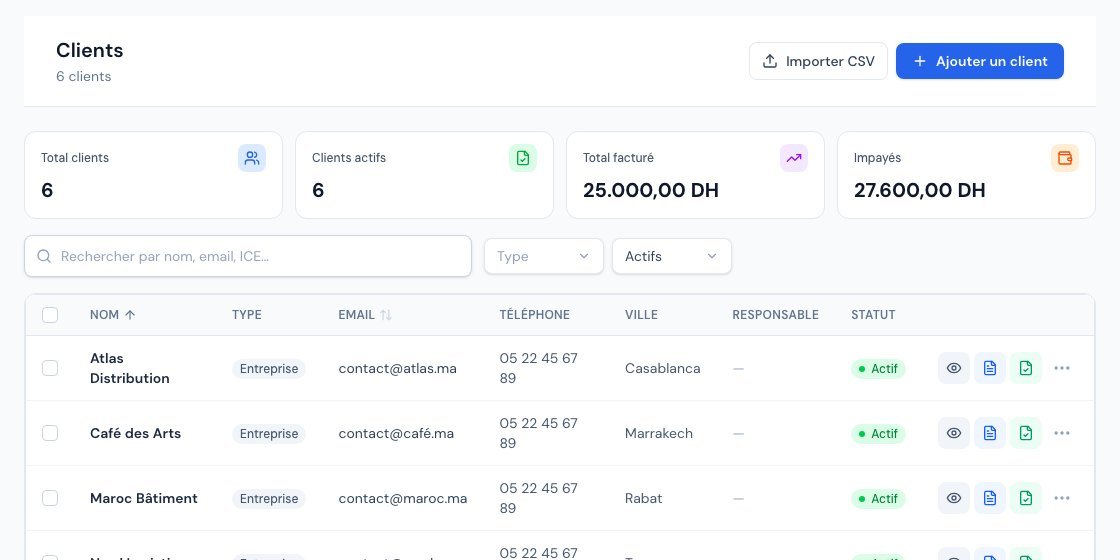 The customer list.
- The ICE must contain exactly 15 digits: if you enter a different number of digits, Billora replies « L'ICE doit contenir exactement 15 chiffres » (The ICE must contain exactly 15 digits). Billora does not prevent you from creating a customer without an ICE, but it is required for a business customer with e-invoicing: see Is the ICE mandatory?.
- Depending on your subscription, typing the company name suggests companies from three characters and pre-fills the record. You can always continue by hand.
- For foreign customers, the « International » card lets you choose a Devise de facturation (Billing currency), an exchange rate (amounts remain in MAD) and a Langue préférée (Preferred language).
Default payment term and discount
If you always grant the same terms to a customer, save them once and for all. In the customer form, the « Profil et conditions » (Profile and terms) card contains two useful fields:
- Délai de paiement par défaut (Default payment term): the due date of their new invoices is calculated from the issue date plus this term.
- Remise par défaut (%) (Default discount (%)): a percentage between 0 and 100, picked up as a global discount in their new invoices and new quotes (the mobile app does the same).
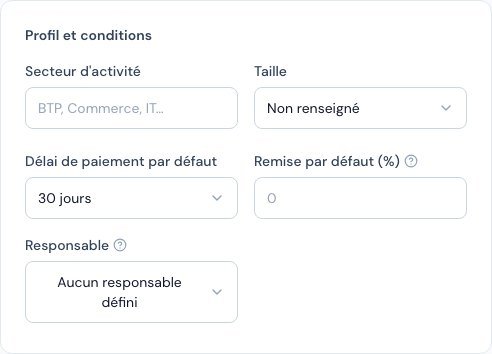 The Profile and terms card of the customer form with the default discount.
The default discount is only a suggestion: you can change it on each document, and if you change it, Billora never puts it back on its own. It does not apply to documents already created. For special prices on certain items, see Customer pricing.
Find and manage your customers
In Répertoire → Clients, the search bar (« Rechercher par nom, email, ICE… » (Search by name, email, ICE…)) and the filters Type (Entreprise, Particulier), Statut (Status) (Actifs, Archivés) and Responsable (Manager) help you find a customer. A row's action menu offers: Consulter (View), Nouvelle facture (New invoice), Nouveau devis (New quote), Modifier (Edit), Archiver (Archive), Supprimer (Delete).
A customer's page gathers their information and several tabs: Aperçu (Overview), Contacts, Factures (Invoices), Devis (Quotes), Proforma, Avoirs (Credit notes), Bons de livraison (Delivery notes), Paiements (Payments), Tarifs (Pricing), Documents and Journal d'activité (Activity log).
- Archive: the customer disappears from the current lists (use the « Archivés » filter to find them, « Désarchiver » (Unarchive) action) without losing their history.
- Delete: possible only if the customer has no invoice or quote. Otherwise Billora replies « Impossible de supprimer un client ayant des factures ou devis. Archivez-le à la place. » (Cannot delete a customer with invoices or quotes. Archive them instead.).
- Import a list: the « Importer CSV » (Import CSV) button in the list (see Import your customers and products).
- Export the list as CSV: Paramètres → Import / Export (Settings → Import / Export), « Export des données » (Data export) section, « Clients » row.
Depending on your subscription, the number of customers may be limited: a « Limite atteinte » (Limit reached) box then appears on the list.
Frequently asked questions
Can a customer have several addresses?
They have a main address (billing) and an optional delivery address. The people to contact are entered in the « Contacts » card, which can hold as many as needed.
What happens if I delete a customer?
A customer can be deleted only if they have no invoice or quote. Otherwise, archive them: their history remains viewable.
What is the difference between « Entreprise » and « Particulier »?
A company has a company name and tax identifiers (ICE, IF, RC). An individual is identified by their first and last name, without tax identifiers.
How do I give special prices to a customer?
See Customer pricing.
Next steps
Related articles
Was this article helpful?
Invoice compliantly, effortlessly
DGI-compliant invoices, quotes, credit notes, VAT and supplier tracking in a single tool.
Try it free