Browse help
What is it for?
A client's outstanding balance (« encours ») is what they owe you at a given moment. The credit limit (« plafond d'encours ») is the maximum amount you accept to leave outstanding. Billora compares the balance with the limit, shows it as a gauge on the client's page and, if you wish, refuses to issue a new invoice that would exceed it.
The opening balance (« encours initial ») lets you carry over what the client already owed you before using Billora (old software, notebook, spreadsheet): it counts in the outstanding balance and in the aged balance, without re-entering old invoices.
Example. Karim distributes office supplies in Tangier. He sets a client's limit to 50,000 DH. That client already owes 42,000 DH; Karim prepares a 15,000 DH invoice. In "Bloquer" (Block) mode, sending is refused: the projected balance would be 57,000 DH. Karim, the owner, notes that the client has wired a deposit and grants a reasoned override for that invoice only.
The credit limit is a subscription feature: if it is not included, the settings page and the limit field show "Cette fonctionnalité est disponible à partir du plan …" (the plan name is read from the plan configuration). The opening balance, on the other hand, always remains available.
1. Turn the feature on
- In the menu, open Paramètres (Settings), then Risque client (Client risk).
- Turn on the switch « Activer la gestion du risque client » (Enable client risk management).
- Under « Quand le plafond est dépassé » (When the limit is exceeded), choose the mode:
- Alerter (Warn): a banner warns you, nothing is blocked;
- Bloquer (Block): issuing an invoice and creating a delivery note are refused beyond the limit. The owner can grant an override.
- Click « Enregistrer » (Save): "Paramètres du risque client enregistrés."
When turned off, the feature keeps the limits you entered but no longer applies them. The owner and administrators can change these settings; other members see the page read-only. This setting is made from the web.
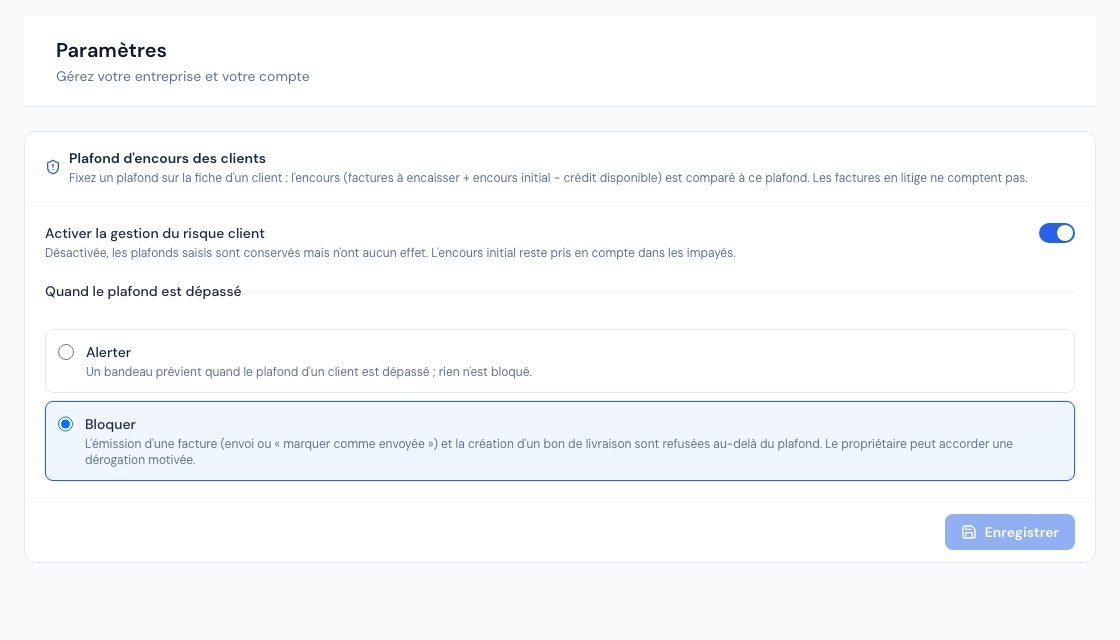 The Risque client settings page: activation and control mode.
2. Set a client's limit
- Open the client's page, then Modifier (Edit) (or create a new client).
- In the « Risque client » card, enter the « Plafond d'encours (DH) » (credit limit).
- Save.
- Empty field: no limit for this client.
- 0: cash payment only — any new outstanding amount counts as exceeding the limit.
- Only the owner and administrators can set a limit. Removing a limit is always possible.
You can also import limits with the « Plafond d'encours (MAD) » column of the clients CSV import (see Import your data); without the required right, or if the feature is not included, the column is ignored with a warning and the client is still imported.
3. How the outstanding balance is calculated
Billora calculates the balance on the server, always the same way:
outstanding = invoices to collect + remaining opening balance − available credit (credit notes), never below 0.
| Item | Counted? |
|---|---|
| Issued invoices with a balance to collect | Yes (remaining amount due) |
| Drafts, cancelled invoices, invoices cancelled by credit note | No |
| Disputed invoices ("litige") | No — they are shown separately, "Litiges (exclus)" |
| Remaining opening balance | Yes |
| Available credit of active credit notes | Yes, it is deducted (except a credit note awaiting DGI validation) |
| Cheques in progress and payment promises | Not deducted: shown for information, "dont chèques en cours et promesses" |
| Quotes and proforma invoices | No: they are not receivables |
The projected balance adds the amount of the document you are issuing (its remaining amount to collect). The limit is exceeded when the projected balance is strictly above the limit; landing exactly on the limit is accepted. The gauge switches to "Proche du plafond" (close to the limit) from 80% of the limit.
4. The gauge on the client's page
On each client's page, the « Risque client » card shows the balance, the limit, a progress bar (green, orange, then red), "Reste disponible" (remaining) or "Dépassement" (excess), and the calculation detail. The status can be "Sous le plafond" (under the limit), "Proche du plafond", "Plafond dépassé" (limit exceeded) or "Aucun plafond" (no limit). If the feature is not included in your subscription, the card only appears when the client has an opening balance.
In the invoice, quote and proforma forms, a banner flags when the client is close to the limit or has exceeded it, even before saving.
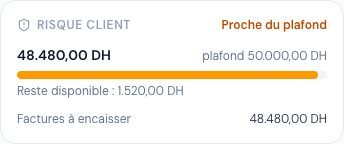 The Risque client gauge on a client record: outstanding, limit and remaining headroom.
5. Where the limit is applied
A draft invoice is not yet a receivable: blocking therefore happens at issue, not at creation.
| Action | "Alerter" mode | "Bloquer" mode |
|---|---|---|
| Email an invoice (first send) | Warning | Refused beyond the limit |
| "Marquer comme envoyée" (one invoice or several at once) | Warning | Refused beyond the limit |
| Create a delivery note for an invoice that is still a draft | Warning | Refused beyond the limit |
| Increase the total of an already issued invoice | Warning | Refused if the increase exceeds the limit |
| Create or duplicate a draft invoice, create a quote or a proforma, convert them, convert a client order request from the portal | Warning only, never blocked | |
| Recurring invoices (automatic sending) | Warning | Invoice generated but left as a draft, owners notified: "Facture … non envoyée : plafond dépassé" |
| Invoice CSV import | Never blocked (history migration) | |
In "Bloquer" mode, a refused invoice shows "Plafond d'encours dépassé : encours … DH + ce document … DH = … DH pour un plafond de … DH." In bulk sends, refused invoices are counted separately ("refusée : plafond d'encours dépassé"): send them one by one to request an override. The same rule applies in the mobile app.
6. Grant an override (owner)
When an invoice is refused, a "Plafond d'encours dépassé" window opens:
- the owner sees the detail (current balance, this document, projected balance, limit), enters the « Motif de la dérogation » (reason, at least 10 characters) and clicks « Accorder la dérogation et continuer »: sending resumes immediately;
- other members read "Plafond dépassé : contactez le propriétaire du compte, qui peut accorder une dérogation motivée."
- It is valid for one document only, once, for 15 minutes. If the invoice grows in the meantime, or if the time runs out, you need to request another one.
- It is kept permanently with the reason, the balance and the limit at the time of the decision, and appears in the activity log: "Dérogation au plafond d'encours accordée" then "Plafond d'encours dépassé par dérogation".
- Only the owner can grant it (neither administrators nor collaborators).
7. Carry over an opening balance
If a client already owed you money before Billora, enter it without recreating the old invoices:
- Client page → Modifier → "Risque client" card.
- Fill in the « Encours initial (DH TTC) », the « Date du solde reporté », the « Échéance » (due date; used to place the balance in the aged balance report, otherwise the carried-over date) and a « Référence » (e.g. statement of the old software).
- Save. The amount is in dirhams incl. VAT and cannot be negative.
The opening balance is included in: the client's outstanding balance, the aged balance ("Solde d'ouverture" line), the unpaid-amount cards of the clients list, the "À encaisser" card of the collections page (when no search is applied), the dashboard's unpaid balance and a manager's portfolio. It is not included in revenue, VAT, profit reports, automatic reminders, debt collection, nor in the "Solde impayé" card of the client page, which keeps its usual definition.
Settle the opening balance
- On the client's page, in the "Risque client" card, click « Régler le solde d'ouverture ».
- Enter the « Montant (DH) », the « Date du règlement », the « Mode de règlement », a reference and notes.
- Click « Enregistrer le règlement ». The remaining opening balance decreases; you can settle in several instalments.
It does not appear in the payments list, in the cash flow, nor in collected VAT (cash-basis regime). It does not generate a receipt. Have these points validated by your accountant. To cancel a settlement entered by mistake (owner and administrators only), open "Règlements" in the card and cancel it: the amount goes back into the remaining opening balance. The owner, administrators and collaborators can record a settlement; the viewer and the external accountant cannot.
You can change the opening balance amount as long as the new amount stays at least equal to the settlements already entered. A client with an opening balance cannot be deleted ("Impossible de supprimer un client ayant un encours initial. Archivez-le à la place."). The opening balance can also be imported (columns "Encours initial (MAD, TTC)" and "Date de l'encours initial (AAAA-MM-JJ)" of the CSV import).
8. In the mobile app
A client's page shows the same "Risque client" card (gauge, detail, "Régler le solde d'ouverture"). The client form offers the limit and the opening balance to the members who have the right. Issuing refusals (send, "Marquer comme envoyée", delivery note) open a "Plafond d'encours dépassé" sheet, with the same mandatory reason for the owner. The choice of the "Alerter" or "Bloquer" mode is made from the web.
Frequently asked questions
Why can I create a draft invoice when the limit is exceeded?
A draft is not a receivable: only its move to the issued state (send or "Marquer comme envoyée") is checked. At creation, a banner warns you.
Can a client with 10,000 DH of credit notes exceed their limit?
The available credit of active credit notes is deducted from the balance: a client who owes you 8,000 DH but holds 10,000 DH of credit has a balance of 0 DH.
Can two invoices of the same client sent at the same time both go through?
The check is made just before each invoice is issued. If two issues for the same client happen at exactly the same instant, both may go through. Bulk sends, on the other hand, are processed one by one and take the previous invoices into account.
What happens if my subscription no longer includes the feature?
The limits stay recorded but are no longer applied, and the screens show their default value with a lock message. The opening balance keeps being taken into account. If the feature comes back, the limits become active again.
Do automatic reminders take the limit into account?
No. Reminders and debt collection follow overdue invoices; the limit is only used for the issuing check and the gauge.
Next steps
Related articles
Was this article helpful?
Invoice compliantly, effortlessly
DGI-compliant invoices, quotes, credit notes, VAT and supplier tracking in a single tool.
Try it free